@arcgis/core
Version:
ArcGIS Maps SDK for JavaScript: A complete 2D and 3D mapping and data visualization API
137 lines (135 loc) • 7.4 kB
TypeScript
import type Analysis from "./Analysis.js";
import type Point from "../geometry/Point.js";
import type { SystemOrLengthUnit } from "../core/units.js";
import type { PointProperties } from "../geometry/Point.js";
import type { AnalysisProperties } from "./Analysis.js";
export interface DirectLineMeasurementAnalysisProperties extends AnalysisProperties, Partial<Pick<DirectLineMeasurementAnalysis, "unit">> {
/**
* Ending point for the measurement.
*
* If the point has a [z-value](https://developers.arcgis.com/javascript/latest/references/core/geometry/Point/#hasZ) then this will be treated
* as an absolute value, otherwise the point will be aligned to the ground.
*/
endPoint?: PointProperties | null;
/**
* Starting point for the measurement.
*
* If the point has a [z-value](https://developers.arcgis.com/javascript/latest/references/core/geometry/Point/#hasZ) then this will be treated
* as an absolute value, otherwise the point will be aligned to the ground.
*/
startPoint?: PointProperties | null;
}
/**
* DirectLineMeasurementAnalysis computes the distance between two points and displays the measurement
* in a 3D [SceneView](https://developers.arcgis.com/javascript/latest/references/core/views/SceneView/).
*
* To display a distance measurement between two [points](https://developers.arcgis.com/javascript/latest/references/core/geometry/Point/), create a new instance of
* DirectLineMeasurementAnalysis, add it to [SceneView.analyses](https://developers.arcgis.com/javascript/latest/references/core/views/SceneView/#analyses) and set the
* [startPoint](https://developers.arcgis.com/javascript/latest/references/core/analysis/DirectLineMeasurementAnalysis/#startPoint) and [endPoint](https://developers.arcgis.com/javascript/latest/references/core/analysis/DirectLineMeasurementAnalysis/#endPoint) properties.
*
* Use the [DirectLineMeasurementAnalysisView3D](https://developers.arcgis.com/javascript/latest/references/core/views/3d/analysis/DirectLineMeasurementAnalysisView3D/) to retrieve analysis results.
*
* ```js
* // create analysis
* const directLineMeasurement = new DirectLineMeasurementAnalysis({
* startPoint: new Point({ }),
* endPoint: new Point({ }),
* unit: "imperial"
* });
*
* // add to the scene view
* view.analyses.add(directLineMeasurement);
*
* // retrieve measured results from analysis view once available
* const analysisView = await view.whenAnalysisView(directLineMeasurement);
* await reactiveUtils.whenOnce(() => analysisView.result);
*
* const result = analysisView.result;
* ```
*
* To place the start and end points interactively, use the
* [DirectLineMeasurementAnalysisView3D.place()](https://developers.arcgis.com/javascript/latest/references/core/views/3d/analysis/DirectLineMeasurementAnalysisView3D/#place) method.
*
* ```js
* const abortController = new AbortController();
*
* try {
* await analysisView.place({ signal: abortController.signal });
* } catch (error) {
* if (error.name === "AbortError") {
* console.log("Placement operation was cancelled.");
* }
* }
*
* // cancel the placement operation at some later point
* abortController.abort();
* ```
*
* How distances are computed depends on the scene's spatial reference.
*
* In **geographic coordinate systems** (GCS) and in **Web Mercator**:
* - Direct distance is computed in a Euclidean manner, in an [ECEF](https://en.wikipedia.org/wiki/ECEF) coordinate system (or equivalent on other planets);
* - Horizontal distance is computed geodetically, taking into consideration the curvature of the planet;
* - Vertical distance is computed as an elevation difference.
*
* In **projected coordinate systems** (PCS), apart from Web Mercator, all three distances (direct, horizontal, and vertical)
* are computed in a Euclidean manner (in their respective PCS).
*
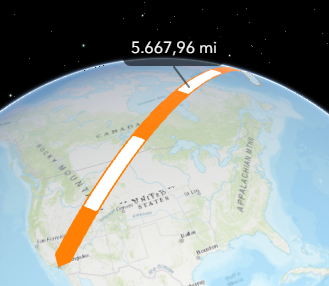
* DirectLineMeasurementAnalysis visualizes and labels the direct, horizontal, and vertical distances
* When the distance between the points is greater than 100 kilometers, the measurement visualization is simplified,
* and in the [analysis results](https://developers.arcgis.com/javascript/latest/references/core/views/3d/analysis/DirectLineMeasurementAnalysisView3D/#result)
* only the horizontal and vertical distances are calculated.
*
* 
*
* Use the [Direct Line Measurement 3D component](https://developers.arcgis.com/javascript/latest/references/map-components/components/arcgis-direct-line-measurement-3d/) to
* display a user interface for the direct line measurement analysis.
*
* > [!WARNING]
* >
* > **Known Limitation**
* >
* > This analysis is only supported in a 3D [SceneView](https://developers.arcgis.com/javascript/latest/references/core/views/SceneView/).
*
* @since 4.23
* @see [DirectLineMeasurementAnalysisView3D](https://developers.arcgis.com/javascript/latest/references/core/views/3d/analysis/DirectLineMeasurementAnalysisView3D/)
* @see [Direct Line Measurement 3D component](https://developers.arcgis.com/javascript/latest/references/map-components/components/arcgis-direct-line-measurement-3d/)
* @see [Sample - Analysis objects](https://developers.arcgis.com/javascript/latest/sample-code/analysis-objects/)
*/
export default class DirectLineMeasurementAnalysis extends Analysis {
constructor(properties?: DirectLineMeasurementAnalysisProperties);
/**
* Ending point for the measurement.
*
* If the point has a [z-value](https://developers.arcgis.com/javascript/latest/references/core/geometry/Point/#hasZ) then this will be treated
* as an absolute value, otherwise the point will be aligned to the ground.
*/
get endPoint(): Point | null | undefined;
set endPoint(value: PointProperties | null | undefined);
/**
* Starting point for the measurement.
*
* If the point has a [z-value](https://developers.arcgis.com/javascript/latest/references/core/geometry/Point/#hasZ) then this will be treated
* as an absolute value, otherwise the point will be aligned to the ground.
*/
get startPoint(): Point | null | undefined;
set startPoint(value: PointProperties | null | undefined);
/** The type of analysis. For direct line measurement analysis, this is always "direct-line-measurement". */
get type(): "direct-line-measurement";
/** Unit system (imperial, metric) or specific unit used for computing the distance. */
accessor unit: SystemOrLengthUnit | null | undefined;
/**
* Indicates whether the analysis is ready to be computed and interacted with in the view.
* It requires both the [startPoint](https://developers.arcgis.com/javascript/latest/references/core/analysis/DirectLineMeasurementAnalysis/#startPoint) and [endPoint](https://developers.arcgis.com/javascript/latest/references/core/analysis/DirectLineMeasurementAnalysis/#endPoint) to be set.
*
* @since 4.33
*/
get valid(): boolean;
/**
* Clears the analysis by resetting the [startPoint](https://developers.arcgis.com/javascript/latest/references/core/analysis/DirectLineMeasurementAnalysis/#startPoint) and
* [endPoint](https://developers.arcgis.com/javascript/latest/references/core/analysis/DirectLineMeasurementAnalysis/#endPoint) properties.
*
* @since 5.0
*/
clear(): void;
}