@arcgis/core
Version:
ArcGIS Maps SDK for JavaScript: A complete 2D and 3D mapping and data visualization API
840 lines (838 loc) • 55.6 kB
TypeScript
import type Collection from "./core/Collection.js";
import type ExpressionInfo from "./popup/ExpressionInfo.js";
import type FieldInfo from "./popup/FieldInfo.js";
import type LayerOptions from "./popup/LayerOptions.js";
import type { ClonableMixin } from "./core/Clonable.js";
import type { JSONSupport } from "./core/JSONSupport.js";
import type { PopupTemplateContent, PopupTemplateContentCreated, PopupTemplateCreatorEvent, PopupTemplateTitle } from "./popup/types.js";
import type { ContentProperties } from "./popup/content/Content.js";
import type { PopupAction } from "./widgets/Popup/types.js";
import type { ActionToggleProperties } from "./support/actions/ActionToggle.js";
import type { ActionButtonProperties } from "./support/actions/ActionButton.js";
import type { ReadonlyArrayOrCollection } from "./core/Collection.js";
import type { ExpressionInfoProperties } from "./popup/ExpressionInfo.js";
import type { FieldInfoProperties } from "./popup/FieldInfo.js";
import type { LayerOptionsProperties } from "./popup/LayerOptions.js";
export interface PopupTemplateProperties extends Partial<Pick<PopupTemplate, "lastEditInfoEnabled" | "outFields" | "overwriteActions" | "returnGeometry" | "title">> {
/**
* A [Collection](https://developers.arcgis.com/javascript/latest/references/core/core/Collection/) of [action](https://developers.arcgis.com/javascript/latest/references/core/support/actions/ActionButton/) or [action toggle](https://developers.arcgis.com/javascript/latest/references/core/support/actions/ActionToggle/) objects.
* Each object represents an action or function that may be executed by clicking the icon
* or image symbolizing them in the [Popup](https://developers.arcgis.com/javascript/latest/references/core/widgets/Popup/). By default, every
* [Popup](https://developers.arcgis.com/javascript/latest/references/core/widgets/Popup/) has a `zoom-to` action styled with a magnifying glass icon
* .
* When this icon is clicked, the view zooms in four LODs and centers on the selected feature.
*
* PopupTemplates do not have default actions. To override actions on the
* [Popup](https://developers.arcgis.com/javascript/latest/references/core/widgets/Popup/) using PopupTemplate see [overwriteActions](https://developers.arcgis.com/javascript/latest/references/core/PopupTemplate/#overwriteActions).
* Actions defined in a PopupTemplate will only appear in the [Popup](https://developers.arcgis.com/javascript/latest/references/core/widgets/Popup/) for
* features or layers that apply that particular PopupTemplate.
*
* The order of each action in the popup is the same order in which they appear in
* the actions [Collection](https://developers.arcgis.com/javascript/latest/references/core/core/Collection/).
*
* The [Popup.@trigger-action](https://developers.arcgis.com/javascript/latest/references/core/widgets/Popup/#event-trigger-action) event in
* [Popup](https://developers.arcgis.com/javascript/latest/references/core/widgets/Popup/) fires each time an action in the popup is clicked.
* This event should be used to execute custom code for each action clicked. For example, if you would
* like to add a `zoom-out` action to the PopupTemplate that zooms the view out several LODs, you would
* define the zoom-out code in a separate function. Then you would call the custom `zoom-out` function
* in the [Popup.@trigger-action](https://developers.arcgis.com/javascript/latest/references/core/widgets/Popup/#event-trigger-action) event handler. See the sample code
* snippet below for more details on how this works.
*
* Actions are defined with the properties listed in the [ActionButton](https://developers.arcgis.com/javascript/latest/references/core/support/actions/ActionButton/) or [ActionToggle](https://developers.arcgis.com/javascript/latest/references/core/support/actions/ActionToggle/) class.
*
* @see [Sample - Popup actions](https://developers.arcgis.com/javascript/latest/sample-code/popup-actions/)
* @see [Sample - Custom popup actions per feature](https://developers.arcgis.com/javascript/latest/sample-code/popup-custom-action/)
* @see [Sample - Popup with edit action](https://developers.arcgis.com/javascript/latest/sample-code/popup-editaction/)
* @example
* // Defines an action to zoom out from the selected feature
* let zoomOutAction = {
* // This text is displayed as a tooltip
* title: "Zoom out",
* // The ID by which to reference the action in the event handler
* id: "zoom-out",
* // Sets the icon font used to style the action button
* className: "esri-icon-zoom-out-magnifying-glass"
* };
* // Adds the custom action to the PopupTemplate.
* popupTemplate.actions.push(zoomOutAction);
* // Apply this PopupTemplate to a layer (or graphic)
* layer.popupTemplate = popupTemplate;
* // This action will only appear in the popup for features in that layer
*
* // The function to execute when the zoom-out action is clicked
* function zoomOut() {
* // In this case the view zooms out two LODs on each click
* view.goTo({
* center: view.center,
* zoom: view.zoom - 2
* });
* }
*
* // This event fires for each click on any action
* // Notice this event is handled on the default popup of the View
* // NOT on an instance of PopupTemplate
* view.popup.on("trigger-action", function(event){
* // If the zoom-out action is clicked, fire the zoomOut() function
* if(event.action.id === "zoom-out"){
* zoomOut();
* }
* });
*/
actions?: ReadonlyArrayOrCollection<((ActionButtonProperties & { type: "button" }) | (ActionToggleProperties & { type: "toggle" }))> | null;
/**
* The template for defining and formatting a popup's content.
*
* * **String** - A popup's content can be a simple text or string value referencing field
* values or [Arcade](https://developers.arcgis.com/javascript/latest/arcade/) expressions. Expressions must be defined in
* the [expressionInfos](https://developers.arcgis.com/javascript/latest/references/core/PopupTemplate/#expressionInfos) property.
* * **Popup elements** - You can also display content as popup elements. There are various types of
* elements which can be used individually or combined. The order in which they are set determines
* how they display within the popup. See the items below describing each element.
* - **text** - A [text content element](https://developers.arcgis.com/javascript/latest/references/core/popup/content/TextContent/)
* that provides descriptive text as content.
* - **media** - A [media content element](https://developers.arcgis.com/javascript/latest/references/core/popup/content/MediaContent/)
* that is used to display media such as charts/images.
* - **fields** - A [fields content element](https://developers.arcgis.com/javascript/latest/references/core/popup/content/FieldsContent/).
* that contains the fields to display within the content. If this is not set
* directly within the `content` property, the popup will display whatever is set in the
* [fieldInfos](https://developers.arcgis.com/javascript/latest/references/core/PopupTemplate/#fieldInfos) property.
* - **attachments** - An [attachments content element](https://developers.arcgis.com/javascript/latest/references/core/popup/content/AttachmentsContent/)
* that contains attachments associated with the feature.
* - **expression** - An [expression content element](https://developers.arcgis.com/javascript/latest/references/core/popup/content/ExpressionContent/) that contains an [Arcade](https://developers.arcgis.com/javascript/latest/arcade/)
* expression evaluating to a dictionary representing a [TextContent](https://developers.arcgis.com/javascript/latest/references/core/popup/content/TextContent/),
* [FieldsContent](https://developers.arcgis.com/javascript/latest/references/core/popup/content/FieldsContent/), or a [MediaContent](https://developers.arcgis.com/javascript/latest/references/core/popup/content/MediaContent/) popup element as
* defined in the [Popup Element web map specification](https://developers.arcgis.com/web-map-specification/objects/popupElement/).
* - **relationship** - A [relationship content element](https://developers.arcgis.com/javascript/latest/references/core/popup/content/RelationshipContent/) associated with a feature.
* - **custom** - A [custom content element](https://developers.arcgis.com/javascript/latest/references/core/popup/content/CustomContent/)
* that contains custom content.
* * **promise** - The PopupTemplate's content may also be defined with a promise that resolves to any of the
* above-mentioned elements. This is useful for cases when you call a method or execute a query and want
* to display the results in the popup. Simply pass the promise to the popupTemplate's content and ensure
* that it resolves to a string or other popup element.
* * **function** - Content may be defined with a JavaScript function that returns any of the above-mentioned
* elements. This is useful when your popup requires additional processing or functionality than what is
* provided with the content types listed above. For example, assume that you would like to
* display charts using third-party JavaScript libraries or categorize information into separate tabs.
* In these cases, you can use a function that returns either a string, a reference to an
* HTML element, a popup element, or a promise.
* When the feature is clicked, the feature is passed as an argument to the function and provides
* access to the feature's graphic and attributes. Set the [outFields](https://developers.arcgis.com/javascript/latest/references/core/PopupTemplate/#outFields) property to
* specify any fields needed for rendering the popup and set the [returnGeometry](https://developers.arcgis.com/javascript/latest/references/core/PopupTemplate/#returnGeometry) property
* to `true` if needing access to the associated feature's geometry.
* The function then executes and returns a value to display in the popup template.
*
* > [!CAUTION]
* >
* > **Note:** Autocasting does not apply when creating content via a function or promise.
*
* @see [FieldInfo](https://developers.arcgis.com/javascript/latest/references/core/popup/FieldInfo/)
* @see [FieldInfoFormat](https://developers.arcgis.com/javascript/latest/references/core/popup/support/FieldInfoFormat/)
* @see [ExpressionInfo](https://developers.arcgis.com/javascript/latest/references/core/popup/ExpressionInfo/)
* @see [Sample - Multiple popup elements](https://developers.arcgis.com/javascript/latest/sample-code/popup-multipleelements/)
* @see [Sample - PopupTemplate function](https://developers.arcgis.com/javascript/latest/sample-code/popuptemplate-function/)
* @see [Sample - PopupTemplate with promise](https://developers.arcgis.com/javascript/latest/sample-code/popuptemplate-promise/)
* @see [Sample - Browse related records in a popup](https://developers.arcgis.com/javascript/latest/sample-code/popuptemplate-browse-related-records/)
* @see [Sample - Custom popup content](https://developers.arcgis.com/javascript/latest/sample-code/popup-customcontent/)
* @example
* // Set a simple string to a popupTemplate's content
* // The string references a value from the POP_2015 attribute field
* layer.popupTemplate = {
* content: "{POP_2015} people live in this census tract"
* };
* @example
* // Set a simple string to a popupTemplate's content
* // referencing the value returned from an Arcade expression
* layer.popupTemplate = {
* content: "{expression/per-total}% of people in this boundary have a college education.",
* expressionInfos: [{
* name: "per-total",
* expression: "Round((($feature.bachelor + $feature.master + $feature.doctorate) / $feature.TOT_POP) * 100, 2)"
* }]
* };
* @example
* // Display a table in the popup's content referencing two values
* // one from a field, and another returned from an Arcade expression
* layer.popupTemplate = {
* title: "College Education in {NAME}",
* content: [
* {
* type: "fields", // Autocasts as new FieldsContent()
* // Autocasts as new FieldInfo[]
* fieldInfos: [
* {
* fieldName: "TOT_POP",
* label: "Total population (2023)",
* format: {
* digitSeparator: true
* }
* },
* {
* fieldName: "expression/college"
* }]
* }],
* // autocasts to ExpressionInfo class
* expressionInfos: [{
* name: "college",
* title: "Completed a college degree",
* expression: "$feature.bachelor + $feature.master + $feature.doctorate"
* }]
* };
* @example
* // The following snippet shows how to set various popup element types within the template's
* // content. This snippet also works with related tables.
* layer.popupTemplate.content = [{
* type: "fields", // Autocast as new FieldsContent()
* // Autocast as new FieldInfo[]
* fieldInfos: [{
* fieldName: "Point_Count",
* visible: false,
* label: "Count of Points",
* // Autocast as new FieldInfoFormat()
* format: {
* places: 0,
* digitSeparator: true
* }
* }, {
* fieldName: "relationships/0/Point_Count_COMMON",
* visible: true,
* label: "Sum of species tree count",
* format: {
* places: 0,
* digitSeparator: true
* },
* statisticType: "sum"
* }]
* }, {
* // Autocasts as new TextContent()
* type: "text",
* text: "There are {Point_Count} trees within census block {BLOCKCE10}"
* }, {
*
* // Autocasts as new MediaContent()
* type: "media",
* mediaInfos: [{
* title: "<b>Count by type</b>",
* type: "pie-chart", // Autocasts as new PieChartMediaInfo()
* caption: "",
* // Autocasts as new ChartMediaInfoValue()
* value: {
* fields: [ "relationships/0/Point_Count_COMMON" ],
* normalizeField: null,
* tooltipField: "relationships/0/COMMON"
* }
* }, {
* title: "<b>Mexican Fan Palm</b>",
* type: "image", // Autocasts as new ImageMediaInfo()
* caption: "tree species",
* // Autocasts as new ImageMediaInfoValue()
* value: {
* sourceURL: "https://www.sunset.com/wp-content/uploads/96006df453533f4c982212b8cc7882f5-800x0-c-default.jpg"
* }
* }]
* }, {
* // if attachments are associated with feature, display it.
* // Autocasts as new AttachmentsContent()
* type: "attachments"
* }];
* @example
* // The following snippet shows how to set a popupTemplate
* // on the returned results (features) from identify
*
* idResult.feature.popupTemplate = {
* title: "{NAME}",
* content: [{
* // Pass in the fields to display
* type: "fields",
* fieldInfos: [{
* fieldName: "NAME",
* label: "Name"
* }, {
* fieldName: "REGION",
* label: "Region"
* }]
* }]
* };
*/
content?: PopupTemplateContentCreated | ContentProperties[] | Promise<PopupTemplateContentCreated | ContentProperties[]> | ((event: PopupTemplateCreatorEvent) => PopupTemplateContentCreated | ContentProperties[] | Promise<PopupTemplateContentCreated | ContentProperties[]>) | null;
/**
* An array of objects or [ExpressionInfo[]](https://developers.arcgis.com/javascript/latest/references/core/popup/ExpressionInfo/) that reference
* [Arcade](https://developers.arcgis.com/javascript/latest/arcade/) expressions following
* the specification defined by the [Arcade Popup Profile](https://developers.arcgis.com/javascript/latest/arcade/#popup).
*
* @since 4.4
* @see [Arcade Popup Profile](https://developers.arcgis.com/javascript/latest/arcade/#popup)
* @see [Arcade Feature Reduction Popup Profile](https://developers.arcgis.com/javascript/latest/arcade/#feature-reduction-popup)
* @example
* // Displays two values returned from Arcade expressions
* // in a table within the popup when a feature is clicked
* layer.popupTemplate = {
* content: [{
* type: "fields", // Autocasts as new FieldsContent()
* // Autocasts as new FieldInfo[]
* fieldInfos: [{
* fieldName: "expression/college"
* }, {
* fieldName: "expression/nocollege"
* }]
* }],
* // autocasts to ExpressionInfo class
* expressionInfos: [{
* name: "college",
* title: "Completed a college degree",
* expression: "$feature.bachelor + $feature.master + $feature.doctorate"
* }, {
* name: "nocollege",
* title: "Did not complete a college degree",
* expression: "$feature.elementary + $feature.middle + $feature.highschool + $feature.somecollege"
* }]
* };
* @example
* // Displays a value returned from an Arcade expression within
* // a simple string defined in the popupTemplate's content
* layer.popupTemplate = {
* content: "{expression/per-total}% of people in this boundary have a college education.",
* expressionInfos: [{
* name: "per-total",
* expression: "Round((($feature.bachelor + $feature.master + $feature.doctorate) / $feature.TOT_POP) * 100, 2)"
* }]
* };
*/
expressionInfos?: ExpressionInfoProperties[] | null;
/**
* An array of [FieldInfo](https://developers.arcgis.com/javascript/latest/references/core/popup/FieldInfo/) that defines how fields in the dataset
* or values from [Arcade](https://developers.arcgis.com/javascript/latest/arcade/) expressions participate
* in a popup. If no [FieldInfo](https://developers.arcgis.com/javascript/latest/references/core/popup/FieldInfo/) are specified, nothing will display since
* the popup will only display the fields that are defined by this array.
* Each [FieldInfo](https://developers.arcgis.com/javascript/latest/references/core/popup/FieldInfo/) contains properties for a single field
* or expression. This property can be set directly within the PopupTemplate or
* within the [fields content element](https://developers.arcgis.com/javascript/latest/references/core/popup/content/FieldsContent/).
* If this is not set within the [fields content element](https://developers.arcgis.com/javascript/latest/references/core/popup/content/FieldsContent/),
* it will default to whatever is specified directly within the `PopupTemplate.fieldInfos`.
*
* > [!WARNING]
* >
* > Use this `fieldInfos` property to display fields from related tables in chart or text elements.
* > `FieldInfos` set within the template's [fields content element](https://developers.arcgis.com/javascript/latest/references/core/popup/content/FieldsContent/) take precedence over the `PopupTemplate.fieldInfos`.
*
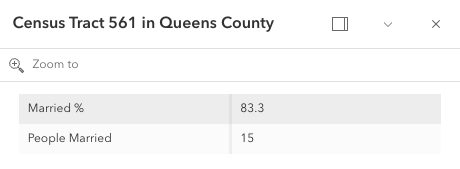
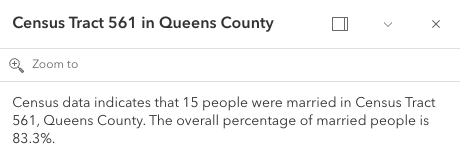
* The image on the left is a result of using the first example snippet below, whereas the image on the right is a result of the second snippet.
*
* | **Content set using 'fields' type** | **Content referenced from fields set within fieldInfo** |
* | -------------------------- | --------------------------- |
* |  |  |
*
* @example
* // This snippet demonstrates how to show only a subset of fields.
* // By setting the 'type: "fields"', and providing the fieldInfos,
* // only field data will display within this feature layer's popuptemplate.
* // If no fieldInfos is specified directly in the content, the popup defaults
* // to whatever is set in the popupTemplate.fieldInfos.
* let popupTemplate = new PopupTemplate({
* // autocasts as new PopupTemplate()
* title: "{NAME} in {COUNTY}",
* outFields: ["*"],
* content: [{
* // It is also possible to set the fieldInfos outside of the content
* // directly in the popupTemplate. If no fieldInfos is specifically set
* // in the content, it defaults to whatever may be set within the popupTemplate.
* type: "fields",
* fieldInfos: [{
* fieldName: "B12001_calc_pctMarriedE",
* label: "Married %"
* },{
* fieldName: "B12001_calc_numMarriedE",
* label: "People Married",
* format: {
* digitSeparator: true,
* places: 0
* }
* }]
* }]
* });
* @example
* // This snippet demonstrates setting the popup's content by referencing
* // specific fields defined within the popupTemplate's fieldInfos.
* let popupTemplate = new PopupTemplate({
* title: "{NAME} in {COUNTY}",
* outFields: ["*"],
* content: "Census data indicates that {B12001_calc_numMarriedE} people were married in {NAME}, {COUNTY}. The overall percentage of married people is {B12001_calc_pctMarriedE}%.",
* fieldInfos: [{
* fieldName: "B12001_calc_pctMarriedE",
* },{
* fieldName: 'B12001_calc_numMarriedE',
* format: {
* places: 0,
* digitSeparator: true
* }
* }]
* });
*/
fieldInfos?: FieldInfoProperties[] | null;
/**
* Additional options that can be defined for the popup layer.
*
* @since 4.5
*/
layerOptions?: LayerOptionsProperties | null;
}
/**
* A PopupTemplate formats and defines the content of a [Popup](https://developers.arcgis.com/javascript/latest/references/core/widgets/Popup/) for
* a specific [Layer](https://developers.arcgis.com/javascript/latest/references/core/layers/Layer/) or [Graphic](https://developers.arcgis.com/javascript/latest/references/core/Graphic/). The user can also use
* the PopupTemplate to access values from feature attributes and values returned
* from [Arcade](https://developers.arcgis.com/javascript/latest/arcade/) expressions when a feature in the
* view is selected.
*
* The PopupTemplate contains [title](https://developers.arcgis.com/javascript/latest/references/core/PopupTemplate/#title) and [content](https://developers.arcgis.com/javascript/latest/references/core/PopupTemplate/#content) properties
* that act as a template used to transform a feature's
* [Graphic.attributes](https://developers.arcgis.com/javascript/latest/references/core/Graphic/#attributes) into an HTML representation.
* The syntax `{fieldName}` or `{expression/expressionName}` performs parameter
* substitution. The default behavior on a [Graphic](https://developers.arcgis.com/javascript/latest/references/core/Graphic/) is to show the
* view's Popup after a
* click on the [Graphic](https://developers.arcgis.com/javascript/latest/references/core/Graphic/). A PopupTemplate is required for this
* default behavior.
*
* PopupTemplate also allows you to format the `Number` and `Date` field values and
* override field aliases with
* the [fieldInfos](https://developers.arcgis.com/javascript/latest/references/core/PopupTemplate/#fieldInfos) property. [actions](https://developers.arcgis.com/javascript/latest/references/core/PopupTemplate/#actions) may also be added
* to the template to give users
* the ability to perform actions related to the feature, such as zooming to it or performing a Query based on
* the feature's location or attributes.
*
* [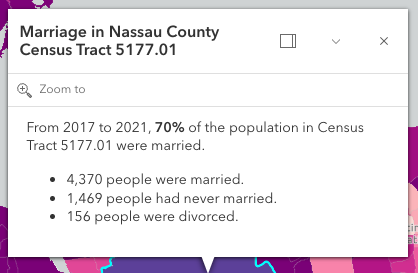](https://developers.arcgis.com/javascript/latest/sample-code/sandbox/?sample=intro-popuptemplate)
*
* In the image above, the initial text **Marriage in Nassau County Census Tract 5177.01** is set in the [title](https://developers.arcgis.com/javascript/latest/references/core/PopupTemplate/#title)
* property of the PopupTemplate where `CENSUS_TRACT` is the name of the field containing census tract numbers.
*
* ```
* popupTemplate.title = "Marriage in {COUNTY} County {CENSUS_TRACT}",
* ```
*
* The rest of the content is defined in the [content](https://developers.arcgis.com/javascript/latest/references/core/PopupTemplate/#content) property where
* `MARRIEDRATE`, `NEVMARR_CY`, `MARRIED_CY`, and `DIVORCD_CY` are all field names that contain
* values to be used in the popup.
*
* ```
* popupTemplate.content = "<p>From 2017 to 2021, <b>{MARRIEDRATE}%</b> of the" +
* " population in {CENSUS_TRACT} were married.</p>" +
* "<ul><li>{MARRIED_CY} people were married.</li>" +
* "<li>{NEVMARR_CY} people had never married.</li>" +
* "<li>{DIVORCD_CY} people were divorced.</li><ul>";
* ```
* The above example demonstrates how to format the content directly with a custom
* text string. This is one way to format the template, it is also possible to
* add additional elements in the content such as `fields`, `media`, and `attachments`.
* These elements can be added individually or combined. More information on working
* with these various elements can be found in [content](https://developers.arcgis.com/javascript/latest/references/core/PopupTemplate/#content).
*
* PopupTemplates may also contain custom [actions](https://developers.arcgis.com/javascript/latest/references/core/PopupTemplate/#actions). When clicked, these actions execute custom code
* defined by the developer. See the [actions](https://developers.arcgis.com/javascript/latest/references/core/PopupTemplate/#actions) property for more details.
*
* @since 4.0
* @see [Popup component](https://developers.arcgis.com/javascript/latest/references/map-components/components/arcgis-popup/)
* @see [Popup](https://developers.arcgis.com/javascript/latest/references/core/widgets/Popup/)
* @see [FieldInfo](https://developers.arcgis.com/javascript/latest/references/core/popup/FieldInfo/)
* @see [Map component popup](https://developers.arcgis.com/javascript/latest/references/map-components/components/arcgis-map/#popup)
* @see [Scene component popup](https://developers.arcgis.com/javascript/latest/references/map-components/components/arcgis-scene/#popup)
* @see [Link Chart component popup](https://developers.arcgis.com/javascript/latest/references/map-components/components/arcgis-link-chart/#popup)
* @see [MapView.popup](https://developers.arcgis.com/javascript/latest/references/core/views/MapView/#popup)
* @see [SceneView.popup](https://developers.arcgis.com/javascript/latest/references/core/views/SceneView/#popup)
* @see [PopupTemplate samples](https://developers.arcgis.com/javascript/latest/sample-code/?tagged=PopupTemplate)
* @see [Popup samples](https://developers.arcgis.com/javascript/latest/sample-code/?tagged=popup)
*/
export default class PopupTemplate extends PopupTemplateSuperclass {
constructor(properties?: PopupTemplateProperties);
/**
* A [Collection](https://developers.arcgis.com/javascript/latest/references/core/core/Collection/) of [action](https://developers.arcgis.com/javascript/latest/references/core/support/actions/ActionButton/) or [action toggle](https://developers.arcgis.com/javascript/latest/references/core/support/actions/ActionToggle/) objects.
* Each object represents an action or function that may be executed by clicking the icon
* or image symbolizing them in the [Popup](https://developers.arcgis.com/javascript/latest/references/core/widgets/Popup/). By default, every
* [Popup](https://developers.arcgis.com/javascript/latest/references/core/widgets/Popup/) has a `zoom-to` action styled with a magnifying glass icon
* .
* When this icon is clicked, the view zooms in four LODs and centers on the selected feature.
*
* PopupTemplates do not have default actions. To override actions on the
* [Popup](https://developers.arcgis.com/javascript/latest/references/core/widgets/Popup/) using PopupTemplate see [overwriteActions](https://developers.arcgis.com/javascript/latest/references/core/PopupTemplate/#overwriteActions).
* Actions defined in a PopupTemplate will only appear in the [Popup](https://developers.arcgis.com/javascript/latest/references/core/widgets/Popup/) for
* features or layers that apply that particular PopupTemplate.
*
* The order of each action in the popup is the same order in which they appear in
* the actions [Collection](https://developers.arcgis.com/javascript/latest/references/core/core/Collection/).
*
* The [Popup.@trigger-action](https://developers.arcgis.com/javascript/latest/references/core/widgets/Popup/#event-trigger-action) event in
* [Popup](https://developers.arcgis.com/javascript/latest/references/core/widgets/Popup/) fires each time an action in the popup is clicked.
* This event should be used to execute custom code for each action clicked. For example, if you would
* like to add a `zoom-out` action to the PopupTemplate that zooms the view out several LODs, you would
* define the zoom-out code in a separate function. Then you would call the custom `zoom-out` function
* in the [Popup.@trigger-action](https://developers.arcgis.com/javascript/latest/references/core/widgets/Popup/#event-trigger-action) event handler. See the sample code
* snippet below for more details on how this works.
*
* Actions are defined with the properties listed in the [ActionButton](https://developers.arcgis.com/javascript/latest/references/core/support/actions/ActionButton/) or [ActionToggle](https://developers.arcgis.com/javascript/latest/references/core/support/actions/ActionToggle/) class.
*
* @see [Sample - Popup actions](https://developers.arcgis.com/javascript/latest/sample-code/popup-actions/)
* @see [Sample - Custom popup actions per feature](https://developers.arcgis.com/javascript/latest/sample-code/popup-custom-action/)
* @see [Sample - Popup with edit action](https://developers.arcgis.com/javascript/latest/sample-code/popup-editaction/)
* @example
* // Defines an action to zoom out from the selected feature
* let zoomOutAction = {
* // This text is displayed as a tooltip
* title: "Zoom out",
* // The ID by which to reference the action in the event handler
* id: "zoom-out",
* // Sets the icon font used to style the action button
* className: "esri-icon-zoom-out-magnifying-glass"
* };
* // Adds the custom action to the PopupTemplate.
* popupTemplate.actions.push(zoomOutAction);
* // Apply this PopupTemplate to a layer (or graphic)
* layer.popupTemplate = popupTemplate;
* // This action will only appear in the popup for features in that layer
*
* // The function to execute when the zoom-out action is clicked
* function zoomOut() {
* // In this case the view zooms out two LODs on each click
* view.goTo({
* center: view.center,
* zoom: view.zoom - 2
* });
* }
*
* // This event fires for each click on any action
* // Notice this event is handled on the default popup of the View
* // NOT on an instance of PopupTemplate
* view.popup.on("trigger-action", function(event){
* // If the zoom-out action is clicked, fire the zoomOut() function
* if(event.action.id === "zoom-out"){
* zoomOut();
* }
* });
*/
get actions(): Collection<PopupAction> | null | undefined;
set actions(value: ReadonlyArrayOrCollection<((ActionButtonProperties & { type: "button" }) | (ActionToggleProperties & { type: "toggle" }))> | null | undefined);
/**
* The template for defining and formatting a popup's content.
*
* * **String** - A popup's content can be a simple text or string value referencing field
* values or [Arcade](https://developers.arcgis.com/javascript/latest/arcade/) expressions. Expressions must be defined in
* the [expressionInfos](https://developers.arcgis.com/javascript/latest/references/core/PopupTemplate/#expressionInfos) property.
* * **Popup elements** - You can also display content as popup elements. There are various types of
* elements which can be used individually or combined. The order in which they are set determines
* how they display within the popup. See the items below describing each element.
* - **text** - A [text content element](https://developers.arcgis.com/javascript/latest/references/core/popup/content/TextContent/)
* that provides descriptive text as content.
* - **media** - A [media content element](https://developers.arcgis.com/javascript/latest/references/core/popup/content/MediaContent/)
* that is used to display media such as charts/images.
* - **fields** - A [fields content element](https://developers.arcgis.com/javascript/latest/references/core/popup/content/FieldsContent/).
* that contains the fields to display within the content. If this is not set
* directly within the `content` property, the popup will display whatever is set in the
* [fieldInfos](https://developers.arcgis.com/javascript/latest/references/core/PopupTemplate/#fieldInfos) property.
* - **attachments** - An [attachments content element](https://developers.arcgis.com/javascript/latest/references/core/popup/content/AttachmentsContent/)
* that contains attachments associated with the feature.
* - **expression** - An [expression content element](https://developers.arcgis.com/javascript/latest/references/core/popup/content/ExpressionContent/) that contains an [Arcade](https://developers.arcgis.com/javascript/latest/arcade/)
* expression evaluating to a dictionary representing a [TextContent](https://developers.arcgis.com/javascript/latest/references/core/popup/content/TextContent/),
* [FieldsContent](https://developers.arcgis.com/javascript/latest/references/core/popup/content/FieldsContent/), or a [MediaContent](https://developers.arcgis.com/javascript/latest/references/core/popup/content/MediaContent/) popup element as
* defined in the [Popup Element web map specification](https://developers.arcgis.com/web-map-specification/objects/popupElement/).
* - **relationship** - A [relationship content element](https://developers.arcgis.com/javascript/latest/references/core/popup/content/RelationshipContent/) associated with a feature.
* - **custom** - A [custom content element](https://developers.arcgis.com/javascript/latest/references/core/popup/content/CustomContent/)
* that contains custom content.
* * **promise** - The PopupTemplate's content may also be defined with a promise that resolves to any of the
* above-mentioned elements. This is useful for cases when you call a method or execute a query and want
* to display the results in the popup. Simply pass the promise to the popupTemplate's content and ensure
* that it resolves to a string or other popup element.
* * **function** - Content may be defined with a JavaScript function that returns any of the above-mentioned
* elements. This is useful when your popup requires additional processing or functionality than what is
* provided with the content types listed above. For example, assume that you would like to
* display charts using third-party JavaScript libraries or categorize information into separate tabs.
* In these cases, you can use a function that returns either a string, a reference to an
* HTML element, a popup element, or a promise.
* When the feature is clicked, the feature is passed as an argument to the function and provides
* access to the feature's graphic and attributes. Set the [outFields](https://developers.arcgis.com/javascript/latest/references/core/PopupTemplate/#outFields) property to
* specify any fields needed for rendering the popup and set the [returnGeometry](https://developers.arcgis.com/javascript/latest/references/core/PopupTemplate/#returnGeometry) property
* to `true` if needing access to the associated feature's geometry.
* The function then executes and returns a value to display in the popup template.
*
* > [!CAUTION]
* >
* > **Note:** Autocasting does not apply when creating content via a function or promise.
*
* @see [FieldInfo](https://developers.arcgis.com/javascript/latest/references/core/popup/FieldInfo/)
* @see [FieldInfoFormat](https://developers.arcgis.com/javascript/latest/references/core/popup/support/FieldInfoFormat/)
* @see [ExpressionInfo](https://developers.arcgis.com/javascript/latest/references/core/popup/ExpressionInfo/)
* @see [Sample - Multiple popup elements](https://developers.arcgis.com/javascript/latest/sample-code/popup-multipleelements/)
* @see [Sample - PopupTemplate function](https://developers.arcgis.com/javascript/latest/sample-code/popuptemplate-function/)
* @see [Sample - PopupTemplate with promise](https://developers.arcgis.com/javascript/latest/sample-code/popuptemplate-promise/)
* @see [Sample - Browse related records in a popup](https://developers.arcgis.com/javascript/latest/sample-code/popuptemplate-browse-related-records/)
* @see [Sample - Custom popup content](https://developers.arcgis.com/javascript/latest/sample-code/popup-customcontent/)
* @example
* // Set a simple string to a popupTemplate's content
* // The string references a value from the POP_2015 attribute field
* layer.popupTemplate = {
* content: "{POP_2015} people live in this census tract"
* };
* @example
* // Set a simple string to a popupTemplate's content
* // referencing the value returned from an Arcade expression
* layer.popupTemplate = {
* content: "{expression/per-total}% of people in this boundary have a college education.",
* expressionInfos: [{
* name: "per-total",
* expression: "Round((($feature.bachelor + $feature.master + $feature.doctorate) / $feature.TOT_POP) * 100, 2)"
* }]
* };
* @example
* // Display a table in the popup's content referencing two values
* // one from a field, and another returned from an Arcade expression
* layer.popupTemplate = {
* title: "College Education in {NAME}",
* content: [
* {
* type: "fields", // Autocasts as new FieldsContent()
* // Autocasts as new FieldInfo[]
* fieldInfos: [
* {
* fieldName: "TOT_POP",
* label: "Total population (2023)",
* format: {
* digitSeparator: true
* }
* },
* {
* fieldName: "expression/college"
* }]
* }],
* // autocasts to ExpressionInfo class
* expressionInfos: [{
* name: "college",
* title: "Completed a college degree",
* expression: "$feature.bachelor + $feature.master + $feature.doctorate"
* }]
* };
* @example
* // The following snippet shows how to set various popup element types within the template's
* // content. This snippet also works with related tables.
* layer.popupTemplate.content = [{
* type: "fields", // Autocast as new FieldsContent()
* // Autocast as new FieldInfo[]
* fieldInfos: [{
* fieldName: "Point_Count",
* visible: false,
* label: "Count of Points",
* // Autocast as new FieldInfoFormat()
* format: {
* places: 0,
* digitSeparator: true
* }
* }, {
* fieldName: "relationships/0/Point_Count_COMMON",
* visible: true,
* label: "Sum of species tree count",
* format: {
* places: 0,
* digitSeparator: true
* },
* statisticType: "sum"
* }]
* }, {
* // Autocasts as new TextContent()
* type: "text",
* text: "There are {Point_Count} trees within census block {BLOCKCE10}"
* }, {
*
* // Autocasts as new MediaContent()
* type: "media",
* mediaInfos: [{
* title: "<b>Count by type</b>",
* type: "pie-chart", // Autocasts as new PieChartMediaInfo()
* caption: "",
* // Autocasts as new ChartMediaInfoValue()
* value: {
* fields: [ "relationships/0/Point_Count_COMMON" ],
* normalizeField: null,
* tooltipField: "relationships/0/COMMON"
* }
* }, {
* title: "<b>Mexican Fan Palm</b>",
* type: "image", // Autocasts as new ImageMediaInfo()
* caption: "tree species",
* // Autocasts as new ImageMediaInfoValue()
* value: {
* sourceURL: "https://www.sunset.com/wp-content/uploads/96006df453533f4c982212b8cc7882f5-800x0-c-default.jpg"
* }
* }]
* }, {
* // if attachments are associated with feature, display it.
* // Autocasts as new AttachmentsContent()
* type: "attachments"
* }];
* @example
* // The following snippet shows how to set a popupTemplate
* // on the returned results (features) from identify
*
* idResult.feature.popupTemplate = {
* title: "{NAME}",
* content: [{
* // Pass in the fields to display
* type: "fields",
* fieldInfos: [{
* fieldName: "NAME",
* label: "Name"
* }, {
* fieldName: "REGION",
* label: "Region"
* }]
* }]
* };
*/
get content(): PopupTemplateContent | null | undefined;
set content(value: PopupTemplateContentCreated | ContentProperties[] | Promise<PopupTemplateContentCreated | ContentProperties[]> | ((event: PopupTemplateCreatorEvent) => PopupTemplateContentCreated | ContentProperties[] | Promise<PopupTemplateContentCreated | ContentProperties[]>) | null | undefined);
/**
* An array of objects or [ExpressionInfo[]](https://developers.arcgis.com/javascript/latest/references/core/popup/ExpressionInfo/) that reference
* [Arcade](https://developers.arcgis.com/javascript/latest/arcade/) expressions following
* the specification defined by the [Arcade Popup Profile](https://developers.arcgis.com/javascript/latest/arcade/#popup).
*
* @since 4.4
* @see [Arcade Popup Profile](https://developers.arcgis.com/javascript/latest/arcade/#popup)
* @see [Arcade Feature Reduction Popup Profile](https://developers.arcgis.com/javascript/latest/arcade/#feature-reduction-popup)
* @example
* // Displays two values returned from Arcade expressions
* // in a table within the popup when a feature is clicked
* layer.popupTemplate = {
* content: [{
* type: "fields", // Autocasts as new FieldsContent()
* // Autocasts as new FieldInfo[]
* fieldInfos: [{
* fieldName: "expression/college"
* }, {
* fieldName: "expression/nocollege"
* }]
* }],
* // autocasts to ExpressionInfo class
* expressionInfos: [{
* name: "college",
* title: "Completed a college degree",
* expression: "$feature.bachelor + $feature.master + $feature.doctorate"
* }, {
* name: "nocollege",
* title: "Did not complete a college degree",
* expression: "$feature.elementary + $feature.middle + $feature.highschool + $feature.somecollege"
* }]
* };
* @example
* // Displays a value returned from an Arcade expression within
* // a simple string defined in the popupTemplate's content
* layer.popupTemplate = {
* content: "{expression/per-total}% of people in this boundary have a college education.",
* expressionInfos: [{
* name: "per-total",
* expression: "Round((($feature.bachelor + $feature.master + $feature.doctorate) / $feature.TOT_POP) * 100, 2)"
* }]
* };
*/
get expressionInfos(): ExpressionInfo[] | null | undefined;
set expressionInfos(value: ExpressionInfoProperties[] | null | undefined);
/**
* An array of [FieldInfo](https://developers.arcgis.com/javascript/latest/references/core/popup/FieldInfo/) that defines how fields in the dataset
* or values from [Arcade](https://developers.arcgis.com/javascript/latest/arcade/) expressions participate
* in a popup. If no [FieldInfo](https://developers.arcgis.com/javascript/latest/references/core/popup/FieldInfo/) are specified, nothing will display since
* the popup will only display the fields that are defined by this array.
* Each [FieldInfo](https://developers.arcgis.com/javascript/latest/references/core/popup/FieldInfo/) contains properties for a single field
* or expression. This property can be set directly within the PopupTemplate or
* within the [fields content element](https://developers.arcgis.com/javascript/latest/references/core/popup/content/FieldsContent/).
* If this is not set within the [fields content element](https://developers.arcgis.com/javascript/latest/references/core/popup/content/FieldsContent/),
* it will default to whatever is specified directly within the `PopupTemplate.fieldInfos`.
*
* > [!WARNING]
* >
* > Use this `fieldInfos` property to display fields from related tables in chart or text elements.
* > `FieldInfos` set within the template's [fields content element](https://developers.arcgis.com/javascript/latest/references/core/popup/content/FieldsContent/) take precedence over the `PopupTemplate.fieldInfos`.
*
* The image on the left is a result of using the first example snippet below, whereas the image on the right is a result of the second snippet.
*
* | **Content set using 'fields' type** | **Content referenced from fields set within fieldInfo** |
* | -------------------------- | --------------------------- |
* |  |  |
*
* @example
* // This snippet demonstrates how to show only a subset of fields.
* // By setting the 'type: "fields"', and providing the fieldInfos,
* // only field data will display within this feature layer's popuptemplate.
* // If no fieldInfos is specified directly in the content, the popup defaults
* // to whatever is set in the popupTemplate.fieldInfos.
* let popupTemplate = new PopupTemplate({
* // autocasts as new PopupTemplate()
* title: "{NAME} in {COUNTY}",
* outFields: ["*"],
* content: [{
* // It is also possible to set the fieldInfos outside of the content
* // directly in the popupTemplate. If no fieldInfos is specifically set
* // in the content, it defaults to whatever may be set within the popupTemplate.
* type: "fields",
* fieldInfos: [{
* fieldName: "B12001_calc_pctMarriedE",
* label: "Married %"
* },{
* fieldName: "B12001_calc_numMarriedE",
* label: "People Married",
* format: {
* digitSeparator: true,
* places: 0
* }
* }]
* }]
* });
* @example
* // This snippet demonstrates setting the popup's content by referencing
* // specific fields defined within the popupTemplate's fieldInfos.
* let popupTemplate = new PopupTemplate({
* title: "{NAME} in {COUNTY}",
* outFields: ["*"],
* content: "Census data indicates that {B12001_calc_numMarriedE} people were married in {NAME}, {COUNTY}. The overall percentage of married people is {B12001_calc_pctMarriedE}%.",
* fieldInfos: [{
* fieldName: "B12001_calc_pctMarriedE",
* },{
* fieldName: 'B12001_calc_numMarriedE',
* format: {
* places: 0,
* digitSeparator: true
* }
* }]
* });
*/
get fieldInfos(): FieldInfo[] | null | undefined;
set fieldInfos(value: FieldInfoProperties[] | null | undefined);
/**
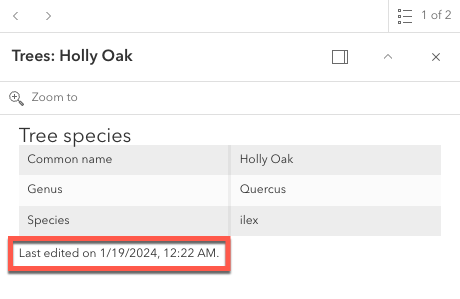
* Indicates whether or not editor tracking should display.
*
* 
*
* @default true
* @since 4.10
*/
accessor lastEditInfoEnabled: boolean;
/**
* Additional options that can be defined for the popup layer.
*
* @since 4.5
*/
get layerOptions(): LayerOptions | null | undefined;
set layerOptions(value: LayerOptionsProperties | null | undefined);
/**
* An array of field names used in the PopupTemplate.
* Use this property to indicate what fields are required
* to fully render the PopupTemplate. This is important if setting
* [content](https://developers.arcgis.com/javascript/latest/references/core/PopupTemplate/#content) via a function since any fields needed for successful
* rendering should be specified here.
*
* Generally speaking, it is good practice to always set this property
* when instantiating a new popup template.
*
* To fetch the values from all fields, use `["*"]`.
*
* > [!WARNING]
* >
* > This will not fetch fields from related tables. If related features
* > are needed, set this using [FieldInfo](https://developers.arcgis.com/javascript/latest/references/core/popup/FieldInfo/).
*
* @since 4.9
* @see [FeatureLayer.outFields](https://developers.arcgis.com/javascript/latest/references/core/layers/FeatureLayer/#outFields)
* @example
* // Set the MapImageLayer with specified popupTemplate
* USALayer = new MapImageLayer({
* url: "https://sampleserver6.arcgisonline.com/arcgis/rest/services/US