@arcgis/core
Version:
ArcGIS Maps SDK for JavaScript: A complete 2D and 3D mapping and data visualization API
287 lines (285 loc) • 13.8 kB
TypeScript
import type Color from "./Color.js";
import type Collection from "./core/Collection.js";
import type Extent from "./geometry/Extent.js";
import type Multipoint from "./geometry/Multipoint.js";
import type Point from "./geometry/Point.js";
import type Polyline from "./geometry/Polyline.js";
import type NavigationConstraint from "./ground/NavigationConstraint.js";
import type ElevationSampler from "./layers/support/ElevationSampler.js";
import type { ReadonlyArrayOrCollection } from "./core/Collection.js";
import type { JSONSupportMixin } from "./core/JSONSupport.js";
import type { Loadable, LoadableMixinProperties } from "./core/Loadable.js";
import type { ElevationLayerUnion } from "./layers/types.js";
import type { ElevationQueryResult, ElevationQueryGeometry, ElevationQueryOptions, CreateElevationSamplerOptions } from "./layers/support/types.js";
import type { ColorLike } from "./Color.js";
import type { NavigationConstraintProperties } from "./ground/NavigationConstraint.js";
export interface GroundProperties extends LoadableMixinProperties, Partial<Pick<Ground, "opacity">> {
/**
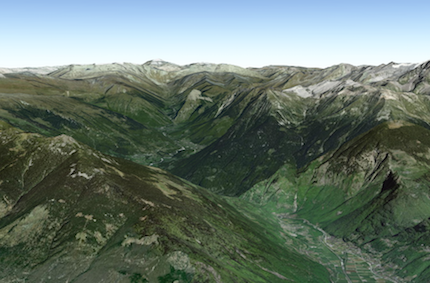
* A collection of [ElevationLayers](https://developers.arcgis.com/javascript/latest/references/core/layers/ElevationLayer/) that define the elevation or terrain
* that makes up the ground surface. When elevation layers are added to the ground, the topographical variations of
* the surface are rendered in 3D as they would appear in the real world.
*
* 
*
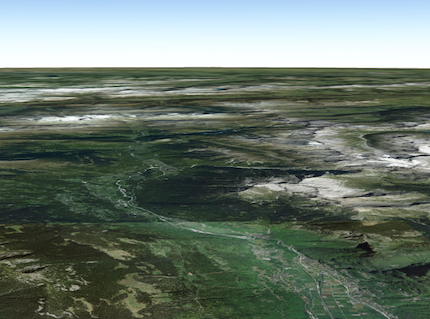
* When the layers collection is empty, the ground surface is flat.
*
* 
*
* @example
* // Adds the esri world elevation service to the ground
* let layer = new ElevationLayer({
* url: "//elevation3d.arcgis.com/arcgis/rest/services/WorldElevation3D/Terrain3D/ImageServer"
* });
* map.ground.layers.add(layer);
*/
layers?: ReadonlyArrayOrCollection<ElevationLayerUnion>;
/**
* Specifies the user navigation constraints relative to
* the ground surface.
*
* @since 4.8
*/
navigationConstraint?: NavigationConstraintProperties | null;
/**
* The color of the ground surface, displayed underneath the basemap.
* If this is null, a grid is displayed instead. The alpha value in the color is ignored. Use the
* [opacity](https://developers.arcgis.com/javascript/latest/references/core/Ground/#opacity) property to control the opacity of the ground.
*
* @since 4.8
*/
surfaceColor?: ColorLike | null;
}
/**
* The Ground class contains properties that specify how the ground surface is
* displayed in a [SceneView](https://developers.arcgis.com/javascript/latest/references/core/views/SceneView/). It contains a [layers](https://developers.arcgis.com/javascript/latest/references/core/Ground/#layers)
* property, which is a collection of [ElevationLayer](https://developers.arcgis.com/javascript/latest/references/core/layers/ElevationLayer/) that
* defines the elevation or terrain of the map's surface.
*
* On a [Map](https://developers.arcgis.com/javascript/latest/references/core/Map/) instance, a default ground surface using the
* [World Elevation Service](https://www.arcgis.com/home/item.html?id=7029fb60158543ad845c7e1527af11e4)
* can conveniently be initialized through the [Map.ground](https://developers.arcgis.com/javascript/latest/references/core/Map/#ground) property:
* ```js
* let map = new Map({
* basemap: "topo-vector",
* ground: "world-elevation"
* });
* ```
*
* When terrain and bathymetry values are needed, the
* [TopoBathy 3D Service](https://www.arcgis.com/home/item.html?id=0c69ba5a5d254118841d43f03aa3e97d) can be used:
*
* ```js
* let map = new Map({
* basemap: "topo-vector",
* ground: "world-topobathymetry"
* });
* ```
*
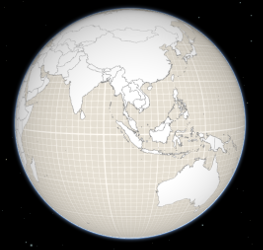
* When no basemap is available, the Ground displays a grid by default:
*
* 
*
* That can be changed by setting a color on the [surfaceColor](https://developers.arcgis.com/javascript/latest/references/core/Ground/#surfaceColor) property:
*
* ```js
* map.ground.surfaceColor = '#004c73';
* ```
*
* 
*
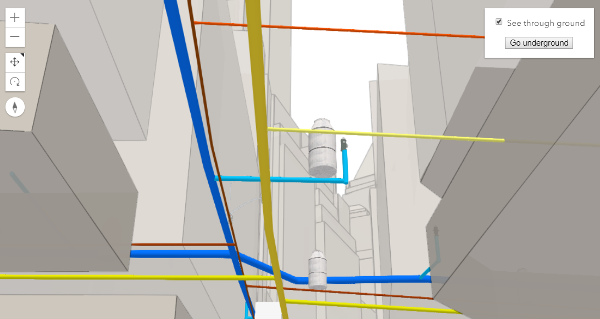
* If the scene contains underground data, reduce the [opacity](https://developers.arcgis.com/javascript/latest/references/core/Ground/#opacity) of the ground to be able to see through the ground:
*
* ```js
* map.ground.opacity = 0.4;
* ```
*
* [](https://developers.arcgis.com/javascript/latest/sample-code/sceneview-underground/)
*
* @since 4.0
* @see [Map.ground](https://developers.arcgis.com/javascript/latest/references/core/Map/#ground)
* @see [ElevationLayer](https://developers.arcgis.com/javascript/latest/references/core/layers/ElevationLayer/)
* @see [Sample - Underground navigation in global mode](https://developers.arcgis.com/javascript/latest/sample-code/sceneview-underground/)
*/
export default class Ground extends GroundSuperclass {
constructor(properties?: GroundProperties);
/**
* A collection of [ElevationLayers](https://developers.arcgis.com/javascript/latest/references/core/layers/ElevationLayer/) that define the elevation or terrain
* that makes up the ground surface. When elevation layers are added to the ground, the topographical variations of
* the surface are rendered in 3D as they would appear in the real world.
*
* 
*
* When the layers collection is empty, the ground surface is flat.
*
* 
*
* @example
* // Adds the esri world elevation service to the ground
* let layer = new ElevationLayer({
* url: "//elevation3d.arcgis.com/arcgis/rest/services/WorldElevation3D/Terrain3D/ImageServer"
* });
* map.ground.layers.add(layer);
*/
get layers(): Collection<ElevationLayerUnion>;
set layers(value: ReadonlyArrayOrCollection<ElevationLayerUnion>);
/**
* Indicates whether the instance has loaded. When `true`,
* the properties of the object can be accessed. A Ground is considered loaded
* when its [layers](https://developers.arcgis.com/javascript/latest/references/core/Ground/#layers) are fully created, but not yet loaded.
*
* @default false
*/
get loaded(): boolean;
/**
* Specifies the user navigation constraints relative to
* the ground surface.
*
* @since 4.8
*/
get navigationConstraint(): NavigationConstraint | null | undefined;
set navigationConstraint(value: NavigationConstraintProperties | null | undefined);
/**
* Opacity of the ground, including surface default color and the basemap (without reference layers).
* This property can be used for a see-through ground effect.
*
* @default 1
* @since 4.8
*/
accessor opacity: number;
/**
* The color of the ground surface, displayed underneath the basemap.
* If this is null, a grid is displayed instead. The alpha value in the color is ignored. Use the
* [opacity](https://developers.arcgis.com/javascript/latest/references/core/Ground/#opacity) property to control the opacity of the ground.
*
* @since 4.8
*/
get surfaceColor(): Color | null | undefined;
set surfaceColor(value: ColorLike | null | undefined);
/**
* Creates a deep clone of this object.
*
* @returns A deep clone of the [Ground](https://developers.arcgis.com/javascript/latest/references/core/Ground/) instance
* that invoked this method.
*/
clone(): Ground;
/**
* Creates an elevation sampler for the given extent by querying the ground layers for elevation data and caching it
* so values may be sampled quickly afterwards.
* The sampler uses the elevation data from the first layer that has data available. For getting elevation data from
* a specific layer use
* [ElevationLayer.createElevationSampler()](https://developers.arcgis.com/javascript/latest/references/core/layers/ElevationLayer/#createElevationSampler).
*
* @param extent - The extent for which to create the sampler.
* @param options - Additional sampler options.
* @returns An elevation sampler.
* @since 4.7
*/
createElevationSampler(extent: Extent, options?: CreateElevationSamplerOptions): Promise<ElevationSampler>;
/**
* Destroys the ground and its [layers](https://developers.arcgis.com/javascript/latest/references/core/Ground/#layers).
* These can no longer be used once the ground has been destroyed. To prevent the layers from being destroyed,
* remove them from the ground before calling `destroy()`.
*
* ```
* // prevent the layers from being destroyed by removing them from the ground
* const layers = ground.layers.removeAll();
*
* // destroy the ground and any remaining associated resources
* ground.destroy();
* ```
*
* @since 4.17
* @see [Map.destroy()](https://developers.arcgis.com/javascript/latest/references/core/Map/#destroy)
* @see [WebMap.destroy()](https://developers.arcgis.com/javascript/latest/references/core/WebMap/#destroy)
* @see [WebScene.destroy()](https://developers.arcgis.com/javascript/latest/references/core/WebScene/#destroy)
* @see [Basemap.destroy()](https://developers.arcgis.com/javascript/latest/references/core/Basemap/#destroy)
* @see [Layer.destroy()](https://developers.arcgis.com/javascript/latest/references/core/layers/Layer/#destroy)
* @see [PortalItem.destroy()](https://developers.arcgis.com/javascript/latest/references/core/portal/PortalItem/#destroy)
*/
destroy(): void;
/**
* Loads all the externally loadable resources associated with the ground.
* For the ground this will load all the layers.
*
* @returns Resolves when all the loadable resources have been loaded.
* Rejects if at least one of the loadable resources failed to load.
* @since 4.9
* @see [load()](https://developers.arcgis.com/javascript/latest/references/core/Ground/#load)
* @example
* // Load all resources but ignore if one or more of them failed to load
* ground.loadAll()
* .catch(function(error) {
* // Ignore any failed resources
* })
* .then(function() {
* console.log("All loaded");
* });
*/
loadAll(): Promise<this>;
/**
* @param geometry
* @param options
*/
queryElevation(geometry: Point, options?: ElevationQueryOptions): Promise<ElevationQueryResult<Point>>;
/**
* @param geometry
* @param options
*/
queryElevation(geometry: Multipoint, options?: ElevationQueryOptions): Promise<ElevationQueryResult<Multipoint>>;
/**
* @param geometry
* @param options
*/
queryElevation(geometry: Polyline, options?: ElevationQueryOptions): Promise<ElevationQueryResult<Polyline>>;
/**
* Query the ground layer services for elevation values for the given geometry.
*
* The returned result contains a copy of the geometry with z-values sampled from elevation data from the first layer
* that has data available. The resolution from which the elevation is queried can be set using the `demResolution`
* option. In many cases, `auto` demResolution can be used to get high quality elevation samples without the need to
* know exactly where the data in the service is located. This is particularly useful for services which combine
* elevation data from many sources (such as the world elevation service). If more control, or higher quality samples
* are required, use either `finest-contiguous` or a fixed `{number}` resolution.
*
* @param geometry - The geometry to sample.
* @param options - Additional query options.
* @returns Resolves to an object with the sampled geometry, resolution information, and no data value.
* @example
* const [Map, Multipoint] = await $arcgis.import(["@arcgis/core/Map.js", "@arcgis/core/geometry/Multipoint.js"]);
* const map = new Map({
* ground: "world-elevation"
* });
*
* // Various points across a ridge of the mount everest
* const points = [
* [ 86.9252, 27.9883 ],
* [ 86.9265, 27.9894 ],
* [ 86.9292, 27.9923 ],
* [ 86.9324, 27.9960 ],
* [ 86.9359, 27.9992 ]
* ];
*
* map.ground.queryElevation(new Multipoint({ points }), { returnSampleInfo: true })
*
* // Successfully sampled all points
* .then(function(result) {
* // Print result of each sampled point to the console
* result.geometry.points.forEach(function(point, index) {
* const elevation = Math.round(point[2]);
* const resolution = result.sampleInfo[index].demResolution;
*
* const coordinateText = "(" + point[0] + ", " + point[1] + ")";
* const resolutionText = Math.round(resolution) + " meter resolution";
*
* console.log("Sampled " + coordinateText + ": " + elevation + " at " + resolutionText);
* });
* })
*
* // Failed to sample (e.g. service unavailable)
* .catch(function(error) {
* console.error("Failed to query elevation:", error);
* });
*/
queryElevation(geometry: ElevationQueryGeometry, options?: ElevationQueryOptions): Promise<ElevationQueryResult<ElevationQueryGeometry>>;
}
declare const GroundSuperclass: typeof Loadable & typeof JSONSupportMixin