@arcgis/core
Version:
ArcGIS Maps SDK for JavaScript: A complete 2D and 3D mapping and data visualization API
161 lines (159 loc) • 6.56 kB
TypeScript
import type CameraLayout from "./CameraLayout.js";
import type Point from "./geometry/Point.js";
import type { ClonableMixin } from "./core/Clonable.js";
import type { JSONSupport } from "./core/JSONSupport.js";
import type { PointProperties } from "./geometry/Point.js";
import type { CameraLayoutProperties } from "./CameraLayout.js";
export interface CameraProperties extends Partial<Pick<Camera, "fov" | "heading" | "tilt">> {
/**
* The layout defines which sub-region of the camera is rendered.
*
* It is intended for tiled display walls, where each display instance configures a different layout.
* This property is only supported in a 3D [SceneView](https://developers.arcgis.com/javascript/latest/references/core/views/SceneView/).
*/
layout?: CameraLayoutProperties;
/**
* The position of the camera defined by a map point.
*
* > [!WARNING]
* >
* > **Z-values** defined in a geographic or metric coordinate system are
* > expressed in meters. However, in local scenes that use a
* > projected coordinate system, vertical units are assumed to be the same as the
* > horizontal units specified by the service.
*
* @example
* const cam = view.camera.clone();
* // the position is autocast as new Point()
* cam.position = {
* latitude: 38,
* longitude: -122,
* z: 50000 // altitude in meters
* }
* // go to the new camera
* view.goTo(cam);
*/
position?: PointProperties;
}
/**
* The camera defines the [position](https://developers.arcgis.com/javascript/latest/references/core/Camera/#position), [tilt](https://developers.arcgis.com/javascript/latest/references/core/Camera/#tilt), and [heading](https://developers.arcgis.com/javascript/latest/references/core/Camera/#heading)
* of the point from which the [SceneView's](https://developers.arcgis.com/javascript/latest/references/core/views/SceneView/) visible extent
* is observed. It is not associated with device hardware.
* This class only applies to 3D [SceneViews](https://developers.arcgis.com/javascript/latest/references/core/views/SceneView/).
*
* When a [SceneView](https://developers.arcgis.com/javascript/latest/references/core/views/SceneView/) is created, it contains a
* [camera property](https://developers.arcgis.com/javascript/latest/references/core/views/SceneView/#camera).
*
* @since 4.0
* @see [SceneView.camera](https://developers.arcgis.com/javascript/latest/references/core/views/SceneView/#camera)
* @see [SceneView.goTo()](https://developers.arcgis.com/javascript/latest/references/core/views/SceneView/#goTo)
* @see [Sample - Easy navigation](https://developers.arcgis.com/javascript/latest/sample-code/scene-easy-navigate/)
* @see [Blog post - Introduction to camera](https://www.esri.com/arcgis-blog/products/js-api-arcgis/3d-gis/arcgis-api-for-javascript-camera-intro/)
*/
export default class Camera extends CameraSuperclass {
constructor(properties?: CameraProperties);
/**
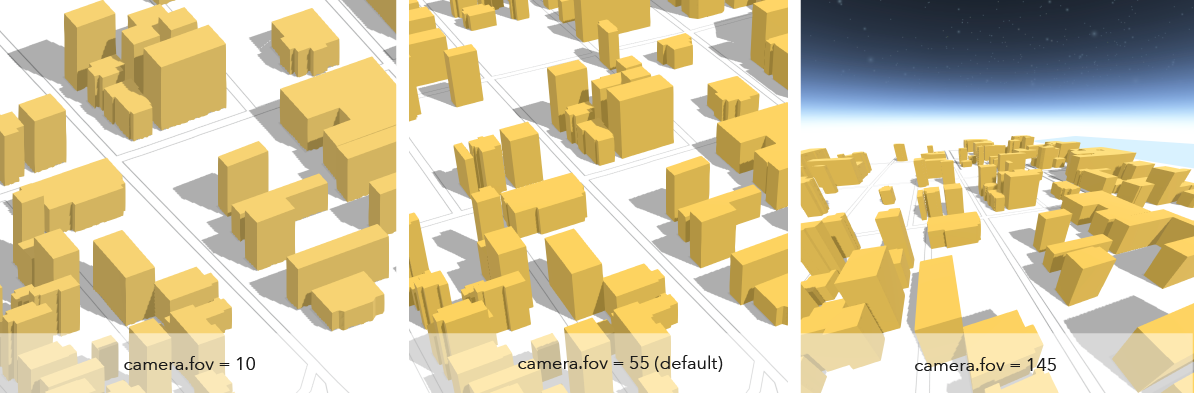
* The diagonal field of view (fov) angle for the camera. The range of angles must be between 1 and 170 degrees,
* where smaller fov angles mimic a telephoto lens zooming in, and larger fov angles mimic a fish-eye lens
* zooming out. The default angle is 55 degrees.
*
* 
*
* @default 55
*/
accessor fov: number;
/**
* The compass heading of the camera in degrees. Heading
* is zero when north is the top of the screen. It increases as the view rotates
* clockwise. The angles are always normalized between 0 and 360 degrees.
*
* @default 0
* @example
* // Initialize the view with a specific camera
* const cam = new Camera({
* heading: 90, // face due east
* tilt: 45, // looking from a bird's eye view
* position: [ -122, 38, 20000 ] // creates a point instance (x,y,z)
* });
* @example
* // Initialize the view with a specific camera
* const cam = new Camera({
* heading: 90, // face due east
* tilt: 45, // looking from a bird's eye view
* position: {
* latitude: 38,
* longitude: -122,
* z: 20000,
* spatialReference: { wkid: 3857 }
* }
* });
*
* view.camera = cam;
* @example
* // Set the heading of the view's camera to 180 degrees
* const newCam = view.camera.clone();
* newCam.heading = 180;
* view.camera = newCam;
* @example
* // go to the pt geometry facing due south
* view.goTo({ target: pt, heading: 180 });
*/
accessor heading: number;
/**
* The layout defines which sub-region of the camera is rendered.
*
* It is intended for tiled display walls, where each display instance configures a different layout.
* This property is only supported in a 3D [SceneView](https://developers.arcgis.com/javascript/latest/references/core/views/SceneView/).
*/
get layout(): CameraLayout;
set layout(value: CameraLayoutProperties);
/**
* The position of the camera defined by a map point.
*
* > [!WARNING]
* >
* > **Z-values** defined in a geographic or metric coordinate system are
* > expressed in meters. However, in local scenes that use a
* > projected coordinate system, vertical units are assumed to be the same as the
* > horizontal units specified by the service.
*
* @example
* const cam = view.camera.clone();
* // the position is autocast as new Point()
* cam.position = {
* latitude: 38,
* longitude: -122,
* z: 50000 // altitude in meters
* }
* // go to the new camera
* view.goTo(cam);
*/
get position(): Point;
set position(value: PointProperties);
/**
* The tilt of the camera in degrees with respect to the surface as projected
* down from the camera position. Tilt is zero when looking straight down
* at the surface and 90 degrees when the camera is looking parallel to
* the surface.
*
* @default 0
* @example
* // Initialize the view with a specific camera
* const cam = new Camera({
* heading: 90, // face due east
* tilt: 45, // looking from a bird's eye view
* position: {
* latitude: 38,
* longitude: -122,
* spatialReference: { wkid: 3857 }
* }
* });
*
* view.camera = cam;
* @example
* // go to the pt geometry facing directly down
* view.goTo({ target: pt, tilt: 0 });
*/
accessor tilt: number;
}
declare const CameraSuperclass: typeof JSONSupport & typeof ClonableMixin