@arcgis/core
Version:
ArcGIS Maps SDK for JavaScript: A complete 2D and 3D mapping and data visualization API
367 lines (364 loc) • 17 kB
TypeScript
import type Collection from "../core/Collection.js";
import type Bookmark from "../webmap/Bookmark.js";
import type Widget from "./Widget.js";
import type BookmarksViewModel from "./Bookmarks/BookmarksViewModel.js";
import type BookmarksVisibleElements from "./Bookmarks/BookmarksVisibleElements.js";
import type { Icon } from "@esri/calcite-components/components/calcite-icon";
import type { ReadonlyArrayOrCollection } from "../core/Collection.js";
import type { IdentifiableMixin, IdentifiableMixinProperties } from "../core/Identifiable.js";
import type { MapViewOrSceneView } from "../views/MapViewOrSceneView.js";
import type { BookmarkProperties } from "../webmap/Bookmark.js";
import type { WidgetProperties } from "./Widget.js";
import type { BookmarksViewModelEvents, BookmarksViewModelProperties } from "./Bookmarks/BookmarksViewModel.js";
import type { BookmarkOptions } from "./Bookmarks/types.js";
import type { HeadingLevel, GoToOverride } from "./support/types.js";
import type { BookmarksVisibleElementsProperties } from "./Bookmarks/BookmarksVisibleElements.js";
export interface BookmarksProperties extends WidgetProperties, IdentifiableMixinProperties, Partial<Pick<Bookmarks, "disabled" | "dragEnabled" | "filterPlaceholder" | "filterText" | "goToOverride" | "headingLevel" | "view">> {
/**
* A collection of [Bookmark](https://developers.arcgis.com/javascript/latest/references/core/webmap/Bookmark/)s. These are typically defined inside of a [WebMap.bookmarks](https://developers.arcgis.com/javascript/latest/references/core/WebMap/#bookmarks), but can also be defined manually, as shown in the code snippet below.
*
* @example
* const bookmarks = new Bookmarks({
* view: view,
* bookmarks: [ // array of bookmarks defined manually
* new Bookmark({
* name: "Angeles National Forest",
* viewpoint: {
* targetGeometry: {
* type: "extent",
* spatialReference: {
* wkid: 102100
* },
* xmin: -13139131.948889678,
* ymin: 4047767.23531948,
* xmax: -13092887.54677721,
* ymax: 4090610.189673263
* }
* }
* }),
* new Bookmark({
* name: "Crystal Lake",
* viewpoint: {
* targetGeometry: {
* type: "extent",
* spatialReference: {
* wkid: 102100
* },
* xmin: -13125852.551697943,
* ymin: 4066904.1101411926,
* xmax: -13114291.451169826,
* ymax: 4077614.8487296384
* },
* rotation: 90
* }
* })
* ]
* });
*/
bookmarks?: ReadonlyArrayOrCollection<BookmarkProperties>;
/**
* Specifies how new bookmarks will be created if [visibleElements.addBookmarkButton](https://developers.arcgis.com/javascript/latest/references/core/widgets/Bookmarks/BookmarksVisibleElements/) is set to `true`.
* Can be used to enable or disable taking screenshots or capturing the bookmark's viewpoint based on the current
* view when a bookmark is created. See [BookmarkOptions](https://developers.arcgis.com/javascript/latest/references/core/widgets/Bookmarks/types/#BookmarkOptions)
* for the full list of options.
*
* @since 4.18
* @example
* const bookmarks = new Bookmarks({
* view: view,
* visibleElements: {
* addBookmarkButton: true,
* editBookmarkButton: true
* },
* draggable: true,
* // whenever a new bookmark is created, a 100x100 px
* // screenshot of the view will be taken and the rotation, scale, and extent
* // of the view will not be set as the viewpoint of the new bookmark
* defaultCreateOptions: {
* takeScreenshot: true,
* captureViewpoint: false,
* captureTimeExtent: false, // the time extent of the view will not be saved in the bookmark
* screenshotSettings: {
* width: 100,
* height: 100
* }
* }
* });
*/
defaultCreateOptions?: Partial<BookmarkOptions>;
/**
* Specifies how bookmarks will be edited, if [visibleElements.editBookmarkButton](https://developers.arcgis.com/javascript/latest/references/core/widgets/Bookmarks/BookmarksVisibleElements/) is set to `true`.
* Can be used to enable or disable taking screenshots or capturing the bookmark's viewpoint based on the current
* view when a bookmark is edited. See [BookmarkOptions](https://developers.arcgis.com/javascript/latest/references/core/widgets/Bookmarks/types/#BookmarkOptions)
* for the full list of options.
*
* @since 4.18
*/
defaultEditOptions?: Partial<BookmarkOptions>;
/**
* Icon which represents the widget. It is typically used when the widget is controlled by another
* one (e.g. in the Expand widget).
*
* @default "bookmark"
* @since 4.27
* @see [Calcite Icon Search](https://developers.arcgis.com/calcite-design-system/icons/)
* @see [Calcite Icon Search](https://developers.arcgis.com/calcite-design-system/icons/)
*/
icon?: Icon["icon"] | null;
/**
* The widget's default label.
*
* @since 4.11
*/
label?: string | null;
/**
* The view model for this widget. This is a class that contains all the logic
* (properties and methods) that controls this widget's behavior. See the
* [BookmarksViewModel](https://developers.arcgis.com/javascript/latest/references/core/widgets/Bookmarks/BookmarksViewModel/) class to access
* all properties and methods on the widget.
*/
viewModel?: BookmarksViewModelProperties;
/**
* The visible elements that are displayed within the widget.
* This property provides the ability to turn individual elements of the widget's display on/off.
*
* @since 4.13
* @example
* bookmarks.visibleElements = {
* thumbnail: false
* };
*/
visibleElements?: BookmarksVisibleElementsProperties;
}
export interface BookmarksEvents extends BookmarksViewModelEvents {}
/**
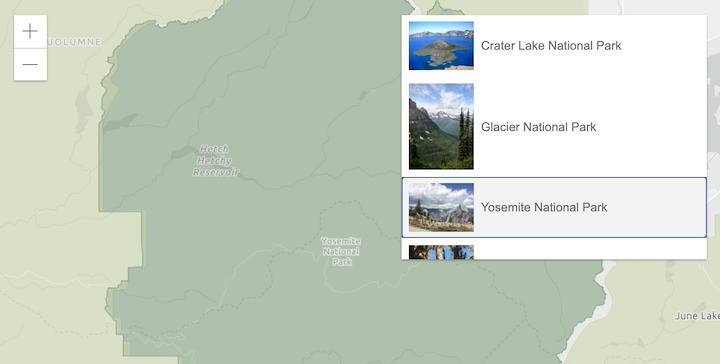
* The Bookmarks widget allows end users to quickly navigate to a particular area of interest.
* It displays a list of [bookmarks](https://developers.arcgis.com/javascript/latest/references/core/webmap/Bookmark/),
* which are typically defined inside the [WebMap.bookmarks](https://developers.arcgis.com/javascript/latest/references/core/WebMap/#bookmarks).
*
* 
*
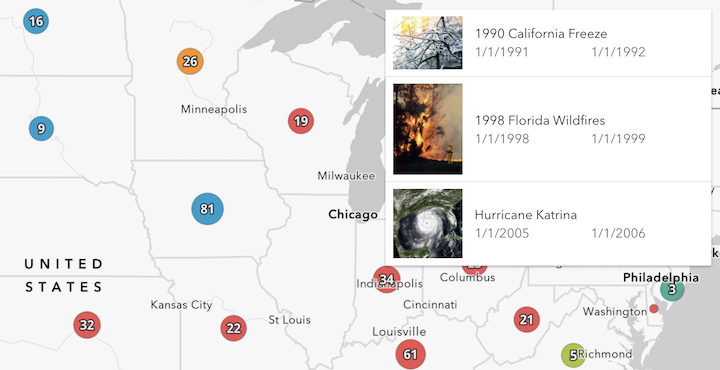
* Each bookmark may contain the following properties: `name`, `thumbnail`, `viewpoint` (defines rotation, scale, and target geometry), and `timeExtent`.
* If the timeExtent is defined on a bookmark, it will be displayed in the bookmark widget as shown in the following image.
*
* 
*
* When a bookmark with a timeExtent is selected, the [MapView.timeExtent](https://developers.arcgis.com/javascript/latest/references/core/views/MapView/#timeExtent) of the View will be set to the timeExtent of the selected bookmark.
* To disable time capability in the Bookmarks widget, set [capabilities.time](https://developers.arcgis.com/javascript/latest/references/core/widgets/Bookmarks/BookmarksViewModel/#capabilities) in the BookmarksViewModel to `false`.
*
* @deprecated since version 4.34. Use the [Bookmarks component](https://developers.arcgis.com/javascript/latest/references/map-components/components/arcgis-bookmarks/) instead. For information on widget deprecation, read about [Esri's move to web components](https://developers.arcgis.com/javascript/latest/components-transition-plan/).
* @since 4.8
* @see [Sample - Bookmarks widget](https://developers.arcgis.com/javascript/latest/sample-code/widgets-bookmarks/)
* @see [Sample - WebStyleSymbol (has manually defined bookmarks)](https://developers.arcgis.com/javascript/latest/sample-code/webstylesymbol-2d)
* @see [BookmarksViewModel](https://developers.arcgis.com/javascript/latest/references/core/widgets/Bookmarks/BookmarksViewModel/)
*/
export default class Bookmarks extends BookmarksSuperclass {
/**
* @deprecated
* Do not directly reference this property.
* Use EventNames and EventTypes helpers from \@arcgis/core/Evented
*/
"@eventTypes": BookmarksEvents;
constructor(properties?: BookmarksProperties);
/**
* A collection of [Bookmark](https://developers.arcgis.com/javascript/latest/references/core/webmap/Bookmark/)s. These are typically defined inside of a [WebMap.bookmarks](https://developers.arcgis.com/javascript/latest/references/core/WebMap/#bookmarks), but can also be defined manually, as shown in the code snippet below.
*
* @example
* const bookmarks = new Bookmarks({
* view: view,
* bookmarks: [ // array of bookmarks defined manually
* new Bookmark({
* name: "Angeles National Forest",
* viewpoint: {
* targetGeometry: {
* type: "extent",
* spatialReference: {
* wkid: 102100
* },
* xmin: -13139131.948889678,
* ymin: 4047767.23531948,
* xmax: -13092887.54677721,
* ymax: 4090610.189673263
* }
* }
* }),
* new Bookmark({
* name: "Crystal Lake",
* viewpoint: {
* targetGeometry: {
* type: "extent",
* spatialReference: {
* wkid: 102100
* },
* xmin: -13125852.551697943,
* ymin: 4066904.1101411926,
* xmax: -13114291.451169826,
* ymax: 4077614.8487296384
* },
* rotation: 90
* }
* })
* ]
* });
*/
get bookmarks(): Collection<Bookmark>;
set bookmarks(value: ReadonlyArrayOrCollection<BookmarkProperties>);
/**
* Specifies how new bookmarks will be created if [visibleElements.addBookmarkButton](https://developers.arcgis.com/javascript/latest/references/core/widgets/Bookmarks/BookmarksVisibleElements/) is set to `true`.
* Can be used to enable or disable taking screenshots or capturing the bookmark's viewpoint based on the current
* view when a bookmark is created. See [BookmarkOptions](https://developers.arcgis.com/javascript/latest/references/core/widgets/Bookmarks/types/#BookmarkOptions)
* for the full list of options.
*
* @since 4.18
* @example
* const bookmarks = new Bookmarks({
* view: view,
* visibleElements: {
* addBookmarkButton: true,
* editBookmarkButton: true
* },
* draggable: true,
* // whenever a new bookmark is created, a 100x100 px
* // screenshot of the view will be taken and the rotation, scale, and extent
* // of the view will not be set as the viewpoint of the new bookmark
* defaultCreateOptions: {
* takeScreenshot: true,
* captureViewpoint: false,
* captureTimeExtent: false, // the time extent of the view will not be saved in the bookmark
* screenshotSettings: {
* width: 100,
* height: 100
* }
* }
* });
*/
get defaultCreateOptions(): BookmarkOptions;
set defaultCreateOptions(value: Partial<BookmarkOptions>);
/**
* Specifies how bookmarks will be edited, if [visibleElements.editBookmarkButton](https://developers.arcgis.com/javascript/latest/references/core/widgets/Bookmarks/BookmarksVisibleElements/) is set to `true`.
* Can be used to enable or disable taking screenshots or capturing the bookmark's viewpoint based on the current
* view when a bookmark is edited. See [BookmarkOptions](https://developers.arcgis.com/javascript/latest/references/core/widgets/Bookmarks/types/#BookmarkOptions)
* for the full list of options.
*
* @since 4.18
*/
get defaultEditOptions(): BookmarkOptions;
set defaultEditOptions(value: Partial<BookmarkOptions>);
/**
* When true, the widget is visually withdrawn and cannot be interacted with.
*
* @default false
* @since 4.15
*/
accessor disabled: boolean;
/**
* Indicates if a Bookmark is able to be dragged in order to update its position in the list.
*
* @default false
* @since 4.29
*/
accessor dragEnabled: boolean;
/**
* Defines the text used as a placeholder when [visibleElements.filter](https://developers.arcgis.com/javascript/latest/references/core/widgets/Bookmarks/BookmarksVisibleElements/) is set to `true`.
*
* @default ""
* @since 4.29
*/
accessor filterPlaceholder: string;
/**
* Defines the text used to filter the bookmarks when [visibleElements.filter](https://developers.arcgis.com/javascript/latest/references/core/widgets/Bookmarks/BookmarksVisibleElements/) is set to `true`.
*
* @default ""
* @since 4.29
*/
accessor filterText: string;
/**
* This function provides the ability to override either the
* [MapView goTo()](https://developers.arcgis.com/javascript/latest/references/core/views/MapView/#goTo) or
* [SceneView goTo()](https://developers.arcgis.com/javascript/latest/references/core/views/SceneView/#goTo) methods.
*
* @since 4.8
* @see [MapView.goTo()](https://developers.arcgis.com/javascript/latest/references/core/views/MapView/#goTo)
* @see [SceneView.goTo()](https://developers.arcgis.com/javascript/latest/references/core/views/SceneView/#goTo)
* @example
* // The following snippet uses Search but can be applied to any
* // widgets that support the goToOverride property.
* search.goToOverride = function(view, goToParams) {
* goToParams.options = {
* duration: updatedDuration
* };
* return view.goTo(goToParams.target, goToParams.options);
* };
*/
accessor goToOverride: GoToOverride | null | undefined;
/**
* Indicates the heading level to use for the message "No bookmarks" when no bookmarks
* are available in this widget. By default, this message is rendered
* as a level 2 heading (e.g. `<h2>No bookmarks</h2>`). Depending on the widget's placement
* in your app, you may need to adjust this heading for proper semantics. This is
* important for meeting accessibility standards.
*
* @default 2
* @since 4.20
* @see [Heading Elements](https://developer.mozilla.org/en-US/docs/Web/HTML/Element/Heading_Elements)
* @example
* // "No bookmarks" will render as an <h3>
* bookmarks.headingLevel = 3;
*/
accessor headingLevel: HeadingLevel;
/**
* Icon which represents the widget. It is typically used when the widget is controlled by another
* one (e.g. in the Expand widget).
*
* @default "bookmark"
* @since 4.27
* @see [Calcite Icon Search](https://developers.arcgis.com/calcite-design-system/icons/)
* @see [Calcite Icon Search](https://developers.arcgis.com/calcite-design-system/icons/)
*/
get icon(): Icon["icon"];
set icon(value: Icon["icon"] | null | undefined);
/**
* The widget's default label.
*
* @since 4.11
*/
get label(): string;
set label(value: string | null | undefined);
/**
* The view from which the widget will operate.
*
* > [!WARNING]
* >
* > **Note:** Bookmarks are supported in a [SceneView](https://developers.arcgis.com/javascript/latest/references/core/views/SceneView/) only if they come from a [WebMap](https://developers.arcgis.com/javascript/latest/references/core/WebMap/) or are provided manually.
* > [Presentation](https://developers.arcgis.com/javascript/latest/references/core/webscene/Presentation/) provides a similar experience for [WebScene](https://developers.arcgis.com/javascript/latest/references/core/WebScene/)s.
*/
accessor view: MapViewOrSceneView | null | undefined;
/**
* The view model for this widget. This is a class that contains all the logic
* (properties and methods) that controls this widget's behavior. See the
* [BookmarksViewModel](https://developers.arcgis.com/javascript/latest/references/core/widgets/Bookmarks/BookmarksViewModel/) class to access
* all properties and methods on the widget.
*/
get viewModel(): BookmarksViewModel;
set viewModel(value: BookmarksViewModelProperties);
/**
* The visible elements that are displayed within the widget.
* This property provides the ability to turn individual elements of the widget's display on/off.
*
* @since 4.13
* @example
* bookmarks.visibleElements = {
* thumbnail: false
* };
*/
get visibleElements(): BookmarksVisibleElements;
set visibleElements(value: BookmarksVisibleElementsProperties);
/**
* Zoom to a specific bookmark.
*
* @param bookmark - The bookmark to zoom to.
* @returns Resolves after the animation to specified bookmark finishes.
*/
goTo(bookmark: Bookmark): Promise<void>;
}
declare const BookmarksSuperclass: typeof Widget & typeof IdentifiableMixin