@arcgis/core
Version:
ArcGIS Maps SDK for JavaScript: A complete 2D and 3D mapping and data visualization API
104 lines (102 loc) • 7.75 kB
TypeScript
import type { ClonableMixin } from "../../core/Clonable.js";
import type { JSONSupport } from "../../core/JSONSupport.js";
import type { Symbol3DEmissiveSource } from "./types.js";
/** @since 5.0 */
export interface Symbol3DEmissiveProperties extends Partial<Pick<Symbol3DEmissive, "source" | "strength">> {}
/**
* [Symbol3DEmissive](https://developers.arcgis.com/javascript/latest/references/core/symbols/support/Symbol3DEmissive/) defines a material as a light emitter for 3D symbols. Light emitters are
* materials that produce visible light in a scene, allowing objects to appear illuminated (for example, glowing windows,
* signage, or highlighted features), independent of external light sources.
*
* It can be configured as part of a [Symbol3DMaterial](https://developers.arcgis.com/javascript/latest/references/core/symbols/support/Symbol3DMaterial/) on volumetric [Symbol3DLayer](https://developers.arcgis.com/javascript/latest/references/core/symbols/Symbol3DLayer/)
* types. The amount and behavior of emitted light are controlled by the [strength](https://developers.arcgis.com/javascript/latest/references/core/symbols/support/Symbol3DEmissive/#strength)
* and its [source](https://developers.arcgis.com/javascript/latest/references/core/symbols/support/Symbol3DEmissive/#source).
*
* An optional [Glow](https://developers.arcgis.com/javascript/latest/references/core/webscene/Glow/) effect can be enabled to enhance the appearance of all emissive elements in the scene
* by adding a stylized glow.
*
* > [!WARNING]
* >
* > **Known Limitations**
* >
* > [Symbol3DEmissive](https://developers.arcgis.com/javascript/latest/references/core/symbols/support/Symbol3DEmissive/) and [Glow](https://developers.arcgis.com/javascript/latest/references/core/webscene/Glow/) require support for the WebGL2 extension
* > `EXT_float_blend`, not available on iOS.
* > [Symbol3DEmissive](https://developers.arcgis.com/javascript/latest/references/core/symbols/support/Symbol3DEmissive/) is supported on [ObjectSymbol3DLayer](https://developers.arcgis.com/javascript/latest/references/core/symbols/ObjectSymbol3DLayer/),
* > [ExtrudeSymbol3DLayer](https://developers.arcgis.com/javascript/latest/references/core/symbols/ExtrudeSymbol3DLayer/), [PathSymbol3DLayer](https://developers.arcgis.com/javascript/latest/references/core/symbols/PathSymbol3DLayer/), or [FillSymbol3DLayer](https://developers.arcgis.com/javascript/latest/references/core/symbols/FillSymbol3DLayer/) on
* > [MeshSymbol3D](https://developers.arcgis.com/javascript/latest/references/core/symbols/MeshSymbol3D/).
*
* Example:
* ```js
* let symbol = {
* type: "polygon-3d", // autocasts as new PolygonSymbol3D()
* symbolLayers: [{
* type: "extrude", // autocasts as new ExtrudeSymbol3DLayer()
* size: 100000,
* material: { // autocasts as new Symbol3DMaterial()
* color: "red",
* emissive: { // autocasts as new Symbol3DEmissive()
* source: "color",
* strength: 0.5
* }
* }
* }]
* };
* ```
*
* @see [Sample - Visualization with light-emitting symbols](https://developers.arcgis.com/javascript/latest/sample-code/light-emitting-symbols/)
* @since 5.0
*/
export class Symbol3DEmissive extends Symbol3DEmissiveSuperclass {
/** @since 5.0 */
constructor(properties?: Symbol3DEmissiveProperties);
/**
* The [source](https://developers.arcgis.com/javascript/latest/references/core/symbols/support/Symbol3DEmissive/#source) for the emissive effect. Determines whether the emissive values
* are derived from an underlying model or from the combined color information of the symbology.
*
* Value | Description
* ------|------------
* emissive | Applies emissive texture and/or emissive factor from underlying models.
* color | Applies the combined symbol material color as emissive color.
*
* Setting source to `"emissive"` only has an effect on elements that contain an underlying model with PBR materials
* with emissive information, such as [ObjectSymbol3DLayer](https://developers.arcgis.com/javascript/latest/references/core/symbols/ObjectSymbol3DLayer/), [SceneLayer](https://developers.arcgis.com/javascript/latest/references/core/layers/SceneLayer/) with glTF resource
* or a [MeshSymbol3D](https://developers.arcgis.com/javascript/latest/references/core/symbols/MeshSymbol3D/) with a [FillSymbol3DLayer](https://developers.arcgis.com/javascript/latest/references/core/symbols/FillSymbol3DLayer/). If the underlying models do not contain
* emissive information, setting source to `"emissive"` has no effect.
*
* Setting `source: "color"` on these elements will ignore all underlying emissive infomation, and use the combined
* base color as emissive color.
*
* Symbol layers such as [ExtrudeSymbol3DLayer](https://developers.arcgis.com/javascript/latest/references/core/symbols/ExtrudeSymbol3DLayer/), [PathSymbol3DLayer](https://developers.arcgis.com/javascript/latest/references/core/symbols/PathSymbol3DLayer/) or [ObjectSymbol3DLayer](https://developers.arcgis.com/javascript/latest/references/core/symbols/ObjectSymbol3DLayer/)
* with primitive resource do not have an underlying model with materials that contain emissive information, hence
* setting source to `"emissive"` has no effect. To make these elements emissive, set source to `"color"` to make them
* emit light in their combined color.
*
* | 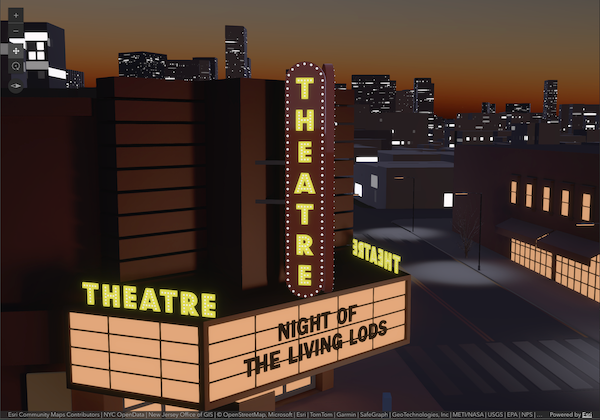 |  |
* |----------|-----------|
* | `source: "emissive"` | `source: "color"` |
* | Emissive color from glTF emissive texture. | Emissive color uses glTF color texture. All glTF emissive textures and factors are ignored. |
*
* @default "emissive"
* @since 5.0
*/
accessor source: Symbol3DEmissiveSource;
/**
* The [strength](https://developers.arcgis.com/javascript/latest/references/core/symbols/support/Symbol3DEmissive/#strength) property controls how much light a material emits and is
* defined as a scalar multiplier on the emission color. It is typically set between 0 and 1, where 0 means no light
* is emitted and 1 represents the full emission color. Values greater than 1 increase the amount of emitted light and
* may lead to overexposure, causing colors to shift toward white.
*
* Increasing [strength](https://developers.arcgis.com/javascript/latest/references/core/symbols/support/Symbol3DEmissive/#strength) makes emissive elements appear more prominent and can
* amplify their visual impact when the optional [Glow](https://developers.arcgis.com/javascript/latest/references/core/webscene/Glow/) effect is enabled.
*
* | 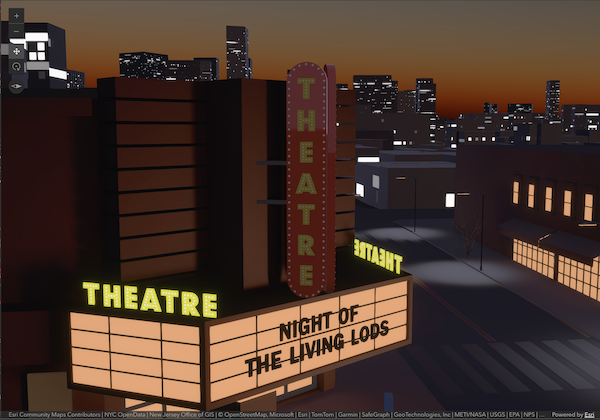 |  | 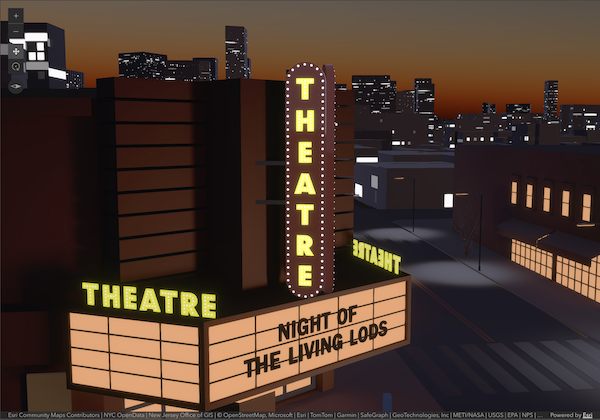 |
* |---------- | ----------- | ----------- |
* | `strength: 0` | `strength: 1` | `strength: 2` |
* | Turn off all emissive parts of theater sign. | Display theater sign with its emissive parts in original strength. | Higher strength increases the amount of emitted light. |
*
* @default 1
* @since 5.0
*/
accessor strength: number;
}
declare const Symbol3DEmissiveSuperclass: typeof JSONSupport & typeof ClonableMixin