@arcgis/core
Version:
ArcGIS Maps SDK for JavaScript: A complete 2D and 3D mapping and data visualization API
112 lines (110 loc) • 5.02 kB
TypeScript
import type Color from "../../Color.js";
import type Callout3D from "./Callout3D.js";
import type LineCallout3DBorder from "./LineCallout3DBorder.js";
import type { Callout3DProperties } from "./Callout3D.js";
import type { ColorLike } from "../../Color.js";
import type { LineCallout3DBorderProperties } from "./LineCallout3DBorder.js";
export interface LineCallout3DProperties extends Callout3DProperties {
/**
* The border settings of the callout line. The border of the callout line can be used
* to improve the contrast of the callout line color against various background colors. If the border is `null`,
* then no border will be visible.
*/
border?: LineCallout3DBorderProperties | null;
/**
* The color of the callout line.
* This can be autocast with an array of rgb(a) values, named string, hex string or an hsl(a) string,
* an object with `r`, `g`, `b`, and `a` properties, or a [Color](https://developers.arcgis.com/javascript/latest/references/core/Color/) object.
*
* @default "black"
*/
color?: ColorLike | null;
/**
* The width of the callout line in points. This value may be autocast with a string
* expressing size in points or pixels (e.g. `12px`).
*
* @default 1px
*/
size?: number | string;
}
/**
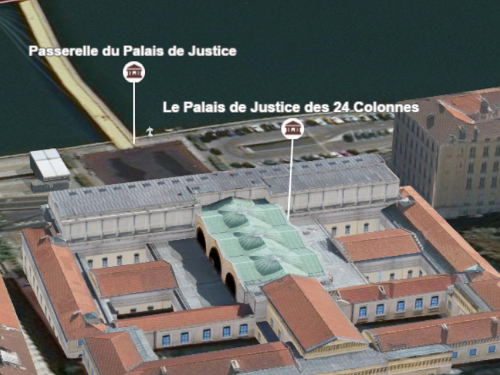
* This type of callout displays a line to connect a symbol or a label with its actual location in the scene.
* For example when displaying points of interest in a city, visualizing them with a callout line helps to understand where the points
* are actually located:
*
* 
*
* This visualization can be created on a [PointSymbol3D](https://developers.arcgis.com/javascript/latest/references/core/symbols/PointSymbol3D/) or a
* [LabelSymbol3D](https://developers.arcgis.com/javascript/latest/references/core/symbols/LabelSymbol3D/). After defining the [PointSymbol3D.symbolLayers](https://developers.arcgis.com/javascript/latest/references/core/symbols/PointSymbol3D/#symbolLayers),
* an offset should be defined by setting the [PointSymbol3D.verticalOffset](https://developers.arcgis.com/javascript/latest/references/core/symbols/PointSymbol3D/#verticalOffset) property. The symbols are now shifted vertically,
* but we still need to add the callout, otherwise it can be very confusing to understand where the points are located:
*
* 
*
* Setting the `callout` property of type `line` on the symbol will create the line that connects the symbol with its actual position:
*
* 
*
* @since 4.4
* @see [Sample: Point styles for cities](https://developers.arcgis.com/javascript/latest/sample-code/visualization-point-styles/)
* @see [Sample: Using callout lines with labels](https://developers.arcgis.com/javascript/latest/sample-code/visualization-label-callout/)
* @example
* let symbol = {
* type: "point-3d", // autocasts as new PointSymbol3D()
* symbolLayers: [{
* type: "icon", // autocasts as new IconSymbol3DLayer()
* resource: {
* href: "CityHall.svg"
* },
* size: 20
* }],
* verticalOffset: {
* screenLength: 40,
* maxWorldLength: 100,
* minWorldLength: 20
* },
* callout: {
* type: "line", // autocasts as new LineCallout3D()
* size: 1.5,
* color: "white",
* border: {
* color: "black"
* }
* }
* });
*/
export default class LineCallout3D extends Callout3D {
constructor(properties?: LineCallout3DProperties);
/**
* The border settings of the callout line. The border of the callout line can be used
* to improve the contrast of the callout line color against various background colors. If the border is `null`,
* then no border will be visible.
*/
get border(): LineCallout3DBorder | null | undefined;
set border(value: LineCallout3DBorderProperties | null | undefined);
/**
* The color of the callout line.
* This can be autocast with an array of rgb(a) values, named string, hex string or an hsl(a) string,
* an object with `r`, `g`, `b`, and `a` properties, or a [Color](https://developers.arcgis.com/javascript/latest/references/core/Color/) object.
*
* @default "black"
*/
get color(): Color | null | undefined;
set color(value: ColorLike | null | undefined);
/**
* The width of the callout line in points. This value may be autocast with a string
* expressing size in points or pixels (e.g. `12px`).
*
* @default 1px
*/
get size(): number;
set size(value: number | string);
readonly type: "line";
/**
* Creates a deep clone of the callout.
*
* @returns A deep clone of the object that
* invoked this method.
*/
clone(): LineCallout3D;
}