@arcgis/core
Version:
ArcGIS Maps SDK for JavaScript: A complete 2D and 3D mapping and data visualization API
337 lines (335 loc) • 17.5 kB
TypeScript
import type Symbol3DLayer from "./Symbol3DLayer.js";
import type ObjectSymbol3DLayerResource from "./support/ObjectSymbol3DLayerResource.js";
import type Symbol3DAnchorPosition3D from "./support/Symbol3DAnchorPosition3D.js";
import type Symbol3DMaterial from "./support/Symbol3DMaterial.js";
import type { ObjectSymbol3DLayerAnchor } from "./types.js";
import type { Symbol3DMaterialProperties } from "./support/Symbol3DMaterial.js";
import type { ObjectSymbol3DLayerResourceProperties } from "./support/ObjectSymbol3DLayerResource.js";
import type { Symbol3DAnchorPosition3DProperties } from "./support/Symbol3DAnchorPosition3D.js";
import type { Symbol3DLayerProperties } from "./Symbol3DLayer.js";
export interface ObjectSymbol3DLayerProperties extends Symbol3DLayerProperties, Partial<Pick<ObjectSymbol3DLayer, "anchor" | "castShadows" | "depth" | "heading" | "height" | "roll" | "tilt" | "width">> {
/**
* Defines the [anchor](https://developers.arcgis.com/javascript/latest/references/core/symbols/ObjectSymbol3DLayer/#anchor) relative to the center of the [symbol layer resource](https://developers.arcgis.com/javascript/latest/references/core/symbols/ObjectSymbol3DLayer/#resource). It is specified as a
* ratio of the resource's bounding box dimensions.
* For example, a value of `{ x: 0, y: 0, z: 0 }` designates the center, while a value of `{ x: -0.5, y: -0.5, z: -0.5 }` places
* the symbol at the lower south-west corner of the symbol's bounding box.
*
* This property only applies when [anchor](https://developers.arcgis.com/javascript/latest/references/core/symbols/ObjectSymbol3DLayer/#anchor) is set to `relative`.
*
* @since 4.10
* @example
* symbolLayer.anchor = "relative";
* symbolLayer.anchorPosition = { x: 0, y: 0, z: -0.5 }; // equivalent to `anchor: "bottom"`
* @example
* symbolLayer.anchor = "relative";
* symbolLayer.anchorPosition = { x: 1.5, y: 1, z: 0 }; // the anchor can be placed outside of the symbol's bounding box
*/
anchorPosition?: Symbol3DAnchorPosition3DProperties | null;
/**
* The material used to shade the object. This property defines the object's color and emissive properties.
*
* @example
* // CSS color string
* symbolLayer.material = {
* color: "dodgerblue"
* };
* @example
* // HEX string
* symbolLayer.material = {
* color: "#33cc33";
* };
* @example
* // array of RGBA values
* symbolLayer.material = {
* color: [51, 204, 51, 0.3];
* };
* @example
* // object with rgba properties
* symbolLayer.material = {
* color: {
* r: 51,
* g: 51,
* b: 204,
* a: 0.7
* }
* };
* @example
* // object with emissive properties enabled
* symbolLayer.material: {
* color: "#00E9FF",
* emissive: { strength: 1, source: "color" },
* };
* @example
* // object with emissive properties from a object's texture
* symbolLayer.material: {
* emissive: { strength: 1, source: "emissive" },
* };
*/
material?: Symbol3DMaterialProperties | null;
/**
* The primitive shape (`primitive`) or external 3D model (`href`) used to visualize the
* points. If both properties are present, `primitive` takes precedence and `href` is ignored.
* When using the `href` property, external 3D models must be present in
* [glTF format](https://www.khronos.org/gltf/).
*
* @default { primitive: "sphere" }
* @see [Sample: Visualize features with realistic 3D symbols](https://developers.arcgis.com/javascript/latest/sample-code/visualization-trees-realistic/)
*/
resource?: ObjectSymbol3DLayerResourceProperties | null;
}
/**
* ObjectSymbol3DLayer is used to render [Point](https://developers.arcgis.com/javascript/latest/references/core/geometry/Point/) geometries
* using a volumetric 3D shape (e.g., a sphere or cylinder) with a [PointSymbol3D](https://developers.arcgis.com/javascript/latest/references/core/symbols/PointSymbol3D/)
* in a [SceneView](https://developers.arcgis.com/javascript/latest/references/core/views/SceneView/). [MapView](https://developers.arcgis.com/javascript/latest/references/core/views/MapView/) does not support
* 3D symbols. [Polygon](https://developers.arcgis.com/javascript/latest/references/core/geometry/Polygon/) features may also be rendered with
* ObjectSymbol3DLayers, but the object symbol layer must be contained in a
* [PolygonSymbol3D](https://developers.arcgis.com/javascript/latest/references/core/symbols/PolygonSymbol3D/), not a [PointSymbol3D](https://developers.arcgis.com/javascript/latest/references/core/symbols/PointSymbol3D/)
* in this scenario.
*
* The shape of the object is set in the [resource](https://developers.arcgis.com/javascript/latest/references/core/symbols/ObjectSymbol3DLayer/#resource) property and the color
* of the object is set in the [material](https://developers.arcgis.com/javascript/latest/references/core/symbols/ObjectSymbol3DLayer/#material) property. The size of the object is
* always defined in meters. Size can be directly set in the
* [height](https://developers.arcgis.com/javascript/latest/references/core/symbols/ObjectSymbol3DLayer/#height), [width](https://developers.arcgis.com/javascript/latest/references/core/symbols/ObjectSymbol3DLayer/#width), and [depth](https://developers.arcgis.com/javascript/latest/references/core/symbols/ObjectSymbol3DLayer/#depth) properties. Object color and size
* can also be data-driven by adding [size](https://developers.arcgis.com/javascript/latest/references/core/renderers/SimpleRenderer/#visualVariables) and/or
* [color visual variables](https://developers.arcgis.com/javascript/latest/references/core/renderers/SimpleRenderer/#visualVariables)
* to any [Renderer](https://developers.arcgis.com/javascript/latest/references/core/renderers/Renderer/) that uses this symbol layer.
*
* ObjectSymbol3DLayers must be added to the `symbolLayers` property of
* either [PointSymbol3D](https://developers.arcgis.com/javascript/latest/references/core/symbols/PointSymbol3D/) or
* [PolygonSymbol3D](https://developers.arcgis.com/javascript/latest/references/core/symbols/PolygonSymbol3D/) symbols. Multiple symbol layers may be used
* in a single symbol. The image below depicts a point [FeatureLayer](https://developers.arcgis.com/javascript/latest/references/core/layers/FeatureLayer/) whose features are
* symbolized with a [PointSymbol3D](https://developers.arcgis.com/javascript/latest/references/core/symbols/PointSymbol3D/) containing a cylinder-based
* ObjectSymbol3DLayer.
*
* [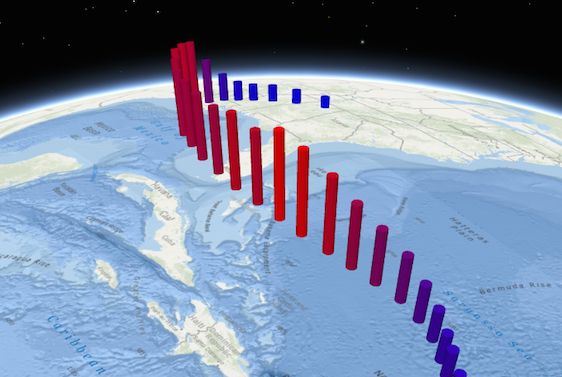](https://developers.arcgis.com/javascript/latest/sample-code/visualization-multivariate-3d/)
*
* See [Symbol3DLayer](https://developers.arcgis.com/javascript/latest/references/core/symbols/Symbol3DLayer/) and [Symbol3D](https://developers.arcgis.com/javascript/latest/references/core/symbols/Symbol3D/) to read
* more general information about 3D symbols, symbol layers and how they relate to one another.
*
* @since 4.0
* @see [Symbol Builder](https://developers.arcgis.com/javascript/latest/symbol-builder/)
* @see [Sample - Flat vs. volumetric 3D symbol layers](https://developers.arcgis.com/javascript/latest/sample-code/symbols-points-3d/)
* @see [Sample - Visualize features thematically with multiple variables (3D)](https://developers.arcgis.com/javascript/latest/sample-code/visualization-multivariate-3d/)
* @see [Sample - Visualize features with realistic 3D symbols](https://developers.arcgis.com/javascript/latest/sample-code/visualization-trees-realistic/)
* @see [Symbol3DLayer](https://developers.arcgis.com/javascript/latest/references/core/symbols/Symbol3DLayer/)
* @see [Symbol3D](https://developers.arcgis.com/javascript/latest/references/core/symbols/Symbol3D/)
* @see [Renderer](https://developers.arcgis.com/javascript/latest/references/core/renderers/Renderer/)
* @see [ArcGIS blog - Working with objects, paths, and extrusion](https://blogs.esri.com/esri/arcgis/2016/01/25/3d-visualization-working-with-objects-paths-and-extrusion/)
* @see [ArcGIS blog - Using attributes to represent real-world sizes of features](https://blogs.esri.com/esri/arcgis/2016/02/01/3d-visualization-using-attributes-to-represent-real-world-sizes-of-features/)
* @example
* // symbol using a cylinder as a resource
* const symbol = new PointSymbol3D ({
* symbolLayers: [ new ObjectSymbol3DLayer({
* width: 5, // diameter of the object from east to west in meters
* height: 20, // height of the object in meters
* depth: 15, // diameter of the object from north to south in meters
* resource: { primitive: "cylinder" },
* material: { color: "red" }
* })]
* });
* @example
* // symbol using a glTF 3D model as a resource
* const symbol = new PointSymbol3D({
* symbolLayers: [ new ObjectSymbol3DLayer({
* resource: {
* href: "../3d-assets/model.gltf"
* },
* height: 3,
* material: {
* color: "red"
* }
* })]
* });
*/
export default class ObjectSymbol3DLayer extends Symbol3DLayer {
constructor(properties?: ObjectSymbol3DLayerProperties);
/**
* The positioning of the symbol relative to the geometry. The default behavior (`origin`) depends on the resource:
* * For `sphere`, `cube` and `diamond` primitives, the origin is at the center.
* * For `cylinder`, `cone`, `inverted-cone` and `tetrahedron` primitives, the origin is at the bottom.
* * For `href` resources, the origin coincides with the origin of the 3D model.
*
* If `anchor` is set to `relative`, the anchor is defined by [anchorPosition](https://developers.arcgis.com/javascript/latest/references/core/symbols/ObjectSymbol3DLayer/#anchorPosition) as a fraction of
* the symbol's bounding box.
*
* @default "origin"
*/
anchor?: ObjectSymbol3DLayerAnchor | null;
/**
* Defines the [anchor](https://developers.arcgis.com/javascript/latest/references/core/symbols/ObjectSymbol3DLayer/#anchor) relative to the center of the [symbol layer resource](https://developers.arcgis.com/javascript/latest/references/core/symbols/ObjectSymbol3DLayer/#resource). It is specified as a
* ratio of the resource's bounding box dimensions.
* For example, a value of `{ x: 0, y: 0, z: 0 }` designates the center, while a value of `{ x: -0.5, y: -0.5, z: -0.5 }` places
* the symbol at the lower south-west corner of the symbol's bounding box.
*
* This property only applies when [anchor](https://developers.arcgis.com/javascript/latest/references/core/symbols/ObjectSymbol3DLayer/#anchor) is set to `relative`.
*
* @since 4.10
* @example
* symbolLayer.anchor = "relative";
* symbolLayer.anchorPosition = { x: 0, y: 0, z: -0.5 }; // equivalent to `anchor: "bottom"`
* @example
* symbolLayer.anchor = "relative";
* symbolLayer.anchorPosition = { x: 1.5, y: 1, z: 0 }; // the anchor can be placed outside of the symbol's bounding box
*/
get anchorPosition(): Symbol3DAnchorPosition3D | null | undefined;
set anchorPosition(value: Symbol3DAnchorPosition3DProperties | null | undefined);
/**
* Indicates whether the symbol layer geometry casts shadows in the scene.
* Setting this property to `false` will disable shadows for the symbol layer
* even if direct shadows are enabled in
* [SceneView.environment](https://developers.arcgis.com/javascript/latest/references/core/views/SceneView/#environment).
*
* @default true
* @since 4.11
* @example
* // disables shadow casting
* symbolLayer.castShadows = false;
*/
accessor castShadows: boolean;
/**
* The depth, or diameter from north to south, of the object in meters.
* If `undefined`, the depth will be calculated to maintain the original
* proportions of the object.
*
* @default 10
* @example
* // depth of the symbol in meters
* symbolLayer.depth = 5000;
*/
accessor depth: number | null | undefined;
/**
* The clockwise rotation of the symbol in the horizontal plane (i.e., around the z axis).
* The rotation is specified in degrees and is relative to the y-axis.
*
* If the symbol resource is aligned such that its forward facing side points in the direction of the y-axis
* (the y-axis always points North in WGS84 or WebMercator coordinates), its upwards facing side is pointing
* in the direction of the z-axis, and its right-hand side points in the direction of the x-axis (the x-axis
* always points East in WGS84 or WebMercator coordinates), then this angle corresponds to the heading of
* the symbol.
*
* @example
* // heading of the symbol in degrees
* symbolLayer.heading = 180;
*/
accessor heading: number | null | undefined;
/**
* The height of the object in meters. If `undefined`, the height will be
* calculated to maintain the original proportions of the object.
*
* @default 10
* @example
* // height of the symbol in meters
* symbolLayer.height = 1000;
*/
accessor height: number | null | undefined;
/**
* The material used to shade the object. This property defines the object's color and emissive properties.
*
* @example
* // CSS color string
* symbolLayer.material = {
* color: "dodgerblue"
* };
* @example
* // HEX string
* symbolLayer.material = {
* color: "#33cc33";
* };
* @example
* // array of RGBA values
* symbolLayer.material = {
* color: [51, 204, 51, 0.3];
* };
* @example
* // object with rgba properties
* symbolLayer.material = {
* color: {
* r: 51,
* g: 51,
* b: 204,
* a: 0.7
* }
* };
* @example
* // object with emissive properties enabled
* symbolLayer.material: {
* color: "#00E9FF",
* emissive: { strength: 1, source: "color" },
* };
* @example
* // object with emissive properties from a object's texture
* symbolLayer.material: {
* emissive: { strength: 1, source: "emissive" },
* };
*/
get material(): Symbol3DMaterial | null | undefined;
set material(value: Symbol3DMaterialProperties | null | undefined);
/**
* The primitive shape (`primitive`) or external 3D model (`href`) used to visualize the
* points. If both properties are present, `primitive` takes precedence and `href` is ignored.
* When using the `href` property, external 3D models must be present in
* [glTF format](https://www.khronos.org/gltf/).
*
* @default { primitive: "sphere" }
* @see [Sample: Visualize features with realistic 3D symbols](https://developers.arcgis.com/javascript/latest/sample-code/visualization-trees-realistic/)
*/
get resource(): ObjectSymbol3DLayerResource | null | undefined;
set resource(value: ObjectSymbol3DLayerResourceProperties | null | undefined);
/**
* The rotation of the symbol in the lateral vertical plane (i.e., around the y axis).
* The rotation is specified in degrees and is relative to the x-axis. At 0 degrees, the model is level.
* A positive value lifts the left part and lowers the right part of the model.
*
* If the symbol resource is aligned such that its forward facing side points in the direction of the y-axis
* (the y-axis always points North in WGS84 or WebMercator coordinates), its upwards facing side is pointing
* in the direction of the z-axis, and its right-hand side points in the direction of the x-axis (the x-axis
* always points East in WGS84 or WebMercator coordinates), then this angle corresponds to the roll of
* the symbol.
*
* @since 4.4
* @example
* // roll of the symbol in degrees
* symbolLayer.roll = 90;
*/
accessor roll: number | null | undefined;
/**
* The rotation of the symbol in the longitudinal vertical plane (i.e., around the x axis).
* The rotation is specified in degrees and is relative to the y-axis. At 0 degrees, the model is level.
* A positive value points lifts the front and lowers the back of the model.
*
* If the symbol resource is aligned such that its forward facing side points in the direction of the y-axis
* (the y-axis always points North in WGS84 or WebMercator coordinates), its upwards facing side is pointing
* in the direction of the z-axis, and its right-hand side points in the direction of the x-axis (the x-axis
* always points East in WGS84 or WebMercator coordinates), then this angle corresponds to the tilt of
* the symbol.
*
* @since 4.4
* @example
* // tilt of the symbol in degrees
* symbolLayer.tilt = 45;
*/
accessor tilt: number | null | undefined;
/** The object type. */
get type(): "object";
/**
* The width, or diameter from east to west, of the object in meters.
* If `undefined`, the width will be calculated to maintain the original
* proportions of the object.
*
* @default 10
* @example
* // width of the symbol in meters
* symbolLayer.width = 5000;
*/
accessor width: number | null | undefined;
/**
* Creates a deep clone of the symbol layer.
*
* @returns A deep clone of the object that
* invoked this method.
* @example
* // Creates a deep clone of the graphic's first symbol layer
* let symLyr = graphic.symbol.symbolLayers.at(0).clone();
*/
clone(): ObjectSymbol3DLayer;
}