@arcgis/core
Version:
ArcGIS Maps SDK for JavaScript: A complete 2D and 3D mapping and data visualization API
290 lines (288 loc) • 12.3 kB
TypeScript
import type Symbol3DLayer from "./Symbol3DLayer.js";
import type Edges3D from "./edges/Edges3D.js";
import type StylePattern3D from "./patterns/StylePattern3D.js";
import type Symbol3DFillMaterial from "./support/Symbol3DFillMaterial.js";
import type Symbol3DOutline from "./support/Symbol3DOutline.js";
import type { StylePattern3DProperties } from "./patterns/StylePattern3D.js";
import type { Symbol3DFillMaterialProperties } from "./support/Symbol3DFillMaterial.js";
import type { Symbol3DOutlineProperties } from "./support/Symbol3DOutline.js";
import type { Edges3DProperties } from "./edges/Edges3D.js";
import type { Symbol3DLayerProperties } from "./Symbol3DLayer.js";
export interface FillSymbol3DLayerProperties extends Symbol3DLayerProperties, Partial<Pick<FillSymbol3DLayer, "castShadows">> {
/**
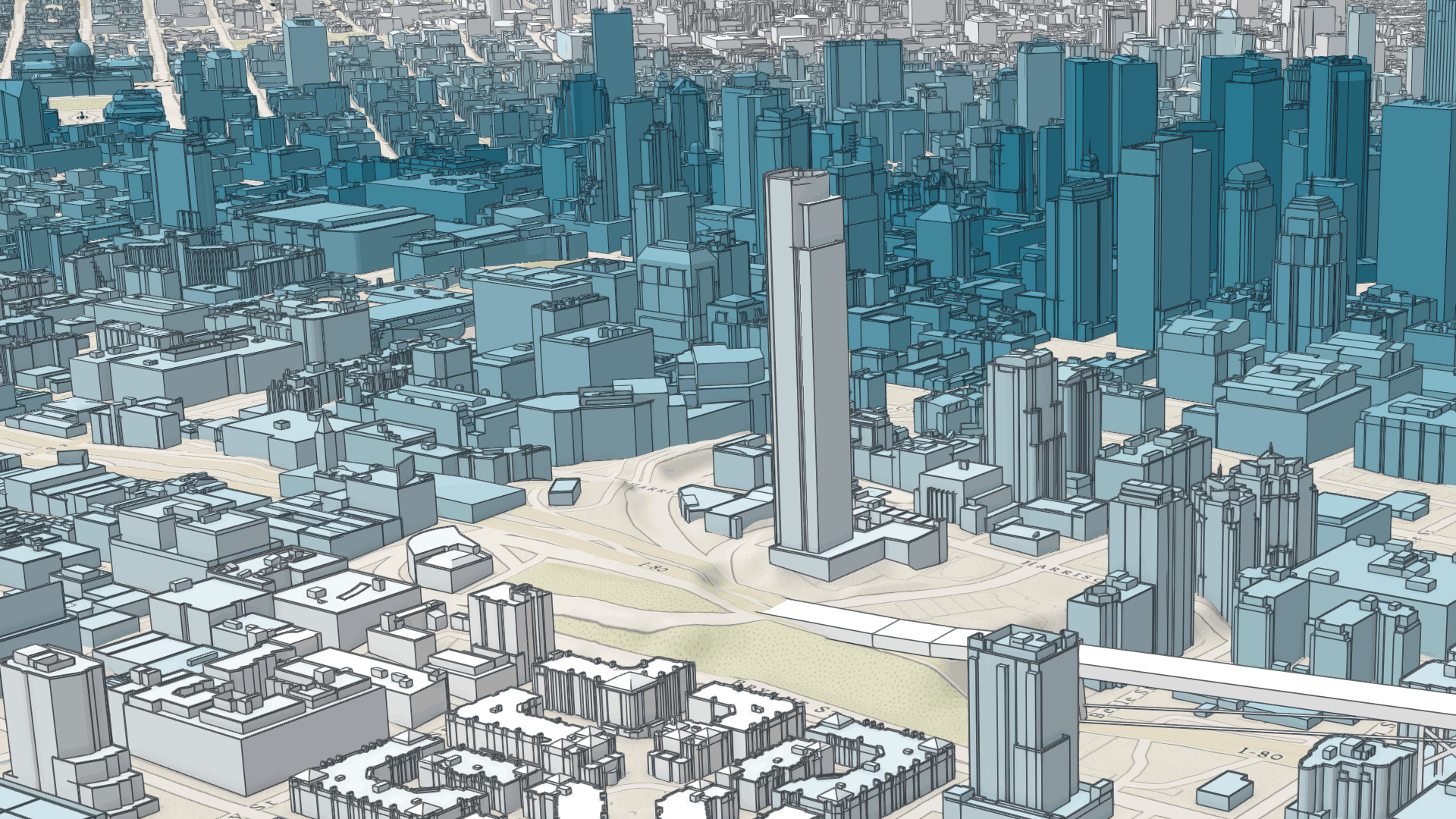
* Sets the contour edges on 3D Objects. This is only applicable for [MeshSymbol3D](https://developers.arcgis.com/javascript/latest/references/core/symbols/MeshSymbol3D/).
*
* 
*
* @since 4.7
* @example
* const symbol = {
* type: "mesh-3d", // autocasts as new MeshSymbol3D()
* symbolLayers: [{
* type: "fill", // autocasts as new FillSymbol3DLayer()
* material: {
* color: [244, 247, 134]
* },
* edges: {
* type: "solid", // autocasts as new SolidEdges3D()
* color: [50, 50, 50, 0.5]
* }
* }]
* };
*/
edges?: Edges3DProperties | null;
/**
* The material used to shade the extrusion. This property defines the extrusion's color and emissive properties. The
* final color of the graphic is defined by blending the `color` property set in the material with the feature's
* geometry color/texture information. `colorMixMode` defines how these colors are mixed together.
*
* @see [Sample: Coloring options for textured buildings](https://developers.arcgis.com/javascript/latest/sample-code/layers-scenelayer-color-mix-mode/)
* @example
* // CSS color string
* symbolLayer.material = {
* color: "dodgerblue",
* colorMixMode: "tint"
* };
* @example
* // HEX string
* symbolLayer.material = {
* color: "#33cc33"
* };
* @example
* // array of RGBA values
* symbolLayer.material = {
* color: [51, 204, 51, 0.3]
* };
* @example
* // object with rgba properties
* symbolLayer.material = {
* color: {
* r: 51,
* g: 51,
* b: 204,
* a: 0.7
* }
* };
* @example
* // object with emissive properties enabled
* symbolLayer.material: {
* color: "#00E9FF",
* emissive: { strength: 1, source: "color" },
* };
* @example
* // object with emissive properties from a object's texture
* symbolLayer.material: {
* emissive: { strength: 1, source: "emissive" },
* };
*/
material?: Symbol3DFillMaterialProperties | null;
/**
* The outline used to draw a line around the filled geometry. This property is not supported in [MeshSymbol3D](https://developers.arcgis.com/javascript/latest/references/core/symbols/MeshSymbol3D/)
* symbol layers.
*
* @example
* symbolLayer.outline = {
* color: "white",
* size: "2px",
* pattern: { // autocasts as new LineStylePattern3D()
* type: "style",
* style: "dash"
* },
* patternCap: "round"
* };
*/
outline?: Symbol3DOutlineProperties | null;
/**
* The pattern used to render the polygon fill. This property only applies to [PolygonSymbol3D](https://developers.arcgis.com/javascript/latest/references/core/symbols/PolygonSymbol3D/).
*
* @since 4.17
* @example
* const symbol = {
* type: "polygon-3d", // autocasts as new PolygonSymbol3D()
* symbolLayers: [{
* type: "fill", // autocasts as new FillSymbol3DLayer()
* material: { color: "red" },
* outline: { color: "red" },
* pattern: {
* type: "style",
* style: "cross"
* }
* }]
* };
*/
pattern?: (StylePattern3DProperties & { type: "style" }) | null;
}
/**
* FillSymbol3DLayer is used to render the surfaces of flat 2D [Polygon](https://developers.arcgis.com/javascript/latest/references/core/geometry/Polygon/)
* geometries and 3D volumetric meshes in a [SceneView](https://developers.arcgis.com/javascript/latest/references/core/views/SceneView/).
* [MapView](https://developers.arcgis.com/javascript/latest/references/core/views/MapView/) does not support 3D symbols.
*
* The color of the fill is set in the [material](https://developers.arcgis.com/javascript/latest/references/core/symbols/FillSymbol3DLayer/#material) property. Because of the nature of polygon
* and mesh geometries, size is not an option in this symbol layer. Colors can be data-driven by
* adding a [color visual variable](https://developers.arcgis.com/javascript/latest/references/core/renderers/SimpleRenderer/#visualVariables)
* to any [Renderer](https://developers.arcgis.com/javascript/latest/references/core/renderers/Renderer/) that uses this symbol layer.
*
* A FillSymbol3DLayer must be added to the `symbolLayers` property of
* a [PolygonSymbol3D](https://developers.arcgis.com/javascript/latest/references/core/symbols/PolygonSymbol3D/) or [MeshSymbol3D](https://developers.arcgis.com/javascript/latest/references/core/symbols/MeshSymbol3D/).
* Multiple symbol layers may be used in a single symbol. The [outline](https://developers.arcgis.com/javascript/latest/references/core/symbols/FillSymbol3DLayer/#outline) property
* does not have an effect when used with a [MeshSymbol3D](https://developers.arcgis.com/javascript/latest/references/core/symbols/MeshSymbol3D/).
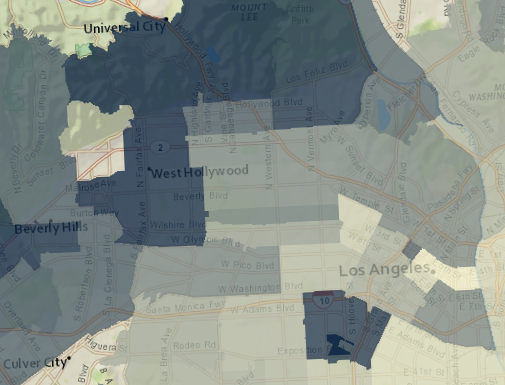
* The image below depicts a polygon [FeatureLayer](https://developers.arcgis.com/javascript/latest/references/core/layers/FeatureLayer/) whose features are
* symbolized with a [PolygonSymbol3D](https://developers.arcgis.com/javascript/latest/references/core/symbols/PolygonSymbol3D/) containing a FillSymbol3DLayer.
*
* 
*
* See [Symbol3DLayer](https://developers.arcgis.com/javascript/latest/references/core/symbols/Symbol3DLayer/) and [Symbol3D](https://developers.arcgis.com/javascript/latest/references/core/symbols/Symbol3D/) to read
* more general information about 3D symbols, symbol layers and how they relate to one another.
*
* @since 4.0
* @see [Symbol Builder](https://developers.arcgis.com/javascript/latest/symbol-builder/)
* @see [Sample - SceneLayer](https://developers.arcgis.com/javascript/latest/sample-code/layers-scenelayer/)
* @see [Symbol3DLayer](https://developers.arcgis.com/javascript/latest/references/core/symbols/Symbol3DLayer/)
* @see [Symbol3D](https://developers.arcgis.com/javascript/latest/references/core/symbols/Symbol3D/)
* @see [Renderer](https://developers.arcgis.com/javascript/latest/references/core/renderers/Renderer/)
* @see [ArcGIS blog - Working with icons, lines, and fill symbols](https://blogs.esri.com/esri/arcgis/2016/01/19/3d-visualization-working-with-icons-lines-and-fill-symbols/)
* @example
* const symbol = {
* type: "polygon-3d", // autocasts as new PolygonSymbol3D()
* symbolLayers: [{
* type: "fill", // autocasts as new FillSymbol3DLayer()
* material: { color: "red" }
* }]
* };
*/
export default class FillSymbol3DLayer extends Symbol3DLayer {
constructor(properties?: FillSymbol3DLayerProperties);
/**
* Indicates whether the symbol layer geometry casts shadows in the scene.
* Setting this property to `false` will disable shadows for the symbol layer
* even if direct shadows are enabled in
* [SceneView.environment](https://developers.arcgis.com/javascript/latest/references/core/views/SceneView/#environment).
*
* This property applies only to [MeshSymbol3D](https://developers.arcgis.com/javascript/latest/references/core/symbols/MeshSymbol3D/) symbols.
*
* @default true
* @since 4.11
* @example
* // disables shadow casting
* symbolLayer.castShadows = false;
*/
accessor castShadows: boolean;
/**
* Sets the contour edges on 3D Objects. This is only applicable for [MeshSymbol3D](https://developers.arcgis.com/javascript/latest/references/core/symbols/MeshSymbol3D/).
*
* 
*
* @since 4.7
* @example
* const symbol = {
* type: "mesh-3d", // autocasts as new MeshSymbol3D()
* symbolLayers: [{
* type: "fill", // autocasts as new FillSymbol3DLayer()
* material: {
* color: [244, 247, 134]
* },
* edges: {
* type: "solid", // autocasts as new SolidEdges3D()
* color: [50, 50, 50, 0.5]
* }
* }]
* };
*/
get edges(): Edges3D | null | undefined;
set edges(value: Edges3DProperties | null | undefined);
/**
* The material used to shade the extrusion. This property defines the extrusion's color and emissive properties. The
* final color of the graphic is defined by blending the `color` property set in the material with the feature's
* geometry color/texture information. `colorMixMode` defines how these colors are mixed together.
*
* @see [Sample: Coloring options for textured buildings](https://developers.arcgis.com/javascript/latest/sample-code/layers-scenelayer-color-mix-mode/)
* @example
* // CSS color string
* symbolLayer.material = {
* color: "dodgerblue",
* colorMixMode: "tint"
* };
* @example
* // HEX string
* symbolLayer.material = {
* color: "#33cc33"
* };
* @example
* // array of RGBA values
* symbolLayer.material = {
* color: [51, 204, 51, 0.3]
* };
* @example
* // object with rgba properties
* symbolLayer.material = {
* color: {
* r: 51,
* g: 51,
* b: 204,
* a: 0.7
* }
* };
* @example
* // object with emissive properties enabled
* symbolLayer.material: {
* color: "#00E9FF",
* emissive: { strength: 1, source: "color" },
* };
* @example
* // object with emissive properties from a object's texture
* symbolLayer.material: {
* emissive: { strength: 1, source: "emissive" },
* };
*/
get material(): Symbol3DFillMaterial | null | undefined;
set material(value: Symbol3DFillMaterialProperties | null | undefined);
/**
* The outline used to draw a line around the filled geometry. This property is not supported in [MeshSymbol3D](https://developers.arcgis.com/javascript/latest/references/core/symbols/MeshSymbol3D/)
* symbol layers.
*
* @example
* symbolLayer.outline = {
* color: "white",
* size: "2px",
* pattern: { // autocasts as new LineStylePattern3D()
* type: "style",
* style: "dash"
* },
* patternCap: "round"
* };
*/
get outline(): Symbol3DOutline | null | undefined;
set outline(value: Symbol3DOutlineProperties | null | undefined);
/**
* The pattern used to render the polygon fill. This property only applies to [PolygonSymbol3D](https://developers.arcgis.com/javascript/latest/references/core/symbols/PolygonSymbol3D/).
*
* @since 4.17
* @example
* const symbol = {
* type: "polygon-3d", // autocasts as new PolygonSymbol3D()
* symbolLayers: [{
* type: "fill", // autocasts as new FillSymbol3DLayer()
* material: { color: "red" },
* outline: { color: "red" },
* pattern: {
* type: "style",
* style: "cross"
* }
* }]
* };
*/
get pattern(): StylePattern3D | null | undefined;
set pattern(value: (StylePattern3DProperties & { type: "style" }) | null | undefined);
/** The symbol type. */
get type(): "fill";
/**
* Creates a deep clone of the symbol layer.
*
* @returns A deep clone of the object that
* invoked this method.
* @example
* // Creates a deep clone of the graphic's first symbol layer
* let symLyr = graphic.symbol.symbolLayers.at(0).clone();
*/
clone(): FillSymbol3DLayer;
}