@arcgis/core
Version:
ArcGIS Maps SDK for JavaScript: A complete 2D and 3D mapping and data visualization API
192 lines (181 loc) • 8.82 kB
TypeScript
/**
* Object containing helper methods for generating optimal symbols for
* data-driven color visualizations.
* The [getSchemes()](https://developers.arcgis.com/javascript/latest/references/core/smartMapping/symbology/color/#getSchemes) method is used to generate symbol properties best suited to
* the given geometry type and basemap.
*
* @since 4.2
*/
import type Basemap from "../../Basemap.js";
import type Color from "../../Color.js";
import type SceneView from "../../views/SceneView.js";
import type { ColorScheme, ColorSchemes, BasemapTheme, Theme } from "./types.js";
/**
* Returns metadata for the available themes. If a basemap is provided, returns themes that work best
* with the given basemap.
*
* @param basemap - The [Esri basemap string](https://developers.arcgis.com/javascript/latest/references/core/Map/#basemap)
* or object that will be used with the returned theme(s).
* @returns Returns an object containing information about the available themes for the given basemap.
*/
export function getThemes(basemap?: Basemap | string | null | undefined): Theme[];
/**
* Returns a primary scheme and secondary schemes defining symbol properties for
* data-driven color visualizations in
* a [FeatureLayer](https://developers.arcgis.com/javascript/latest/references/core/layers/FeatureLayer/). The `basemap` parameter determines the color schemes of the
* graphics used to visualize each feature. The `geometryType` determines which type of symbol to return.
*
* @param params - The function parameters.
* @returns Returns an object containing the optimal color scheme to use for the given
* basemap and secondary schemes that may also be used.
* @example
* // gets the primary scheme for the features of the given geometry type and basemap
* let schemes = colorSchemes.getSchemes({
* basemap: map.basemap,
* geometryType: featureLayer.geometryType,
* theme: "extremes"
* });
*
* // the best default scheme for the layer, basemap, and theme
* let primaryScheme = schemes.primaryScheme;
*/
export function getSchemes(params: GetSchemesParameters): ColorSchemes | null | undefined;
/**
* Returns a color scheme with the provided name.
*
* @param params - The function parameters.
* @returns Returns the color scheme
* with the given name.
* @since 4.12
* @example
* // Returns the Red Extremes 1 scheme
* const redExtremesScheme = colorSchemes.getSchemeByName({
* basemapTheme: "light",
* geometryType: featureLayer.geometryType,
* theme: "extremes",
* name: "Red Extremes 1"
* });
*/
export function getSchemeByName(params: GetSchemesByNameParameters): ColorScheme | null | undefined;
/**
* Returns an array of color schemes with the provided tags. These schemes define symbol properties for
* data-driven color visualizations in any layer that can be rendered with a [Renderer](https://developers.arcgis.com/javascript/latest/references/core/renderers/Renderer/).
*
* @param params - The function parameters.
* @returns Returns an array of color schemes
* either including or excluding the provided tags.
* @since 4.12
* @example
* // Returns all the red color schemes that are color-blind friendly
* let schemes = colorSchemes.getSchemesByTag({
* basemap: map.basemap,
* geometryType: featureLayer.geometryType,
* theme: "extremes",
* includedTags: [ "reds", "colorblind-friendly" ]
* });
*/
export function getSchemesByTag(params: GetSchemesByTagParameters): ColorScheme[];
/**
* Clones a color scheme object.
*
* @param scheme - The color scheme object to clone.
* @returns Returns
* a clone of the given color scheme object.
* @example
* // clones the primary scheme returned from the getSchemes() method
* let colorScheme = primaryScheme.clone();
*/
export function cloneScheme(scheme: ColorScheme | null | undefined): ColorScheme | null | undefined;
/**
* Flips the colors in reverse order of the input color scheme.
*
* @param scheme - The color scheme to reverse.
* @returns Returns
* the input color scheme with its colors in reverse order.
* @example
* // reverses the order of colors in a primary scheme
* // obtained from the getSchemes() method
* let flippedScheme = colorSchemes.flipColors(primaryScheme);
*/
export function flipColors(scheme: ColorScheme): ColorScheme;
/**
* Returns all schemes matching the given color ramp.
*
* @param params - The function parameters.
* @returns An array of color schemes that match the
* given colors.
* @since 4.9
*/
export function getMatchingSchemes(params: GetMatchingSchemesParameters): ColorScheme[];
export interface GetMatchingSchemesParameters {
/** The name of the theme from which to get color schemes. */
theme: "high-to-low" | "above-and-below" | "centered-on" | "extremes" | "above" | "below";
/** An array of colors used to match with schemes for the given theme. */
colors: Color[];
/** The geometry type of the layer for which the color scheme will be applied. */
geometryType: string;
/** Indicates whether 3D volumetric symbols will be used in the visualization. */
worldScale?: boolean;
/**
* The [SceneView](https://developers.arcgis.com/javascript/latest/references/core/views/SceneView/) instance used to calculate
* the suggested sizes of the symbols. This is required for 3D visualizations.
*/
view?: SceneView;
}
export interface GetSchemesParameters {
/**
* The Esri basemap to pair with the visualization. This
* value indicates the best symbol colors for visualizing features against the given basemap. If you have a
* non-Esri basemap (e.g. a VectorTileLayer basemap with a custom style) or no basemap at all, then use the `basemapTheme` parameter
* instead of this parameter.
*/
basemap?: Basemap | string | null;
/** The geometry type of the features to visualize. */
geometryType?: "point" | "multipoint" | "polyline" | "polygon" | "mesh" | "multipatch" | null;
/**
* The theme determines which values will be emphasized in the continuous ramp and the map.
* Possible values are listed below.
* | Value | Description | Example |
* | ----- | ----------- | ------- |
* | high-to-low | High values are emphasized with strong colors. | 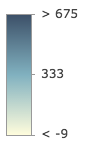 |
* | above-and-below | Values centered around a given point (e.g. the average) are visualized with weak colors while other values are emphasized with strong colors. | 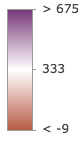 |
* | centered-on | Values centered around a given point (e.g. the average) are emphasized with strong colors while other values are visualized with weak colors. | 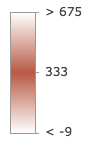 |
* | extremes | High and low values are emphasized with strong colors. All others are visualized with weak colors. | 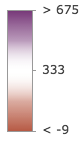 |
*/
theme?: "high-to-low" | "above-and-below" | "centered-on" | "extremes";
/**
* If you have a
* non-Esri basemap (e.g. a VectorTileLayer basemap with a custom style) or no basemap at all, use this parameter to indicate
* whether the background of the visualization is `light` or `dark`.
*/
basemapTheme?: BasemapTheme | null;
/**
* Indicates if the size units of the scheme will be in meters.
* This should be `true` when the scheme is intended for 3D volumetric symbology.
* A `view` must be provided if this property is set to `true`.
*/
worldScale?: boolean | null;
/**
* The SceneView instance in which the scheme
* will be used. This property is only applicable when the scheme will be used in conjunction with 3D symbols.
*/
view?: SceneView | null;
}
export interface GetSchemesByNameParameters extends GetSchemesParameters {
/** The name of the scheme to retrieve. */
name: string;
}
export interface GetSchemesByTagParameters extends GetSchemesParameters {
/**
* When provided, only schemes containing all the matching tags will be returned.
*
* **Known Tags:** light | dark | reds | yellows | oranges | greens | blues | purples | pinks | browns | grays | bright | subdued | colorblind-friendly | diverging | sequential | 3d
*/
includedTags?: string[];
/**
* When provided, only schemes missing all the provided tags will be returned.
*
* **Known Tags:** light | dark | reds | yellows | oranges | greens | blues | purples | pinks | browns | grays | bright | subdued | colorblind-friendly | diverging | sequential | 3d
*/
excludedTags?: string[];
}