@animo-id/pex
Version:
A Typescript implementation of the v1 and v2 DIF Presentation Exchange specification
950 lines (736 loc) • 45.1 kB
Markdown
> [!WARNING]
> This is a temporary fork and release of the original PEX library by Sphereon.
> https://github.com/Sphereon-Opensource/pex
<h1 align="center">
<br>
<a href="https://www.sphereon.com"><img src="https://sphereon.com/content/themes/sphereon/assets/img/logo.svg" alt="Sphereon" width="400"></a>
<br>Presentation Exchange v1 and v2
<br>TypeScript Library
<br>
</h1>
[](https://github.com/Sphereon-Opensource/pex/actions/workflows/main.yml) [](https://codecov.io/gh/Sphereon-Opensource/pex) [](https://npm.im/@sphereon/pex)
## Background
The Presentation Exchange (PEX) Library implements the functionality
described in the [DIF Presentation Exchange specification](https://identity.foundation/presentation-exchange/) for both
version 1 and 2.
Sphereon's PEX Library is useful for both verifier systems and holders (e.g. wallets) and can be used in client side
browsers and mobile applications as well as on server side technology such as REST APIs (e.g. built with NodeJS). It
allows anyone to add DIF Presentation Exchange logic to their existing wallets, agents and/or verifiers, without making
any further assumptions about technologies like cryptography, credential representations used in their products.
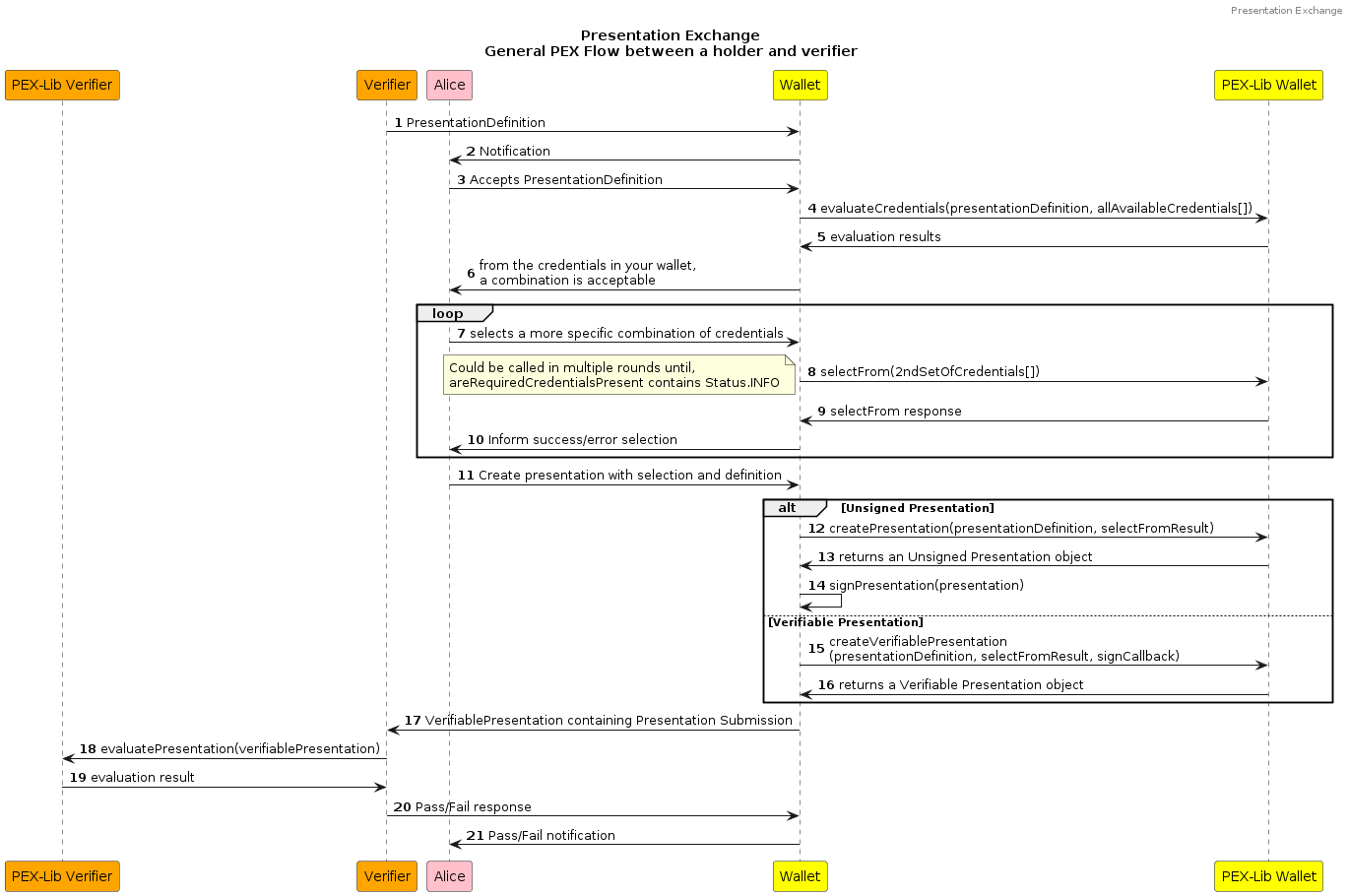
A Presentation Exchange generally goes as follows; The verifier creates a Presentation Definition asking for
credentials from the holder. The Presentation Definition for the credentials is sent to the holder, who returns a
Verifiable
Presentation containing Presentation Submission data that links the Credentials in the Presentation to the received
Definition as a response.
The Presentation Submission describes the relationship between the Verifiable Presentation and the Presentation
Definition.
It can either be part of the Verifiable Presentation or be external, like in OpenID4VC specifications.
Now the verifier will verify the Verifiable Presentation by checking the signature and other
accompanying proofs as well as ensuring the Submission Data fulfills the requirements from the specification.
Presentation Exchange will ensure that the model used by the verifier, can be interpreted by the holder. It then
ensures that the correct parts from the holders credentials are used to create the presentation. The PEX-library
contains all
the logic to interpret the models, therefore removing the need for the verifier and holder to align their specific
models.
The Typescript data objects (models) used in PEX are generated from Sphereon's DIF PEX OpenAPI Spec component. The code
for the
component can be found at [PEX-OpenAPI github repository](https://github.com/Sphereon-Opensource/pex-openapi). This
allows the generation of the objects in many programming languages and frameworks consistently by configuring the maven
plugin.
WARNING: Please be aware that this library does not support the latest V2 specification!. Support will be added as part
of a V3 major version of this library
### The PEX Library supports the following actions:
- Creating a presentation definition / request
- Validating a presentation definition / conforming to the specifications v1 and v2
- Creating a Presentation
- Creating a Verifiable Presentation using a callback function
- Validating a presentation (submission) when received
- Input evaluations: Verification of presentation submissions conforming to the presentation definition
- Utilities: to build and use different models compliant with
the [DIF Presentation Exchange v2.0.0 specification](https://identity.foundation/presentation-exchange/).
- Support
for [DIF Presentation Exchange v1.0.0 specification](https://identity.foundation/presentation-exchange/spec/v1.0.0/).
Stateful storage, signature support or credential management should be implemented in separate libraries/modules that
make use of this library. By keeping these separate, the PEX library will stay
platform-agnostic and lean with respect to dependencies.
## For PEX Users
The library can be installed directly from npmjs via:
```shell
# install via yarn
yarn add /pex
# install via npm
npm install /pex
```
The core functionality of the DIF Presentation Exchange can be outlined as follows:
- Verifiers/Agents:
- [Input Evaluation](#verifier-input-evaluation)
- [Utilities](#utilities)
- Holders/Wallets:
- [Credential Query](#holder-credential-query)
- [Non-Verifiable Presentation creation](#holder-presentation-creation-non-verifiable)
- [Verifiable Presentation creation](#holder-verifiable-presentation-with-callback)
- [Utilities](#utilities)
### Verifier: Create a Presentation Definition object:
[Presentation Definitions](https://identity.foundation/presentation-exchange/#presentation-definition) are objects that
articulate what proofs a Verifier requires. These help the Verifier to decide how or whether to interact with a Holder.
Presentation Definitions are composed of inputs, which describe the forms and details of the proofs they require, and
optional sets of selection rules, to allow Holders flexibility in cases where different types of proofs may satisfy an
input requirement.
PEX library supports two versions of `presentation_definition` object. The details of it can be found
in `/pex-models` below you can find some tips about querying via a presentation_definition object:
- Using the `constraint` field:
- You can use the constraint field for creating your query:
```js
constraints: {
fields: [
{
path: ['$.credentialSubject.role'],
filter: {
type: 'string',
const: 'admin',
},
},
];
}
```
- for special cases, like querying fields that start with `@` you can use the following syntax:
- You can use the following syntax, PEX will change it to correct query itself:
```js
path: ['$.', '$.vc.'];
```
For querying the arrays, right now we don't support the [json-schema](http://json-schema.org/draft-07/schema#) fully,
but we do support the following syntax:
- using `[*]` like:
```json
{
"fields": [
{
"path": ["$.type.[*]"],
"filter": {
"type": "string",
"pattern": "AlumniCredential"
}
}
]
}
```
- using `.*` like:
```json
{
"fields": [
{
"path": ["$.type.*"],
"filter": {
"type": "string",
"pattern": "AlumniCredential"
}
}
]
}
```
- using `type: array` and `contains` keyword. PEX currently doesn't support this syntax fully, but if you don't rely on
our `versionDiscovery` functionality and call the specific version of PEX (PEXv1 or PEXv2) yourself, you can use this
syntax as well.
```json
{
"fields": [
{
"path": ["$.type"],
"filter": {
"type": "array",
"contains": {
"enum": ["https://example.com/type"]
}
}
}
]
}
```
### Verifier: Input Evaluation
Input evaluation is the primary mechanism by which a verifier determines whether a Verifiable Presentation and
Presentation Submission from a holder
matches the requested presentation definition from the request. Obviously a holder/wallet could also use the method to
verify whether its submission would be valid, before contacting the verifier.
```typescript
import { PEX } from '/pex';
const pex: PEX = new PEX();
// Example of Presentation Definition V1 (notice the required schema for V1)
const presentationDefinitionV1 = {
"id": "32f54163-7166-48f1-93d8-ff217bdb0653",
"input_descriptors": [
{
"id": "wa_driver_license",
"name": "Washington State Business License",
"purpose": "We can only allow licensed Washington State business representatives into the WA Business Conference",
"schema": [{
"uri": "https://licenses.example.com/business-license.json"
}]
}
]
};
// Example of Presentation Definition V2
const presentationDefinitionV2 = {
"id": "32f54163-7166-48f1-93d8-ff217bdb0653",
"input_descriptors": [
{
"id": "wa_driver_license",
"name": "Washington State Business License",
"purpose": "We can only allow licensed Washington State business representatives into the WA Business Conference"
}
]
};
const verifiablePresentation = {
'': [
"https://www.w3.org/2018/credentials/v1",
"https://identity.foundation/presentation-exchange/submission/v1"
],
type: [
"VerifiablePresentation",
"PresentationSubmission"
],
presentation_submission: { ... },
verifiableCredential: [...],
proof: { ... }
}
// We are using the PEX class, to automatically detect the definition version. PEXv1 and PEXv2 are also available to use fixed PEX versions
const { value, warnings, errors } = pex.evaluatePresentation(presentationDefinitionV2, verifiablePresentation);
```
### Holder: Credential Query
A credential query allows holders to filter their set of credentials for matches to a given presentation definition.
This filters out any non-matching Credentials that are passed in. Please note that multiple credentials could be
satisfying the definition.
```typescript
import { PEX } from '/pex';
import { IVerifiableCredential } from "./SSI.types";
const pex: PEX = new PEX();
// Definition from verifier request
const presentationDefinition = {
...
};
// Finding out which version presentationDefinition is this:
// The result is either 'v1', 'v2' or an error
// You only have to do this if you want to apply some custom logic. The PEX class uses feature detection on the definition to determine whether it is v1 or v2 internally
const result = PEX.definitionVersionDiscovery(pdSchema);
// Example for loading credentials from your secure storage
const credentials: IVerifiableCredential[] = await secureStore.getCredentials();
// Find matching credentials
const srMatches = pex.selectFrom(presentationDefinition, credentials, { holderDIDs: [holderDID] });
// An example that selects the first 'count' credentials from
// the matches. in a real scenario, the user has to select which
// credentials to use. PEX did the first filtering,
// but there still could be multiple credentials satisfying a presentation definition
const selectedCredentials = srMatches.map(
({ matches, count }) => matches.slice(0, count)
).flat();
```
### Holder: Presentation creation (non-verifiable)
To create a Presentation without Proof (for Proofs,
see [Verifiable Presentation below](#holder-verifiable-presentation-with-callback)) you have to pass in the
Presentation Definition, selected Verifiable Credentials and an optional holder (DID). The result will be a Verifiable
Presentation, without proofs, so actually a Presentation. It also contains the presentation submission data that the
verifier can use.
It is left up to you to sign the Presentation and adding the proof and make it a truly Verifiable Presentation. There
are different libraries that allow you to do this. You can also use the callback integration mentioned in the next
chapter for this.
```typescript
import { PEX, IPresentation, PresentationResult } from '/pex';
const pex: PEX = new PEX();
// Construct presentation from selected credentials
const presentationResult: PresentationResult = pex.presentationFrom(presentationDefinition, selectedCredentials, { holderDIDs: [holderDID] });
const presentation = presentationResult.presentation;
/** presentation object:
*
* {
* "@context": [
* "https://www.w3.org/2018/credentials/v1",
* "https://identity.foundation/presentation-exchange/submission/v1"
* ],
* "type": [
* "VerifiablePresentation",
* "PresentationSubmission"
* ],
* presentation_submission: presentationSubmission,
* verifiableCredential: selectedCredentials
* };
*/
// Presentation would need to be signed and sent to verifier
```
### Holder: Verifiable Presentation with callback
**NOTE:** PEX does not support the creation of signatures by itself. That has to do with the fact that we didn't want to
rely on all kinds of signature suites and libraries. PEX has minimal dependencies currently, so that it can be used in
all kinds of scenarios.
How did we solve this? We have created a callback mechanism, allowing you to supply a callback function that gets all
input allowing you to use your library of choice to create the signature. The callback needs to accept
a `PresentationSignCallBackParams` object.
**NOTE:**
The method `verifiablePresentationFrom` accepts the presentation definition and selected Verifiable Credentials as the
first two arguments, just like the `presentationFrom` method. Next it accepts the callback function as argument and
a `VerifiablePresentationFromOpts` object as last argument. The sign callback params, allow you to control the signature
process. You will have access in the callback to these params as well.
Before calling your callback function a few things happen. First, just like the `presentationFrom` method, it
will evaluate whether the supplied credentials conform to the supplied presentation definition. Then it creates a
presentation, just like `presentationFrom`. This presentation is provided for your convenience and can be used in your
callback for simple use cases. In more elaborate cases, like for instance with more complex signature suites and/or
selective disclosure, you will probably not use the IPresentation directly and make use of other arguments passed into
the callback, like the `EvaluationResults`, `PresentationSubmission` and `Partial<IProof>`.
The `proofOptions` and `signatureOptions`, allow you to populate proof values directly. in which case
the `Partial<IProof>` will have all fields filled to just add it as a proof to the presentation in your callback. This
does mean you would have to create the IPresentation first and sign that, which means you probably have no use for the
callback. If you do not provide these values, the `Partial<IProof>`, will still be populated without the proofValue and
jws, based upon your options.
#### Presentation Sign Options
The options accepted by the `verifiablePresentationFrom` are:
```typescript
interface VerifiablePresentationFromOpts {
/**
* The optional holderDID of the presentation
*/
holderDID?: string;
/**
* The presentation submission data location.
*
* Can be External, which means it is only returned and not embedded into the VP,
* or Presentation, which means it will become part of the VP
*/
presentationSubmissionLocation?: PresentationSubmissionLocation;
/**
* A base presentation payload. Can be used to provide default values. Be aware that any verifiable credential will always be overwritten
*/
basePresentationPayload?: IPresentation;
/**
* IProof options
*/
proofOptions?: ProofOptions;
/**
* The signature options
*/
signatureOptions?: SignatureOptions;
}
interface ProofOptions {
/**
* The signature type. For instance RsaSignature2018
*/
type?: ProofType | string;
/**
* Type supports selective disclosure?
*/
typeSupportsSelectiveDisclosure?: boolean;
/**
* A challenge protecting against replay attacks
*/
challenge?: string;
/**
* A domain protecting against replay attacks
*/
domain?: string;
/**
* The purpose of this proof, for instance assertionMethod or authentication, see https://www.w3.org/TR/vc-data-model/#proofs-signatures-0
*/
proofPurpose?: ProofPurpose | string;
/**
* The ISO8601 date-time string for creation. You can update the IProof value later in the callback. If not supplied the current date/time will be used
*/
created?: string;
/**
* Similar to challenge. A nonce to protect against replay attacks, used in some ZKP proofs
*/
nonce?: string;
}
interface SignatureOptions {
/**
* The private key
*/
privateKey?: string;
/**
* Key encoding
*/
keyEncoding?: KeyEncoding;
/**
* The verification method value
*/
verificationMethod?: string;
/**
* Can be used if you want to provide the Json-ld proof value directly without relying on the callback function generating it
*/
proofValue?: string; // One of any number of valid representations of proof values
/**
* Can be used if you want to provide the JSW proof value directly without relying on the callback function generating it
*/
jws?: string; // JWS based proof
}
```
These options are available in your callback function by accessing the `options` field in
the `PresentationSignCallBackParams`.
#### Callback params object
The callback params gets supplied as the single argument to your callback function. It contains the `Presentation`, a
partial 'Proof' typically missing the proofValue/jws signature. It also contains the initially supplied Verifiable
Credentials and Presentation Definition as well as your supplied options.
If contains the Presentation Submission object, which is also found in the presentation. You can use this to create your
own IPresentation object if you want. Lastly it contains the evaluation results, which includes the mappings and logs
about the evaluation.
You can either choose to use the `Presentation` and partial `Proof` together with the `options`, or in more elaborate
use cases opt to use the `PresentationSubmission`, `EvaluationResults` and the `options` for instance.
```typescript
export interface PresentationSignCallBackParams {
/**
* The originally supplied presentation sign options
*/
options: VerifiablePresentationFromOpts;
/**
* The presentation definition
*/
presentationDefinition: PresentationDefinition;
/**
* The selected credentials to include in the eventual VP as determined by PEX and/or user
*/
selectedCredentials: (IVerifiableCredential | JwtWrappedVerifiableCredential | string)[];
/**
* The presentation object created from the definition and verifiable credentials.
* Can be used directly or in more complex situations can be discarded by using the definition, credentials, proof options, submission and evaluation results
*/
presentation: IPresentation;
/**
* A partial proof value the callback can use to complete. If proofValue or JWS was supplied the proof could be complete already
*/
proof: Partial<IProof>;
/**
* The presentation submission data, which can also be found in the presentation itself
*/
presentationSubmission: PresentationSubmission;
/**
* The evaluation results, which the callback function could use to create a VP using the proof(s) using the supplied credentials
*/
evaluationResults: EvaluationResults;
}
```
#### Simple example of the callback function
A simple use case using your library of choice for non-selective disclosure using an ed25519 key and signature.
```typescript
import { PEX, IProof, ProofPurpose, ProofType, IVerifiablePresentation, PresentationSignOptions, KeyEncoding } from '/pex';
const pex: PEX = new PEX();
const params: VerifiablePresentationFromOpts = {
holderDID: 'did:example:1234....',
proofOptions: {
type: ProofType.Ed25519Signature2018,
proofPurpose: ProofPurpose.assertionMethod,
},
signatureOptions: {
verificationMethod: 'did:example:"1234......#key',
keyEncoding: KeyEncoding.Base58,
privateKey: 'base58 (key encoding type) key here',
},
};
const vp = await pex.verifiablePresentationFrom(presentationDefinition, selectedCredentials, simpleSignedProofCallback, params);
function simpleSignedProofCallback(callBackParams: PresentationSignCallBackParams): IVerifiablePresentation {
// Prereq is properly filled out `proofOptions` and `signatureOptions`, together with a `proofValue` or `jws` value.
// And thus a generated signature
const { presentation, proof, options } = callBackParams; // The created partial proof and presentation, as well as original supplied options
const { signatureOptions, proofOptions } = options; // extract the orignially supploed signature and proof Options
const privateKeyBase58 = signatureOptions.privateKey; // Please check keyEncoding from signatureOptions first!
/**
* IProof looks like this:
* {
* type: 'Ed25519Signature2018',
* created: '2021-12-01T20:10:45.000Z',
* proofPurpose: 'assertionMethod',
* verificationMethod: 'did:example:"1234......#key',
* .....
* }
*/
// Just an example. Obviously your lib will have a different method signature
const vp = myVPSignLibrary(presentation, { ...proof, privateKeyBase58 });
return vp;
}
```
### Utilities
In addition to the core functionality above, the underlying validation methods are exposed as low-level helper
functions.
```typescript
import { PEX } from '/pex';
const presentationDefinition = {
...
};
const result = PEX.definitionVersionDiscovery(presentationDefinition);
const { warnings: pdWarnings, errors: pdErrors } = PEX.validateDefinition(presentationDefinition);
const presentationSubmission = {
...
};
const { warnings: psWarnings, errors: psErrors } = PEX.validateSubmission(presentationSubmission);
```
## API
### Evaluate
```typescript
PEX.evaluatePresentation(presentationDefinition, verifiablePresentation);
PEXv1.evaluatePresentation(presentationDefinition, verifiablePresentation);
PEXv2.evaluatePresentation(presentationDefinition, verifiablePresentation);
```
##### Description
These three methods are quite similar. The first One receives a presentation definition object, decides the version
based upon feature detection and acts accordingly. The other two are specific to their Presentation Exchange definition
version.
**For more detailed difference between v1 and v2 please read the [From V1 to V2 section](#from-v1-to-v2)**.
Evaluates whether a presentation submission meets the requested presentation definition Since this method will be used
both **before** and **after** creating a VerifiablePresentation, we accept both _signed_ and _unsigned_ version of a
presentation here.
#### Parameters
| name | type | description |
| ------------------------ | ------------------------ | ---------------------------------------------------------------------------------------------------------------------------------------------- |
| `presentationDefinition` | `PresentationDefinition` | the presentation definition that initiated the request from the verifier |
| `presentation` | `IPresentation` | the Presentation object containing the required credentials and a `presentation_submission` object mapping back to the presentation definition |
#### Return value
If evaluation is successful, `value` will be a non-null `PresentationSubmission` mapping the submitted credentials to
the requested inputs.
```typescript
interface EvaluationResults {
value?: PresentationSubmission;
warnings?: string[];
errors?: Error[];
verifiableCredential: (IVerifiableCredential | JwtWrappedVerifiableCredential | string)[];
}
```
### SelectFrom
```typescript
PEX.selectFrom(presentationDefinition, credentials, { holderDIDs });
PEXv1.selectFrom(presentationDefinitionV1, credentials, { holderDIDs });
PEXv2.selectFrom(presentationDefinitionV2, credentials, { holderDIDs });
```
##### Description
These three methods are quite similar. The first One receives a presentation definition object, decides the version
based upon feature detection and acts accordingly. The other two are specific to their version.
**For more detailed difference between v1 and v2 of the spec please read the [From V1 to V2 section](#from-v1-to-v2)**.
Gathers the matching credentials that fit a given presentation definition. Please note that there could be multiple
results fitting the same criteria. This basically only filters out the credentials that do not match the definition.
You, or rather the user, typically has to do a final selection.
#### selectFrom Parameters
| name | type | description |
| ------------------------ | ----------------------------------------------------------------------- | ------------------------------------------------------------------------------------------------------------------------------------------------------------ |
| `presentationDefinition` | `PresentationDefinition` | the presentation definition that initiated the request from the verifier |
| `credentials` | `(IVerifiableCredential or JwtWrappedVerifiableCredential or string)[]` | the array of verifiable credentials to select from |
| `{ holderDIDs }` | `string[]` | the holder's DIDs. this can be found in VerifiablePresentation's holder property note that a wallet can have many holderDIDs retrieved from different places |
#### Return value
- If the selection was successful or partially successful, the `matches` array will consist
of `SubmissionRequirementMatch` object(s), representing the matching credentials for each `SubmissionRequirement` in
the `presentationDefinition` input parameter.
- If the selection was not successful, the `errors` array will consist of `Checked` object(s), representing what has
failed in your selection process.
```typescript
import { Status } from './ConstraintUtils';
interface SelectResults {
errors?: Checked[];
matches?: SubmissionRequirementMatch[];
/**
* This is the parameter that the PEX library user should look into to determine what to do next
* Status can have three values:
* 1. INFO: everything is fine, you can call `presentationFrom` after this method
* 2. WARN: method was called with more credentials than required.
* To enhance credential holderDID's privacy it is recommended to select credentials which are absolutely required.
* 3. Error: the credentials you've sent didn't satisfy the requirement defined presentationDefinition object. Do not submit!
*/
areRequiredCredentialsPresent: Status;
/**
* All matched/selectable credentials
*/
verifiableCredential?: (IVerifiableCredential | JwtWrappedVerifiableCredential | string)[];
/**
* Following are indexes of the verifiableCredentials passed to the selectFrom method that have been selected.
*/
vcIndexes?: number[];
warnings?: Checked[];
}
interface SubmissionRequirementMatch {
name?: string;
rule: Rules;
min?: number;
count?: number;
max?: number;
vc_path: string[];
from?: string[];
from_nested?: SubmissionRequirementMatch[]; // VerifiableCredential Address
}
```
### PresentationFrom
```typescript
PEX.presentationFrom(presentationDefinition, selectedCredentials, { holderDID });
PEXv1.presentationFrom(presentationDefinitionV1, selectedCredentials, { holderDID });
PEXv2.presentationFrom(presentationDefinitionV2, selectedCredentials, { holderDID });
```
##### Description
These three methods are quite similar. The first One receives a presentation definition object, decides the version
based upon feature detection and acts accordingly. The other two are specific to their version.
**For more detailed difference between v1 and v2 specification please read the [From V1 to V2 section](#from-v1-to-v2)
**.
Creates the corresponding Presentation Submission object to be included in the Verifiable Presentation response, which
maps the submitted credentials to the requested inputs in the `presentationDefinition` input parameter.
#### presentationFromV1 Parameters
| name | type | description |
| ------------------------ | ----------------------------------------------------------------------- | ------------------------------------------------------------------------------------------------------------------------------------------------------------ |
| `presentationDefinition` | `PresentationDefinitionV1` | the v1 presentation definition that initiated the request from the verifier |
| `selectedCredentials` | `(IVerifiableCredential or JwtWrappedVerifiableCredential or string)[]` | the array of verifiable credentials that meet the submission requirements in the presentation definition |
| `{ holderDID }` | `string` | the holder's DID. This can be found in IVerifiablePresentation's holder property note that a wallet can have many holderDIDs retrieved from different places |
#### presentationFromV2 Parameters
| name | type | description |
| ------------------------ | ----------------------------------------------------------------------- | ------------------------------------------------------------------------------------------------------------------------------------------------------------ |
| `presentationDefinition` | `PresentationDefinitionV2` | the v2 presentation definition that initiated the request from the verifier |
| `selectedCredentials` | `(IVerifiableCredential or JwtWrappedVerifiableCredential or string)[]` | the array of verifiable credentials that meet the submission requirements in the presentation definition |
| `{ holderDID }` | `string` | the holder's DID. This can be found in IVerifiablePresentation's holder property note that a wallet can have many holderDIDs retrieved from different places |
#### Return value
If the selected credentials successfully match the submission requirements in the presentation definition, the return
value will be a non-null 'Presentation' containing a `PresentationSubmission`
```typescript
interface PresentationSubmission {
id?: string;
definition_id: string;
descriptor_map: Descriptor[];
}
```
### Validation
```typescript
PEX.validateDefinition(objToValidate);
PEXv1.validateDefinition(objToValidate);
PEXv2.validateDefinition(objToValidate);
```
```typescript
validateSubmission(objToValidate);
```
#### Description
A validation utility function for `PresentationDefinition` and `PresentationSubmission` objects. If you know the version
of your presentation definition you can call version-specific functions. If not you can call the general one (located in
PEX) to first determine the version and then validate the presentation definition object against that version's specific
rules.
#### Parameters
| name | type | description |
| --------------- | ----------------------------------------------------------------- | ---------------------------------------------------------------------- |
| `objToValidate` | <code>PresentationDefinition | PresentationSubmission</code> | the presentation definition or presentation submission to be validated |
#### Return value
The `validate` method returns a validated results array `NonEmptyArray<Checked>` , with structure:
```typescript
interface Checked {
tag: string;
status: Status;
message?: string;
}
```
status can have following values `'info' | 'warn' | 'error'`
### Definition Version Discovery
```typescript
PEX.definitionVersionDiscovery(presentationDefinition);
```
#### Description
A utility function for `PresentationDefinition` objects. This method will determine the version of your
presentationDefinition object.
#### Parameters
| name | type | description |
| ------------------------ | ----------------------------------- | ------------------------------------------------------------------- |
| `presentationDefinition` | <code>PresentationDefinition</code> | the presentation definition that you need to decide the version for |
#### Return value
The `definitionVersionDiscovery` method returns a version or an error, with following structure:
```typescript
interface DiscoveredVersion {
version?: PEVersion;
error?: string;
}
enum PEVersion {
v1 = 'v1',
v2 = 'v2',
}
```
## From V1 to V2
The following changes has been made in the v2 version of the Presentation Exchange specification. V1 is still the most
predominant version, because it is typically used quite a bite in OpenID4VC scenarios and interop profiles.
1. The required `schema` has been removed altogether from `InputDescriptor` properties, because it was confusing and
redundant.
2. `presentation_definition` has another property called `frame` and if present, its value MUST be a JSON LD Framing
Document object. Used for selective disclosure. Although this library does not use it currently, as we can perform it
without frames.
3. `filter` has several more options for filtering:
- formatMaximum
- formatMinimum
- formatExclusiveMaximum
- formatExclusiveMinimum
As a result we introduced the `PEX` class to replace the former `PEJS` class. This class does feature detection on the
presentation definition to determine whether it is a v1 or v2 spec. Then it delegates the functionality to the PEXv1 or
PEXv2 class respectively. See also: [v0.6 Breaking changes](#breaking-change-class-and-package-renamed-as-of-v060)
**WARNING: Please be aware that this library does not support the latest V2 specification!. Support will be added as
part of a V3 major version of this library**
## Workflow Diagram
The below diagram shows how a typical interaction between a verifier and a wallet looks like.
It makes no assumptions about the actual transport (DIDComm, SIOPv2/OIDC4VP, CHAPI, REST)
## For PEX developers
This project has been created using:
- `yarn` version 1.22.5
- `node` version >= 16
### Install
```shell
yarn install
```
### Build
```shell
yarn build
```
### Test
The test command runs:
- `eslint`
- `prettier`
- `unit`
You can also run only a single section of these tests, using for example `yarn test:unit`.
```shell
yarn test
```
### Utility scripts
There are several other utility scripts that help with development.
- `yarn fix` - runs `eslint --fix` as well as `prettier` to fix code style
- `yarn cov` - generates code coverage report
# Glossary
| Term | Definition |
| ----------------------- | ------------------------------------------------------------------------------------------------------------------------------------------------------------------------------------------------------------------------------------------------------------------------------------------------------------------------------------------------------------------------------------------------------------------------------------------------------------------------------------------------------------------------------- |
| Credential | A set of one or more claims made by an issuer. |
| Verifiable Credential | Is a tamper-evident credential that has authorship that can be cryptographically verified. Verifiable credentials can be used to build Verifiable Presentations, which can also be cryptographically verified. The claims in a credential can be about different subjects. PEX accepts Verifiable credential in 3 forms: 1. JSON_LD which is know in our system as IVerifiableCredential, 2. JWT-Wrapped VC which is known in our system as JwtWrappedVerifiableCredential or string which is a valid Verifiable credential jwt |
| Presentation Definition | Presentation Definitions are objects that articulate what proofs a Verifier requires. |
| Holder | Holders are entities that have one or more verifiable credentials in their possession. Holders are also the entities that submit proofs to Verifiers to satisfy the requirements described in a Presentation Definition. |
| Holder's Did | Unique ID URI string and PKI metadata document format for describing the cryptographic keys and other fundamental PKI values linked to a unique, user-controlled, self-sovereign identifier in holder's wallet |
| Verifier | Verifiers are entities that define what proofs they require from a Holder (via a Presentation Definition) in order to proceed with an interaction. |
| Issuer | A role an entity can perform by asserting claims about one or more subjects, creating a verifiable credential from these claims, and transmitting the verifiable credential to a holder. |
| Presentation | Data derived from one or more verifiable credentials, issued by one or more issuers |
| Verifiable Presentation | Is a tamper-evident presentation encoded in such a way that authorship of the data can be trusted after a process of cryptographic verification. |
## Further work:
This implementation fully supports V1 and Vpartially 2 of the Presentation Exchange specification with the following
exception:
- Support for hashlink verification in the schema part of the V1 specification is not fully incorporated as it depends
on missing external library support. We generate a warning about the missing verification if we encounter them.
- Support for complete [json-schema](http://json-schema.org/draft-07/schema#) in `pex-models`
- which means if you're relying on our version-discovery feature (with calling general `PEX`) and
sending `presentation_definition` object with unsupported fields, you'll get an exception. However if you call
specific version of PEX (PEXv1 or PEXv2) it will work.
- The V2 implementation does not contain latest V2 changes. These will become available in V3 of this library
## Breaking changes
### v2.0.0 Argument and result objects changed slightly
In V2 of the library we have done some refactoring on the PEX external interfaces, to make them more uniform.
Optional arguments for all PEX methods are now part of an optional `opts` Object argument. This allows for cleaner
future extensions, and
also solves the problem of optional argument order in case multiple optional arguments are needed.
Certain non state related methods part of the PEX/PEXv1/PEXv2 classes have moved to static methods, to make the
distinction between state related methods and non-state related methods more clear.
`presentationFrom` and `verifiablePresentationFrom` now return a result object instead of directly returning a (
Verifiable) Presentation.
Reason is that in certain use cases you will want to have an external Presentation Submission object, like for instance
in OpenID4VP.
You can now provide an optional argument where the Presentation Submission object should be located. It will always be
returned in the methods, as well as an indication whether it is used externally or embedded into the (Verifiable)
Presentation.
The (Verifiable) Presentation object is present in the result object in the presentation resp. verifiablePresentation
property.
No more need for \_const and \_enum models/properties in Presentation Definitions. They are now `const` and `enum` (fixed
in OpenAPI model generation). The code replaces the previous versions to be sure.
### v0.6.0: class and package renamed
As part of introducing Presentation Exchange v1 and v2 feature based detection support to our Presentation Exchange
library and not reaching version 1.X yet, we decided to change the name of both the package and the main entry class:
- The package was changed from `/pe-js` to `@sphereon/pex`
- The main class was changed from `PEJS` to `PEX`. The latter class has internal feature detection support on the
provided definition, delegating the actual implementation to the new `PEXv1` or `PEXv2` class internally. If you don't
want the automatic feature detection you can also choose to use the `PEXv1` and `PEXv2` classes directly.
## License
This Presentation Exchange library Open Source software released under
the [Apache 2.0 license](https://www.apache.org/licenses/LICENSE-2.0.html).
## Funded & supported by
<img src="logos-supporter.png">