@amadeus-it-group/microfrontends
Version:
Amadeus Micro Frontend Toolkit
138 lines (105 loc) • 3.9 kB
Markdown
# Amadeus Toolkit for Micro Frontends
## Messaging
The Amadeus Toolkit for Micro Frontends provides a messaging system that allows micro frontends to communicate with each other. The messaging system is based on the [Channel Messaging API](https://developer.mozilla.org/en-US/docs/Web/API/Channel_Messaging_API) and works across iFrames. It can also be used in the same document for talk to MFE packaged as a Web Component for example.
## Features
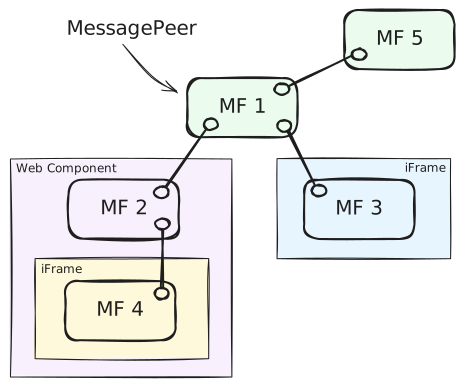
- typed and versioned message exchange between `MessagePeers`
- broadcasting messages across all connected micro frontends (ex. `MF1` to everybody)
- sending messages between two specific micro frontends (ex. `MF4` to `MF3`)
- lifecycle messages (ex. `MF5` disconnected, `MF3` connected)
- message validation before sending and upon reception
## Common use-cases
### Creating a Message Peer
You can create several message peers and connect them to each other in any way avoiding loops. You need to provide some options when creating a peer. Only `id` is technically required.
```ts
import { Message, MessagePeer } from '@amadeus-it-group/microfrontends';
// Message types are optional
const peer = new MessagePeer({
// unique identifier for this peer in the network
id: 'one',
// list of messages this peer accepts
knownMessages: [
{ type: 'hello', version: '1.0' },
{ type: 'hello', version: '2.0' },
],
});
```
### Connection to another peers
A peer can either wait for incoming connections from a peer via `.listen()` or initiate a connection via `.connect()`.
```ts
import { MessagePeer } from '@amadeus-it-group/microfrontends';
// Create two peers
// First waits for incoming connections from 'two'
const one = new MessagePeer({ id: 'one' });
one.listen('two');
// Second connects to 'one'
const two = new MessagePeer({ id: 'two' });
two.connect('one');
// if connection crosses iFrames, you might need to provide
// expected window and origin for both `connect` and `listen` methods
one.listen('two', {
window: iframe.contentWindow,
origin: 'https://example.com',
});
// Disconnecting
one.disconnect('two'); // disconnect from a specific peer
one.disconnect(); // disconnect from all peers
```
### Declaring Message types
This is optional, but allows for type checking during development when sending and receiving messages.
```ts
import { Message } from '@amadeus-it-group/microfrontends';
interface HelloMessage_1_0 extends Message {
type: 'hello';
version: '1.0';
greeting: string;
}
interface HelloMessage_2_0 extends Message {
type: 'hello';
version: '2.0';
greetings: string[];
}
export type MyMessage = HelloMessage_1_0 | HelloMessage_2_0;
```
### Sending and receiving messages
```ts
import { MessagePeer } from '@amadeus-it-group/microfrontends';
// Receiving messages
const one = new MessagePeer<MyMessage>({ id: 'one' });
// An observable-like interface consuming messages
one.messages.subscribe(({ payload }: MyMessage) => {
if (payload.type === 'hello') {
switch (payload.version) {
case '1.0':
console.log(payload.greeting); // string
break;
case '2.0':
console.log(payload.greetings); // string[]
break;
}
}
});
// Broadcast a message. Message will be type checked.
two.send({
type: 'hello',
version: '1.0',
greeting: 'Hello, world!',
});
// Send a message to a specific peer. Other peers will not receive it.
two.send(
{
type: 'hello',
version: '2.0',
greetings: ['Hello', 'world!'],
},
{
to: 'one',
},
);
```
### Get information about the network
```ts
// List all known peers and their accepted messages
one.knownPeers; // a map of known peers and messages they accept
one.knownPeers.get('two'); // a list of message types peer 'two' accepts
```