@allmaps/leaflet
Version:
Allmaps Leaflet plugin
1,125 lines (667 loc) • 25.9 kB
Markdown
# @allmaps/leaflet
Allmaps plugin for [Leaflet](https://leafletjs.com/). This plugin allows displaying georeferenced [IIIF images](https://iiif.io/) on a Leaflet map. The plugin works by loading [Georeference Annotations](https://iiif.io/api/georef/extension/georef/) and uses WebGL to transform images from a IIIF image server to overlay them on their correct geographical position. See [allmaps.org](https://allmaps.org) for more information.
*The development of the Allmaps plugin for Leaflet was funded by [CLARIAH-VL](https://clariahvl.hypotheses.org/).*
*The development of the Allmaps plugin for Leaflet was funded by [CLARIAH-VL](https://clariahvl.hypotheses.org/).*
<!-- TODO: replace with relative URL, but make sure this does not break docs.allmaps.org -->
<!-- Or put these images on static.allmaps.org -->
[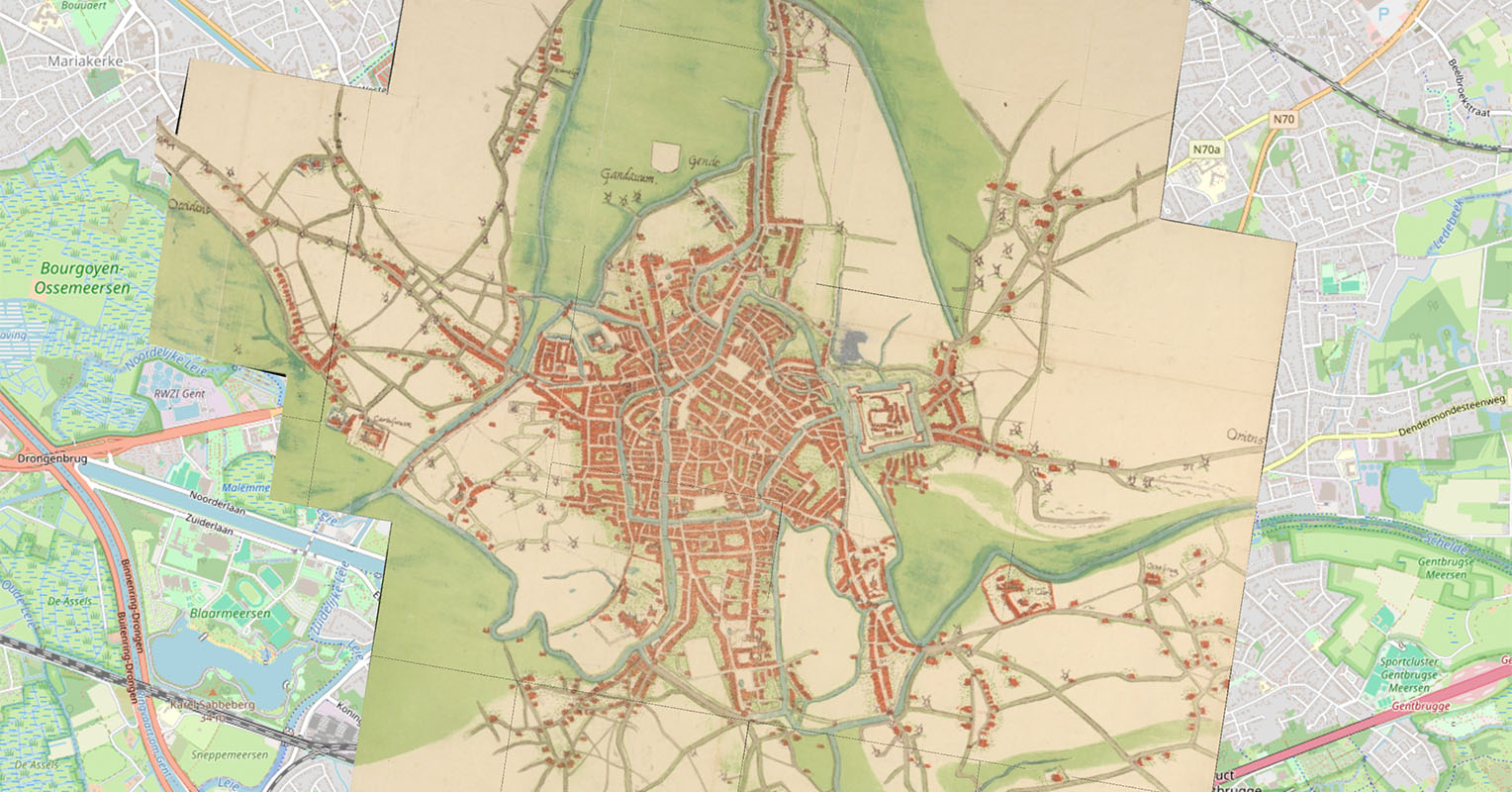](https://observablehq.com/@allmaps/leaflet-plugin)
Examples:
* [Observable notebook](https://observablehq.com/@allmaps/leaflet-plugin)
* [Observable notebook](https://observablehq.com/@allmaps/leaflet-plugin)
## How it works
This plugin exports the class `WarpedMapLayer` that extends [`L.Layer`](https://leafletjs.com/reference.html#layer). You can add one or multiple Georeference Annotations (or AnnotationPages that contain multiple Georeference Annotations) to a WarpedMapLayer, and add the WarpedMapLayer to your Leaflet map. This will render all georeferenced maps defined by the Georeference Annotations.
To understand what happens under the hood for each georeferenced map, see the [@allmaps/render](../render/README.md) package.
## Installation
This package works in browsers and in Node.js as an ESM or an UMD module.
Install with pnpm:
```sh
npm install @allmaps/leaflet
```
You can optionally build this package locally by running:
```sh
pnpm run build
```
## Usage
Built for Leaflet 1.9, but should work with earlier versions as well.
### Loading a Georeference Annotation
Creating a `WarpedMapLayer` and adding it to a map looks like this:
```js
import { WarpedMapLayer } from '@allmaps/leaflet'
const map = L.map('map', {
center: [51.0518, 3.7278],
zoom: 14,
// Zoom animations for more than one zoom level are
// currently not supported by the Allmaps plugin for Leaflet
zoomAnimationThreshold: 1
})
L.tileLayer('https://tile.openstreetmap.org/{z}/{x}/{y}.png', {
attribution:
'© <a href="https://www.openstreetmap.org/copyright">OpenStreetMap</a> contributors'
}).addTo(map)
const annotationUrl =
'https://annotations.allmaps.org/manifests/8f9faeba73d67031'
const warpedMapLayer = new WarpedMapLayer(annotationUrl).addTo(map)
```
When adding this WarpedMapLayer to the Leaflet map, the georeferenced map specified in the Georeference Annotation will be rendered on the Leaflet map.
Specifying a the URL Georeference Annotation when creating a WarpedMapLayer (as is done above) is optional. A Georeference Annotation can also be added at a later stage using the `addGeoreferenceAnnotation` and `addGeoreferenceAnnotationByUrl` functions:
```js
fetch(annotationUrl)
.then((response) => response.json())
.then((annotation) => warpedMapLayer.addGeoreferenceAnnotation(annotation))
```
Or:
```js
await warpedMapLayer.addGeoreferenceAnnotationByUrl(annotationUrl)
```
### WarpedMapLayer API and Events
See the [@allmaps/warpedmaplayer](../warpedmaplayer/README.md) package for the API documentation of the methods inherited from the WarpedMapLayer class (shared by all Allmaps plugins). It includes a list of all options that can be set on instances of the class and all events which are passed to the native map instance hosting the layer instance.
You can set **options** on the entire layer, or on a specific map on the layer (overwriting layer options):
```js
warpedMapLayer.setLayerOptions({ visible: true })
warpedMapLayer.setMapOptions(mapId, { visible: true })
```
You can listen to **events** in the typical way:
```js
map.on('warpedmapadded', (event) => {
console.log(event.mapIds)
})
```
## License
MIT
## API
### `LeafletWarpedMapLayerOptions`
###### Type
```ts
SpecificLeafletWarpedMapLayerOptions & Partial<WebGL2RenderOptions>
```
### `new WarpedMapEvent(type, data)`
###### Parameters
* `type` (`WarpedMapEventType`)
* `data?` (`Partial<WarpedMapEventData> | undefined`)
###### Returns
`WarpedMapEvent`.
###### Extends
* `Event`
### `WarpedMapEvent#data?`
###### Type
```ts
{
mapIds?: Array<string> | undefined
tileUrl?: string | undefined
optionKeys?: Array<string> | undefined
spritesInfo?: SpritesInfo | undefined
}
```
### `new WarpedMapLayer(annotationOrAnnotationUrl, options)`
Creates a WarpedMapLayer
###### Parameters
* `annotationOrAnnotationUrl` (`unknown`)
* Georeference Annotation or URL of a Georeference Annotation
* `options?` (`Partial<LeafletWarpedMapLayerOptions> | undefined`)
* Options for the layer
###### Returns
`WarpedMapLayer`.
###### Extends
* `BaseWarpedMapLayer`
### `WarpedMapLayer#_animateZoom(e)`
###### Parameters
* `e` (`L.ZoomAnimEvent`)
###### Returns
`void`.
### `WarpedMapLayer#_annotationOrAnnotationUrl`
###### Type
```ts
unknown
```
### `WarpedMapLayer#_initGl()`
###### Parameters
There are no parameters.
###### Returns
`void`.
### `WarpedMapLayer#_resized(entries)`
###### Parameters
* `entries` (`Array<ResizeObserverEntry>`)
###### Returns
`void`.
### `WarpedMapLayer#_unload()`
###### Parameters
There are no parameters.
###### Returns
`void`.
### `WarpedMapLayer#_update()`
###### Parameters
There are no parameters.
###### Returns
`HTMLDivElement | undefined`.
### `WarpedMapLayer#_updateZIndex()`
###### Parameters
There are no parameters.
###### Returns
`void`.
### `WarpedMapLayer#addEventListeners()`
###### Parameters
There are no parameters.
###### Returns
`void`.
### `WarpedMapLayer#addGeoreferenceAnnotation(annotation, mapOptions)`
Adds a Georeference Annotation
###### Parameters
* `annotation` (`unknown`)
* Georeference Annotation
* `mapOptions?` (`Partial<WebGL2WarpedMapOptions> | undefined`)
* Map options
###### Returns
Map IDs of the maps that were added, or an error per map (`Promise<Array<string | Error>>`).
### `WarpedMapLayer#addGeoreferenceAnnotationByUrl(annotationUrl, mapOptions)`
Adds a Georeference Annotation by URL
###### Parameters
* `annotationUrl` (`string`)
* URL of a Georeference Annotation
* `mapOptions?` (`Partial<WebGL2WarpedMapOptions> | undefined`)
* Map options
###### Returns
Map IDs of the maps that were added, or an error per map (`Promise<Array<string | Error>>`).
### `WarpedMapLayer#addGeoreferencedMap(georeferencedMap, mapOptions)`
Adds a Georeferenced Map
###### Parameters
* `georeferencedMap` (`unknown`)
* Georeferenced Map
* `mapOptions?` (`Partial<WebGL2WarpedMapOptions> | undefined`)
* Map options
###### Returns
Map ID of the map that was added, or an error (`Promise<string | Error>`).
### `WarpedMapLayer#addImageInfos(imageInfos)`
Adds image information to the WarpedMapList's image information cache
###### Parameters
* `imageInfos` (`Array<unknown>`)
* Image informations
###### Returns
Image IDs of the image informations that were added (`Array<string>`).
### `WarpedMapLayer#addSprites(sprites, imageUrl, imageSize)`
Adds sprites to the Renderer's sprite tile cache
This adds tiles from sprites to warped maps in WarpedMapList. Load maps before running this function.
This uses the image info of related maps. When using addImageInfos(), call it before calling this function.
###### Parameters
* `sprites` (`Array<Sprite>`)
* Sprites
* `imageUrl` (`string`)
* Image url
* `imageSize` (`[number, number]`)
* Image size
###### Returns
`Promise<void>`.
### `WarpedMapLayer#bringMapsForward(mapIds)`
Bring maps forward
###### Parameters
* `mapIds` (`Iterable<string>`)
* IDs of the maps
###### Returns
`void`.
### `WarpedMapLayer#bringMapsToFront(mapIds)`
Bring maps to front
###### Parameters
* `mapIds` (`Iterable<string>`)
* IDs of the maps
###### Returns
`void`.
### `WarpedMapLayer#bringToBack()`
Brings the layer to the back of other overlays (in the same map pane).
###### Parameters
There are no parameters.
###### Returns
`this`.
### `WarpedMapLayer#bringToFront()`
Brings the layer in front of other overlays (in the same map pane).
###### Parameters
There are no parameters.
###### Returns
`this`.
### `WarpedMapLayer#canvas?`
###### Type
```ts
HTMLCanvasElement
```
### `WarpedMapLayer#clear()`
Removes all warped maps from the layer
###### Parameters
There are no parameters.
###### Returns
`void`.
### `WarpedMapLayer#container?`
###### Type
```ts
HTMLDivElement
```
### `WarpedMapLayer#contextLost(event)`
###### Parameters
* `event` (`Event`)
###### Returns
`void`.
### `WarpedMapLayer#contextRestored(event)`
###### Parameters
* `event` (`Event`)
###### Returns
`void`.
### `WarpedMapLayer#defaultSpecificWarpedMapLayerOptions`
###### Type
```ts
{
interactive: boolean
className: string
pane: string
zIndex?: number
}
```
### `WarpedMapLayer#getBounds()`
Returns the bounds of all visible maps (inside or outside of the Viewport), in latitude/longitude coordinates.
###### Parameters
There are no parameters.
###### Returns
`Array<Array<number>> | undefined`.
* L.LatLngBounds in array form of all visible maps
### `WarpedMapLayer#getDefaultOptions()`
Get the default options the layer
###### Parameters
There are no parameters.
###### Returns
`SpecificLeafletWarpedMapLayerOptions & Partial<WebGL2RenderOptions> & object & SpecificWarpedMapListOptions & Partial<...> & SpecificWebGL2WarpedMapOptions & SpecificTriangulatedWarpedMapOptions & WarpedMapOptions`.
### `WarpedMapLayer#getLayerOptions()`
Get the layer options
###### Parameters
There are no parameters.
###### Returns
`{ interactive?: boolean | undefined; className?: string | undefined; pane?: string | undefined; zIndex?: number | undefined; createRTree?: boolean | undefined; rtreeUpdatedOptions?: Array<string> | undefined; ... 62 more ...; distortionMeasure?: DistortionMeasure | undefined; }`.
### `WarpedMapLayer#getMapDefaultOptions(mapId)`
Get the default options of a map
These come from the default option settings for WebGL2WarpedMaps and the map's georeferenced map proporties
###### Parameters
* `mapId` (`string`)
* Map ID for which the options apply
###### Returns
`WebGL2WarpedMapOptions | undefined`.
### `WarpedMapLayer#getMapIds()`
Get mapIds for selected maps
Note: more selection options are available on this function of WarpedMapList
###### Parameters
There are no parameters.
###### Returns
`Array<string>`.
### `WarpedMapLayer#getMapMapOptions(mapId)`
Get the map-specific options of a map
###### Parameters
* `mapId` (`string`)
* Map ID for which the options apply
###### Returns
`Partial<WebGL2WarpedMapOptions> | undefined`.
### `WarpedMapLayer#getMapOptions(mapId)`
Get the options of a map
These options are the result of merging the default, georeferenced map,
layer and map-specific options of that map.
###### Parameters
* `mapId` (`string`)
* Map ID for which the options apply
###### Returns
`WebGL2WarpedMapOptions | undefined`.
### `WarpedMapLayer#getMapZIndex(mapId)`
Get the z-index of a map
###### Parameters
* `mapId` (`string`)
* Map ID for which to get the z-index
###### Returns
The z-index of a map (`number | undefined`).
### `WarpedMapLayer#getMapsBbox(mapIds, projectionOptions)`
Get the bounding box of the maps
By default the result is returned in the list's projection, which is `EPSG:3857` by default
Use {definition: 'EPSG:4326'} to request the result in lon-lat `EPSG:4326`
Note: more selection options are available on this function of WarpedMapList
###### Parameters
* `mapIds` (`Array<string>`)
* Map IDs
* `projectionOptions?` (`ProjectionOptions | undefined`)
###### Returns
The bbox of all selected maps, in the chosen projection, or undefined if there were no maps matching the selection (`Bbox | undefined`).
### `WarpedMapLayer#getMapsCenter(mapIds, projectionOptions)`
Get the center of the bounding box of the maps
By default the result is returned in the list's projection, which is `EPSG:3857` by default
Use {definition: 'EPSG:4326'} to request the result in lon-lat `EPSG:4326`
Note: more selection options are available on this function of WarpedMapList
###### Parameters
* `mapIds` (`Array<string>`)
* Map IDs
* `projectionOptions?` (`ProjectionOptions | undefined`)
###### Returns
The center of the bbox of all selected maps, in the chosen projection, or undefined if there were no maps matching the selection (`Point | undefined`).
### `WarpedMapLayer#getMapsConvexHull(mapIds, projectionOptions)`
Get the convex hull of the maps
By default the result is returned in the list's projection, which is `EPSG:3857` by default
Use {definition: 'EPSG:4326'} to request the result in lon-lat `EPSG:4326`
Note: more selection options are available on this function of WarpedMapList
###### Parameters
* `mapIds` (`Array<string>`)
* Map IDs
* `projectionOptions?` (`ProjectionOptions | undefined`)
###### Returns
The convex hull of all selected maps, in the chosen projection, or undefined if there were no maps matching the selection (`Ring | undefined`).
### `WarpedMapLayer#getOpacity()`
Get the layer opacity
Returns a number between 0 and 1 (the default)
###### Parameters
There are no parameters.
###### Returns
`number`.
### `WarpedMapLayer#getWarpedMap(mapId)`
Get the WarpedMap instance for a map
###### Parameters
* `mapId` (`string`)
* Map ID of the requested WarpedMap instance
###### Returns
`WebGL2WarpedMap | undefined`.
### `WarpedMapLayer#getWarpedMapList()`
Get the WarpedMapList object that contains a list of the warped maps of all loaded maps
###### Parameters
There are no parameters.
###### Returns
`WarpedMapList<WebGL2WarpedMap>`.
### `WarpedMapLayer#getWarpedMaps(mapIds)`
Get the WarpedMap instances for selected maps
Note: more selection options are available on this function of WarpedMapList
###### Parameters
* `mapIds?` (`Array<string> | undefined`)
* Map IDs
###### Returns
`Iterable<WebGL2WarpedMap>`.
### `WarpedMapLayer#getZIndex()`
Gets the z-index of the layer.
###### Parameters
There are no parameters.
###### Returns
`number | undefined`.
### `WarpedMapLayer#gl`
###### Type
```ts
WebGL2RenderingContext | null | undefined
```
### `WarpedMapLayer#initialize(annotationOrAnnotationUrl, options)`
###### Parameters
* `annotationOrAnnotationUrl` (`unknown`)
* `options?` (`Partial<LeafletWarpedMapLayerOptions> | undefined`)
###### Returns
`void`.
### `WarpedMapLayer#nativePassWarpedMapEvent(event)`
###### Parameters
* `event` (`Event`)
###### Returns
`void`.
### `WarpedMapLayer#nativeUpdate()`
###### Parameters
There are no parameters.
###### Returns
`void`.
### `WarpedMapLayer#onAdd(map)`
Contains all code code that creates DOM elements for the layer and adds them to map panes where they belong.
###### Parameters
* `map` (`L.Map`)
###### Returns
`this`.
### `WarpedMapLayer#onRemove(map)`
Contains all cleanup code that removes the layer's elements from the DOM.
###### Parameters
* `map` (`L.Map`)
###### Returns
`this`.
### `WarpedMapLayer#options`
###### Type
```ts
SpecificLeafletWarpedMapLayerOptions & Partial<WebGL2RenderOptions>
```
### `WarpedMapLayer#removeEventListeners()`
###### Parameters
There are no parameters.
###### Returns
`void`.
### `WarpedMapLayer#removeGeoreferenceAnnotation(annotation)`
Removes a Georeference Annotation
###### Parameters
* `annotation` (`unknown`)
* Georeference Annotation
###### Returns
Map IDs of the maps that were removed, or an error per map (`Promise<Array<string | Error>>`).
### `WarpedMapLayer#removeGeoreferenceAnnotationByUrl(annotationUrl)`
Removes a Georeference Annotation by URL
###### Parameters
* `annotationUrl` (`string`)
* URL of a Georeference Annotation
###### Returns
Map IDs of the maps that were removed, or an error per map (`Promise<Array<string | Error>>`).
### `WarpedMapLayer#removeGeoreferencedMap(georeferencedMap)`
Removes a Georeferenced Map
###### Parameters
* `georeferencedMap` (`unknown`)
* Georeferenced Map
###### Returns
Map ID of the map that was removed, or an error (`Promise<string | Error>`).
### `WarpedMapLayer#removeGeoreferencedMapById(mapId)`
Removes a Georeferenced Map by its ID
###### Parameters
* `mapId` (`string`)
* Map ID of the georeferenced map to remove
###### Returns
Map ID of the map that was removed, or an error (`Promise<string | Error | undefined>`).
### `WarpedMapLayer#renderer?`
###### Type
```ts
WebGL2Renderer
```
### `WarpedMapLayer#resetLayerOptions(layerOptionKeys, animationOptions)`
Reset the layer options
An empty array resets all options, undefined resets no options.
Doesn't reset render options or specific warped map layer options
###### Parameters
* `layerOptionKeys?` (`Array<string> | undefined`)
* Keys of the options to reset
* `animationOptions?` (`Partial<AnimationOptions> | undefined`)
* Animation options
###### Returns
`void`.
### `WarpedMapLayer#resetMapsOptions(mapIds, mapOptionKeys, layerOptionKeys, animationOptions)`
Reset the map-specific options of maps (and the layer options)
An empty array resets all options, undefined resets no options.
Doesn't reset render options or specific warped map layer options
###### Parameters
* `mapIds` (`Array<string>`)
* Map IDs for which to reset the options
* `mapOptionKeys?` (`Array<string> | undefined`)
* Keys of the map-specific options to reset
* `layerOptionKeys?` (`Array<string> | undefined`)
* Keys of the layer options to reset
* `animationOptions?` (`Partial<AnimationOptions> | undefined`)
* Animation options
###### Returns
`void`.
### `WarpedMapLayer#resetMapsOptionsByMapId(mapOptionkeysByMapId, layerOptionKeys, animationOptions)`
Reset the map-specific options of maps by map ID (and the layer options)
An empty array or map resets all options (for all maps), undefined resets no options.
Doesn't reset render options or specific warped map layer options
###### Parameters
* `mapOptionkeysByMapId` (`Map<string, Array<string>>`)
* Keys of map-specific options to reset by map ID
* `layerOptionKeys?` (`Array<string> | undefined`)
* Keys of the layer options to reset
* `animationOptions?` (`Partial<AnimationOptions> | undefined`)
* Animation options
###### Returns
`void`.
### `WarpedMapLayer#resizeObserver`
###### Type
```ts
ResizeObserver | undefined
```
### `WarpedMapLayer#sendMapsBackward(mapIds)`
Send maps backward
###### Parameters
* `mapIds` (`Iterable<string>`)
* IDs of the maps
###### Returns
`void`.
### `WarpedMapLayer#sendMapsToBack(mapIds)`
Send maps to back
###### Parameters
* `mapIds` (`Array<string>`)
* IDs of the maps
###### Returns
`void`.
### `WarpedMapLayer#setLayerOptions(layerOptions, animationOptions)`
Set the layer options
###### Parameters
* `layerOptions` (`Partial<WebGL2RenderOptions> | Partial<LeafletWarpedMapLayerOptions>`)
* Layer options to set
* `animationOptions?` (`Partial<AnimationOptions> | undefined`)
* Animation options
###### Returns
`void`.
###### Examples
```ts
warpedMapLayer.setLayerOptions({ transformationType: 'thinPlateSpline' })
```
### `WarpedMapLayer#setMapGcps(mapId, gcps, animationOptions)`
Set the GCPs of a map
This only sets the map-specific `gcps` option of the map
(or more specifically of the warped map used for rendering),
overwriting the original GCPs inferred from the Georeference Annotation.
The original GCPs can be reset by resetting the map-specific GCPs option,
and stay accessible in the warped map's `map` property.
###### Parameters
* `mapId` (`string`)
* Map ID for which to set the options
* `gcps` (`Array<Gcp>`)
* GCPs to set
* `animationOptions?` (`Partial<AnimationOptions> | undefined`)
* Animation options
###### Returns
`void`.
### `WarpedMapLayer#setMapOptions(mapId, mapOptions, layerOptions, animationOptions)`
Set the map-specific options of a map (and the layer options)
In general setting a map-specific option
also sets the corresponding option of the map,
since these are the result of merging the default, georeferenced map,
layer and map-specific options of that map.
A special case is setting a map-specific option to `undefined`:
then the corresponding option is derived from the default, georeferenced map or layer option.
This is equivalent to using the reset function for map-specific option.
###### Parameters
* `mapId` (`string`)
* Map ID for which to set the options
* `mapOptions` (`{ renderMaps?: boolean | undefined; renderLines?: boolean | undefined; renderPoints?: boolean | undefined; renderGcps?: boolean | undefined; renderGcpsColor?: string | undefined; renderGcpsSize?: number | undefined; renderGcpsBorderColor?: string | undefined; ... 54 more ...; distortionMeasure?: DistortionMeasure | ...`)
* Map-specific options to set
* `layerOptions?` (` | Partial<WebGL2RenderOptions>
| Partial<LeafletWarpedMapLayerOptions>
| undefined`)
* Layer options to set
* `animationOptions?` (`Partial<AnimationOptions> | undefined`)
* Animation options
###### Returns
`void`.
###### Examples
```ts
warpedMapLayer.setMapOptions(myMapId, { transformationType: 'thinPlateSpline' })
```
### `WarpedMapLayer#setMapResourceMask(mapId, resourceMask, animationOptions)`
Set the resource mask of a map
This only sets the map-specific `resourceMask` option of the map
(or more specifically of the warped map used for rendering),
overwriting the original resource mask inferred from the Georeference Annotation.
The original resource mask can be reset by resetting the map-specific resource mask option,
and stays accessible in the warped map's `map` property.
###### Parameters
* `mapId` (`string`)
* Map ID for which to set the options
* `resourceMask` (`Array<Point>`)
* Resource mask to set
* `animationOptions?` (`Partial<AnimationOptions> | undefined`)
* Animation options
###### Returns
`void`.
### `WarpedMapLayer#setMapTransformationType(mapId, transformationType, animationOptions)`
Set the transformation type of a map
This only sets the map-specific `transformationType` option of the map
(or more specifically of the warped map used for rendering),
overwriting the original transformation type inferred from the Georeference Annotation.
The original transformation type can be reset by resetting the map-specific transformation type option,
and stays accessible in the warped map's `map` property.
###### Parameters
* `mapId` (`string`)
* Map ID for which to set the options
* `transformationType` (` | 'straight'
| 'helmert'
| 'polynomial'
| 'polynomial1'
| 'polynomial2'
| 'polynomial3'
| 'thinPlateSpline'
| 'projective'
| 'linear'`)
* Transformation type to set
* `animationOptions?` (`Partial<AnimationOptions> | undefined`)
* Animation options
###### Returns
`void`.
### `WarpedMapLayer#setMapsOptions(mapIds, mapOptions, layerOptions, animationOptions)`
Set the map-specific options of maps (and the layer options)
In general setting a map-specific option
also sets the corresponding option of the map,
since these are the result of merging the default, georeferenced map,
layer and map-specific options of that map.
A special case is setting a map-specific option to `undefined`:
then the corresponding option is derived from the default, georeferenced map or layer option.
This is equivalent to using the reset function for map-specific option.
###### Parameters
* `mapIds` (`Array<string>`)
* Map IDs for which to set the options
* `mapOptions` (`{ renderMaps?: boolean | undefined; renderLines?: boolean | undefined; renderPoints?: boolean | undefined; renderGcps?: boolean | undefined; renderGcpsColor?: string | undefined; renderGcpsSize?: number | undefined; renderGcpsBorderColor?: string | undefined; ... 54 more ...; distortionMeasure?: DistortionMeasure | ...`)
* Map-specific options to set
* `layerOptions?` (` | Partial<WebGL2RenderOptions>
| Partial<LeafletWarpedMapLayerOptions>
| undefined`)
* Layer options to set
* `animationOptions?` (`Partial<AnimationOptions> | undefined`)
* Animation options
###### Returns
`void`.
###### Examples
```ts
warpedMapLayer.setMapsOptions([myMapId], { transformationType: 'thinPlateSpline' })
```
### `WarpedMapLayer#setMapsOptionsByMapId(mapOptionsByMapId, layerOptions, animationOptions)`
Set the map-specific options of maps by map ID (and the layer options)
In general setting a map-specific option
also sets the corresponding option of the map,
since these are the result of merging the default, georeferenced map,
layer and map-specific options of that map.
A special case is setting a map-specific option to `undefined`:
then the corresponding option is derived from the default, georeferenced map or layer option.
This is equivalent to using the reset function for map-specific option.
###### Parameters
* `mapOptionsByMapId` (`Map<string, Partial<WebGL2WarpedMapOptions>>`)
* Map-specific options to set by map ID
* `layerOptions?` (` | Partial<WebGL2RenderOptions>
| Partial<LeafletWarpedMapLayerOptions>
| undefined`)
* Layer options to set
* `animationOptions?` (`Partial<AnimationOptions> | undefined`)
* Animation options
###### Returns
`void`.
### `WarpedMapLayer#setOpacity(opacity)`
Set the layer opacity
###### Parameters
* `opacity` (`number`)
* Layer opacity to set
###### Returns
`void`.
### `WarpedMapLayer#setZIndex(value)`
Changes the z-index of the layer.
###### Parameters
* `value` (`number`)
* z-index
###### Returns
`this`.