@aicore/template-nodejs
Version:
Template for nodejs with unit gulp build, test, coverage, code guardian, github and Other defaults
165 lines (130 loc) • 7.86 kB
Markdown
# template-nodejs
A template project for nodejs. Has integrated linting, testing,
coverage, reporting, GitGub actions for publishing to npm repository, dependency updates and other goodies.
Easily use this template to quick start a production ready nodejs project template.
## Code Guardian
[](https://github.com/aicore/template-nodejs/actions/workflows/build_verify.yml)
<a href="https://sonarcloud.io/summary/new_code?id=aicore_template-nodejs-ts">
<img src="https://sonarcloud.io/api/project_badges/measure?project=aicore_template-nodejs-ts&metric=alert_status" alt="Sonar code quality check" />
<img src="https://sonarcloud.io/api/project_badges/measure?project=aicore_template-nodejs-ts&metric=security_rating" alt="Security rating" />
<img src="https://sonarcloud.io/api/project_badges/measure?project=aicore_template-nodejs-ts&metric=vulnerabilities" alt="vulnerabilities" />
<img src="https://sonarcloud.io/api/project_badges/measure?project=aicore_template-nodejs-ts&metric=coverage" alt="Code Coverage" />
<img src="https://sonarcloud.io/api/project_badges/measure?project=aicore_template-nodejs-ts&metric=bugs" alt="Code Bugs" />
<img src="https://sonarcloud.io/api/project_badges/measure?project=aicore_template-nodejs-ts&metric=reliability_rating" alt="Reliability Rating" />
<img src="https://sonarcloud.io/api/project_badges/measure?project=aicore_template-nodejs-ts&metric=sqale_rating" alt="Maintainability Rating" />
<img src="https://sonarcloud.io/api/project_badges/measure?project=aicore_template-nodejs-ts&metric=ncloc" alt="Lines of Code" />
<img src="https://sonarcloud.io/api/project_badges/measure?project=aicore_template-nodejs-ts&metric=sqale_index" alt="Technical debt" />
</a>
# TODOs after template use
1. Update package.json with your app defaults
2. Check Build actions on pull requests.
3. In sonar cloud, enable Automatic analysis from `Administration
Analysis Method` for the first time before a pull request is raised: 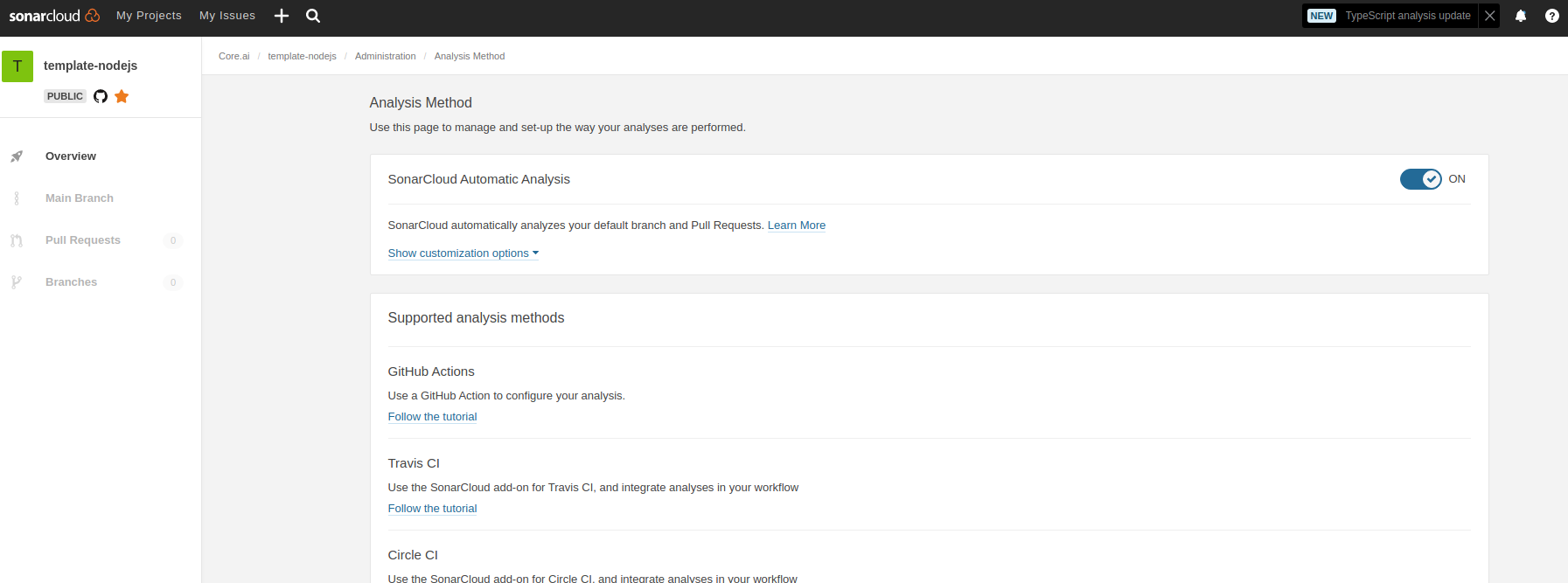
4. Check codacy runs on pull requests, set codacy defaults. You may remove codacy if sonar cloud is only needed.
5. Update the above Code Guardian badges; change all `id=aicore_template-nodejs-ts` to the sonar id of your project fields.
# Commands available
## Building
Since this is a pure JS template project, build command just runs test with coverage.
```shell
> npm install // do this only once.
> npm run build
```
## Linting
To lint the files in the project, run the following command:
```shell
> npm run lint
```
To Automatically fix lint errors:
```shell
> npm run lint:fix
```
## Testing
To run all tests:
```shell
> npm run test
Hello world Tests
✔ should return Hello World
#indexOf()
✔ should return -1 when the value is not present
```
Additionally, to run unit/integration tests only, use the commands:
```shell
> npm run test:unit
> npm run test:integ
```
## Coverage Reports
To run all tests with coverage:
```shell
> npm run cover
Hello world Tests
✔ should return Hello World
#indexOf()
✔ should return -1 when the value is not present
2 passing (6ms)
----------|---------|----------|---------|---------|-------------------
File | % Stmts | % Branch | % Funcs | % Lines | Uncovered Line #s
----------|---------|----------|---------|---------|-------------------
All files | 100 | 100 | 100 | 100 |
index.js | 100 | 100 | 100 | 100 |
----------|---------|----------|---------|---------|-------------------
=============================== Coverage summary ===============================
Statements : 100% ( 5/5 )
Branches : 100% ( 2/2 )
Functions : 100% ( 1/1 )
Lines : 100% ( 5/5 )
================================================================================
Detailed unit test coverage report: file:///template-nodejs/coverage-unit/index.html
Detailed integration test coverage report: file:///template-nodejs/coverage-integration/index.html
```
After running coverage, detailed reports can be found in the coverage folder listed in the output of coverage command.
Open the file in browser to view detailed reports.
To run unit/integration tests only with coverage
```shell
> npm run cover:unit
> npm run cover:integ
```
Sample coverage report:

### Unit and Integration coverage configs
Unit and integration test coverage settings can be updated by configs `.nycrc.unit.json` and `.nycrc.integration.json`.
See https://github.com/istanbuljs/nyc for config options.
# Publishing packages to NPM
To publish a package to npm, push contents to `npm` branch in
this repository.
## Publishing `@aicore/package*`
If you are looking to publish to package owned by core.ai, you will need access to the GitHub Organization secret `NPM_TOKEN`.
For repos managed by [aicore](https://github.com/aicore) org in GitHub, Please contact your Admin to get access to core.ai's NPM tokens.
## Publishing to your own npm account
Alternatively, if you want to publish the package to your own npm account, please follow these docs:
1. Create an automation access token by following this [link](https://docs.npmjs.com/creating-and-viewing-access-tokens).
2. Add NPM_TOKEN to your repository secret by following this [link](https://docs.npmjs.com/using-private-packages-in-a-ci-cd-workflow)
To edit the publishing workflow, please see file: `.github/workflows/npm-publish.yml`
# Dependency updates
We use Rennovate for dependency updates: https://blog.logrocket.com/renovate-dependency-updates-on-steroids/
* By default, dep updates happen on sunday every week.
* The status of dependency updates can be viewed here if you have this repo permissions in github: https://app.renovatebot.com/dashboard#github/aicore/template-nodejs
* To edit rennovate options, edit the rennovate.json file in root, see https://docs.renovatebot.com/configuration-options/
Refer
# Code Guardian
Several automated workflows that check code integrity are integrated into this template.
These include:
1. GitHub actions that runs build/test/coverage flows when a contributor raises a pull request
2. [Sonar cloud](https://sonarcloud.io/) integration using `.sonarcloud.properties`
1. In sonar cloud, enable Automatic analysis from `Administration
Analysis Method` for the first time 
## IDE setup
SonarLint is currently available as a free plugin for jetbrains, eclipse, vscode and visual studio IDEs.
Use sonarLint plugin for webstorm or any of the available
IDEs from this link before raising a pull request: https://www.sonarlint.org/ .
SonarLint static code analysis checker is not yet available as a Brackets
extension.
## Internals
### Testing framework: Mocha , assertion style: chai
See https://mochajs.org/#getting-started on how to write tests
Use chai for BDD style assertions (expect, should etc..). See move here: https://www.chaijs.com/guide/styles/#expect
### Mocks and spies: sinon
if you want to mock/spy on fn() for unit tests, use sinon. refer docs: https://sinonjs.org/
### Note on coverage suite used here:
we use c8 for coverage https://github.com/bcoe/c8. Its reporting is based on nyc, so detailed docs can be found
here: https://github.com/istanbuljs/nyc ; We didn't use nyc as it do not yet have ES module support
see: https://github.com/digitalbazaar/bedrock-test/issues/16 . c8 is drop replacement for nyc coverage reporting tool