@aavanamkit/designer
Version:
Are you looking for a powerful, open-source solution to generate PDF and DOCX documents in your web application? **AavanamKit** is a modern document generation toolkit designed to fix the broken workflow of hardcoded layouts. It provides a full-stack ecos
187 lines (125 loc) • 10.2 kB
Markdown
Are you looking for a powerful, open-source solution to generate PDF and DOCX documents in your web application? **AavanamKit** is a modern document generation toolkit designed to fix the broken workflow of hardcoded layouts. It provides a full-stack ecosystem, featuring a visual, drag-and-drop **React component** for template design and a headless **Node.js engine** for high-quality, server-side document creation. Stop fighting with print CSS and clunky libraries—AavanamKit is the definitive **invoice generator** and **report builder** that saves you time and empowers your users.
AavanamKit is built on top of the popular **React** and **Node.js** frameworks
<div align="center">
<br />
<p>
<img src="https://res.cloudinary.com/dpkxck2uh/image/upload/v1755062483/AavanamKitLogo_ex7mfl.png" alt="AavanamKit Logo" width="150" />
</p>
<h1 align="center">AavanamKit</h1>
<p align="center">
The open-source document design system that dramatically speeds up your development workflow.
<br />
<a href="https://aavanamkit-demo.vercel.app/"><strong>Explore the Live Demo »</strong></a>
·
<a href="https://aavanamkit-docs.vercel.app/"><strong>Read the Docs »</strong></a>
<br />
<br />
<a href="https://github.com/jafranjemal/aavanamkit/issues">Report Bug</a>
·
<a href="https://github.com/jafranjemal/aavanamkit/issues">Request Feature</a>
</p>
</div>
[](https://opensource.org/licenses/MIT)
[](https://github.com/jafranjemal/aavanamkit/actions/workflows/engine-ci.yml)
[](https://github.com/jafranjemal/aavanamkit)
[](https://www.npmjs.com/package/@aavanamkit/designer)
[](https://www.npmjs.com/package/@aavanamkit/designer)
### Stop Coding Layouts Blindly.
You know the process. You need to generate a PDF invoice. You open your editor and start writing code like `` `doc.text('Total:', 400, 750)` ``. You save, re-run your script, and check the output. The text is a few pixels off. You go back, guess a new coordinate, and repeat the cycle. It's slow, frustrating, and completely disconnected from the visual nature of the task.
The alternative is often worse: fighting with print CSS to convert HTML to a PDF, only to end up with a low-quality, blurry document that looks terrible on a professional invoice or a thermal printer receipt.
**AavanamKit is designed to fix this broken workflow.**
### A Visual Development Tool for Documents
AavanamKit is a complete ecosystem that treats document layouts not as a coding chore, but as a visual design process.
Our core philosophy is simple: **Design your document visually first, then use the exported JSON as your production-ready template.**
Instead of guessing at coordinates, you use our powerful visual designer to draw your layout. You see exactly how it will look in real-time. When you're done, you export a clean JSON object that represents your entire design. This JSON **is your layout code**, ready to be used by our headless backend engine.
---
### 🚀 Live Demo & Sample Templates
Seeing is believing. We've built a full live demo where you can experience the power of the AavanamKit designer right in your browser.
**[ » Try the Live Demo Now! ](https://aavanamkit-demo.vercel.app/)**
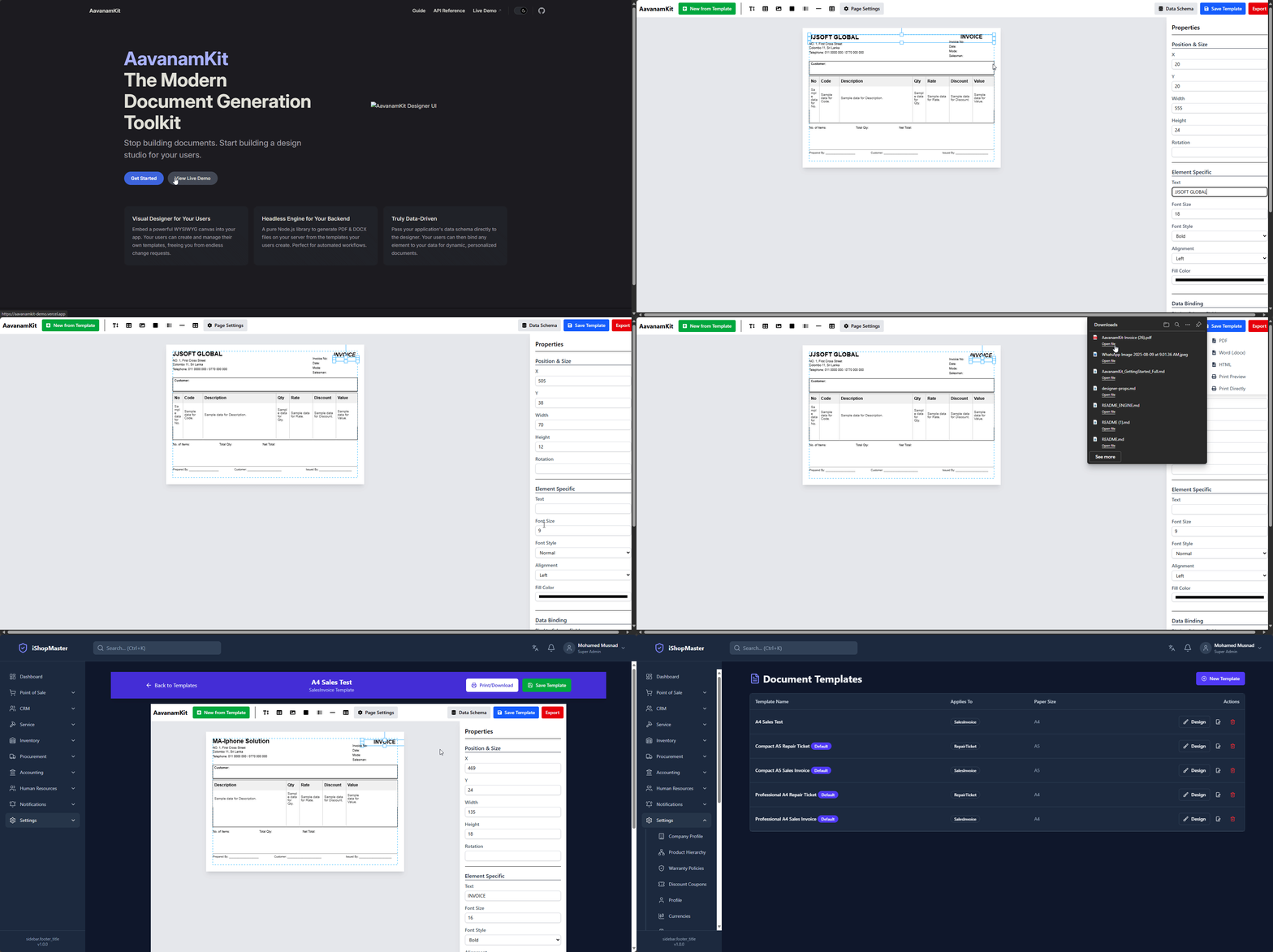
The demo comes pre-loaded with a gallery of professional templates. The complete source code for these templates can be found in the [`packages/designer/src/lib/templates.js`](./packages/designer/src/lib/templates.js) file.
---
## 🚀 Documentation
Seeing is believing. We've built a full a comprehensive documentation site.
* **[ » Read the Official Docs ](https://aavanamkit-docs.vercel.app/)**
The demo comes pre-loaded with a gallery of professional templates. The complete source code for these templates can be found in the [`packages/designer/src/lib/templates.js`](./packages/designer/src/lib/templates.js) file.
---
The demo comes pre-loaded with a gallery of professional templates for a mobile repair shop, showcasing the versatility of the designer:
- **A full A4 Service Invoice**: A standard, comprehensive invoice perfect for detailed billing.
- **A compact A5 Invoice**: A modern, stylish design for smaller jobs or quotes.
- **A continuous-roll Thermal Receipt**: Demonstrates the "Roll Mode" for printers with dynamic paper length.
- **A small Job Repair Ticket**: A custom-sized ticket for internal tracking and customer claims.
You can access these templates by clicking the **"New from Template"** button in the demo. The complete source code for these templates can be found in `packages/designer/src/lib/templates.js`.
## ✨ The AavanamKit Ecosystem
AavanamKit is a monorepo containing two distinct but perfectly synchronized packages:
### 🎨 `@aavanamkit/designer` (Your Visual Dev Tool)
A powerful, embeddable **React component** that provides a full WYSIWYG "design studio." Use it in your local development environment to visually build and export your document templates.
- **Complete Visual Canvas:** A full WYSIWYG experience. Drag, drop, resize, rotate, and style every element with an intuitive properties panel.
- **Powerful Data Binding:** Visually map any element's property to your application's data schema. The designer intelligently flattens complex, nested JSON for easy use.
- **Advanced Components Built-In:** Go beyond simple text and images with a powerful, **auto-paginating Table** that handles page breaks automatically, plus support for Barcodes and various Shapes.
- **Total Page Control:** Full control over your document's layout. Choose standard sizes like A4/Letter, define custom dimensions, switch between portrait/landscape, or use the **Continuous Roll** mode for dynamic-height thermal printer receipts.
- **Professional Workflow Tools:** Speed up your design process with keyboard shortcuts, canvas zoom & pan, and a built-in gallery of production-ready templates to start from.
- **Conditional Rendering:** Easily set rules to show or hide elements based on your live data (e.g., only show a "Discount Applied" label if `discount > 0`).
- **Pre-Printed Stationery Support:** Upload an image of your pre-printed paper as a background to perfectly align your digital design with your physical media.
- **Instant JSON Export:** Get a clean, production-ready template JSON with one click.
## 📦 Installation
Install the designer in your React project using npm:
```bash
npm install @aavanamkit/designer
```
---
## 🔧 Usage
Import the `AavanamKit` component and its required, pre-built CSS file. You control the designer by passing it your application's data schema and wiring up the `onSave` callback to your backend.
```tsx
import React, { useState, useEffect } from 'react';
import AavanamKit from '@aavanamkit/designer';
import '@aavanamkit/designer/dist/AavanamKit.css';
function MyTemplateEditor() {
const myAppSchema = {
customer: { name: "string", address: "string" },
invoiceNumber: "string",
items: [{ description: "string", total: "number" }]
};
const [template, setTemplate] = useState(null);
useEffect(() => {
// fetchTemplateFromApi().then(savedTemplate => setTemplate(savedTemplate));
}, []);
const handleSave = async (newTemplate) => {
console.log("Saving template to database:", newTemplate);
// await saveTemplateToApi(newTemplate);
};
return (
<div style={{ height: '100vh', width: '100%' }}>
<AavanamKit
schema={myAppSchema}
template={template}
onSave={handleSave}
/>
</div>
);
}
```
---
## 📘 Component API
### `<AavanamKit />`
| Prop | Type | Required | Description |
|-----------|----------|----------|-----------------------------------------------------------------------------|
| `schema` | `object` | ✅ Yes | An object representing the data structure of your application. |
| `onSave` | `function`| ✅ Yes | A callback function that receives the complete template JSON on save. |
| `template`| `object` | ❌ No | A previously saved template object to load into the designer. |
| `data` | `object` | ❌ No | Sample data used for live previews and in-browser exporting. |
---
# The Bonus: Safe Client Empowerment
And if you want to go the extra mile, you can then embed the same `` `@aavanamkit/designer` `` component into your application's admin panel. This allows your clients to safely handle their own **visual** changes without ever needing to touch the underlying data structure.
**What clients *can* do:**
- Change element positions (move the logo, rearrange footer text).
- Adjust styling (font sizes, colors, bold/italics).
- Upload their own images, including using a scan of their **pre-printed stationery as a background** to perfectly align their design.
**What clients *cannot* do:**
- They **cannot** change the data schema or the data bindings. The core data structure is controlled by you, the developer, ensuring data integrity is always maintained.
### ❤️ Contributing & Support
The AavanamKit Project is a community-driven, open-source initiative. Your help makes it better.
- [ » Read our Contribution Guide ](./CONTRIBUTING.md)
- [ » Sponsor the Project on GitHub ](https://github.com/sponsors/jafranjemal)
## 🪪 License
This project is licensed under the [MIT License](https://opensource.org/licenses/MIT).