@4u6u57/dotfiles
Version:
August Valera's preferences for Linux
213 lines (143 loc) • 7.54 kB
Markdown
# git-open [](https://travis-ci.org/paulirish/git-open)
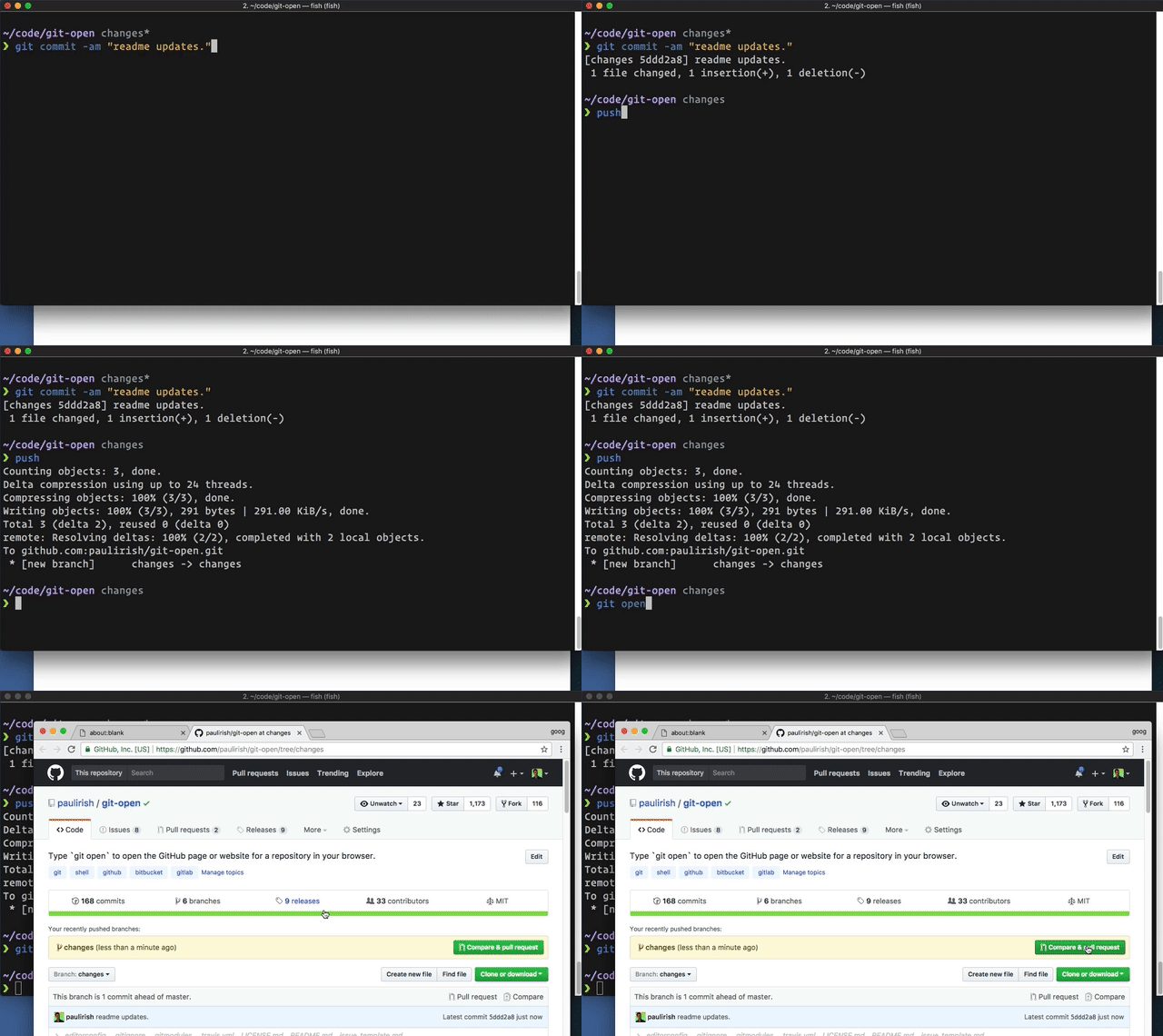
Type `git open` to open the repo website (GitHub, GitLab, Bitbucket) in your browser.
## Usage
```sh
git open [remote-name] [branch-name]
git open --issue
```
(`git open` works with these [hosted repo providers](#supported-remote-repositories), `git open --issue` currently only works with GitHub, Visual Studio Team Services and Team Foundation Server)
### Examples
```sh
$ git open
# opens https://github.com/TRACKED_REMOTE_USER/CURRENT_REPO/tree/CURRENT_BRANCH
$ git open someremote
# opens https://github.com/PROVIDED_REMOTE_USER/CURRENT_REPO/tree/CURRENT_BRANCH
$ git open someremote somebranch
# opens https://github.com/PROVIDED_REMOTE_USER/CURRENT_REPO/tree/PROVIDED_BRANCH
$ git open --issue
# If branches use naming convention of issues/#123,
# opens https://github.com/TRACKED_REMOTE_USER/CURRENT_REPO/issues/123
```
## Installation
### Basic install
The preferred way of installation is to simply add the `git-open` script
somewhere into your path (e.g. add the directory to your `PATH` environment
or copy `git-open` into an existing included path like `/usr/local/bin`).
### Install via NPM:
```sh
npm install --global git-open
```
### Windows Powershell
Save git-open anywhere, say as ~/Documents/Scripts/git-open.sh and define
a function in your Powershell profile (see ~/Documents/WindowsPowerShell/profile.ps1) like this:
```sh
function git-open { cmd /c "C:\Program Files\Git\usr\bin\bash.exe" "~/Documents/Scripts/git-open.sh" }
Set-Alias -Name gop -Value git-open
```
### Windows with `cmd` terminal
Save the `git-open` script in any place accessible via your `%PATH%` environment var.
### ZSH
#### [Antigen](https://github.com/zsh-users/antigen)
Add `antigen bundle paulirish/git-open` to your `.zshrc` with your other bundle
commands.
Antigen will handle cloning the plugin for you automatically the next time you
start zsh, and periodically checking for updates to the git repository. You can
also add the plugin to a running zsh with `antigen bundle paulirish/git-open`
for testing before adding it to your `.zshrc`.
#### [Oh-My-Zsh](http://ohmyz.sh/)
1. `cd ~/.oh-my-zsh/custom/plugins`
1. `git clone https://github.com/paulirish/git-open.git`
1. Add `git-open` to your plugin list - edit `~/.zshrc` and change
`plugins=(...)` to `plugins=(... git-open)`
#### [Zgen](https://github.com/tarjoilija/zgen)
Add `zgen load paulirish/git-open` to your .zshrc file in the same function
you're doing your other `zgen load` calls in. ZGen will take care of cloning
the repository the next time you run `zgen save`, and will also periodically
check for updates to the git repository.
#### [zplug](https://github.com/zplug/zplug)
`zplug "paulirish/git-open", as:plugin`
## Supported remote repositories
git-open can automatically guess the corresponding repository page for remotes
(default looks for `origin`) on the following hosts:
- github.com
- gist.github.com
- gitlab.com
- GitLab custom hosted (see below)
- bitbucket.org
- Atlassian Bitbucket Server (formerly _Atlassian Stash_)
- Visual Studio Team Services
- Team Foundation Server (on-premises)
## Configuration
### Configuring the web destination (aka GitLab support)
To configure GitLab support (or other unique hosting situations) you need to set some options.
| option name | description |
| ------------------------- | ---------------- |
| open.[gitdomain].domain | The (web) domain to open based on the provided git repo domain |
| open.[gitdomain].protocol | The (web) protocol to open based on the provided git repo domain. (Defaults to `https`) |
```sh
git config [--global] open.[gitdomain].domain [value]
git config [--global] open.[gitdomain].protocol [value]
```
**Example**
* Your git remote is at `ssh://git@git.internal.biz:7000/XXX/YYY.git`
* Your hosted gitlab is `http://repo.intranet/subpath/XXX/YYY`
```sh
git config [--global] "open.https://git.internal.biz.domain" "repo.intranet/subpath"
git config [--global] "open.https://git.internal.biz.protocol" "http"
```
### Configuring which remote to open
By default, `git open` opens the remote named `origin`. However, if your current branch is [remotely-tracking](https://git-scm.com/book/en/v2/Git-Branching-Remote-Branches#_tracking_branches) a different remote, that tracked remote will be used.
In some instances, you may want to override this behavior. When you fork a project
and add a remote named `upstream` you often want that upstream to be opened
rather than your fork. To accomplish this, you can set the `open.default.remote` within your project:
```sh
git config open.default.remote upstream
```
This is equivalent to always typing `git open upstream`.
## Alternative projects
See [hub](https://github.com/github/hub) for complete GitHub opening support.
It's the official GitHub project and provides `hub browse`.
[Homebrew has an alternate git-open](https://github.com/jeffreyiacono/git-open)
that only works with GitHub but can open user profile pages, too.
@[gerep has an alternate git-open](https://github.com/gerep/git-open) that
works with a few providers. Of note, it opens the default view for BitBucket
instead of the source view.
And, of course, [jasonmccreary's original gh](https://github.com/jasonmccreary/gh)
from which this plugin was forked.
## Thanks
[jasonmccreary](https://github.com/jasonmccreary/) did [the initial hard work](https://github.com/jasonmccreary/gh). Since then, [many contributors](https://github.com/paulirish/git-open/graphs/contributors) have submitted great PRs.
## Contributing & Development
Please provide examples of the URLs you are parsing with each PR.
You can run `git-open` in `echo` mode, which doesn't open your browser, but just prints the URL to stdout:
```sh
env BROWSER='echo' ./git-open
```
#### Testing:
You'll need to install [bats](https://github.com/sstephenson/bats#installing-bats-from-source), the Bash automated testing system. It's also available as `brew install bats`
```sh
git submodule update --init # pull in the assertion libraries
# Run the test suite once:
bats test # or `npm run unit`
# Run it on every change with `entr`
brew install entr
npm run watch
```
## Related projects
- [`git recent`](https://github.com/paulirish/git-recent) - View your most recent git branches
- [`diff-so-fancy`](https://github.com/so-fancy/diff-so-fancy/) - Making the output of `git diff` so fancy
## License
Copyright Jason McCreary & Paul Irish. Licensed under MIT.
<http://opensource.org/licenses/MIT>
## Changelog
- **2017-12-01** - 2.0 shipped. Breaking change: [Gitlab configuration](https://github.com/paulirish/git-open#configuration) handled differently.
- **2017-12-01** - Configuration for custom remote added
- **2017-11-30** - Support for VSTS Added
- **2017-10-31** - `--issue` and `-h` added
- **2017-10-30** - Configuration for custom domains added
- **2017-10-30** - WSL support added
- **2017-06-16** - Introduced a test suite in BATS
- **2017-06-15** - Entire script rewritten and simplified by @dermagia
- **2016-07-23** - Readme: fix oh-my-zsh install instructions
- **2016-07-22** - 1.1.0 shipped. update and add linters for package.json, readme.
- **2016-07-11** - Readme formatting and installation instructions updated. Changelog started