@100pay-hq/checkout
Version:
accept crypto payments on your website and apps in 3 mins
326 lines (277 loc) • 10.2 kB
Markdown
# 100Pay Checkout
Accept crypto payments on your website in 3 mins
<!--
## ✋ ✋ PACKAGE HAS BEEN DISCONTINUED
## Please 👉 [click here](https://npmjs.com/@100pay-hq/checkout) for the updated package 📦 -->
## Getting Started
# 🏄 🚀
Before you can start accepting crypto payments, you need to create a [100pay account](https://100pay.co) and obtain your api keys from the [100Developers platform](https://100pay.co)
## Features
* Accept cryptopayments on your website
* Withdraw to your crypto wallet or fiat balance
* create payment invoice
* create payment links
* create your own coin on any supported network
* analytics to monitor your business
* swap crypto
* buy/sell crypto
## 100pay-js
---
## Example 👇🏾👇🏾😋👇🏾👇🏾
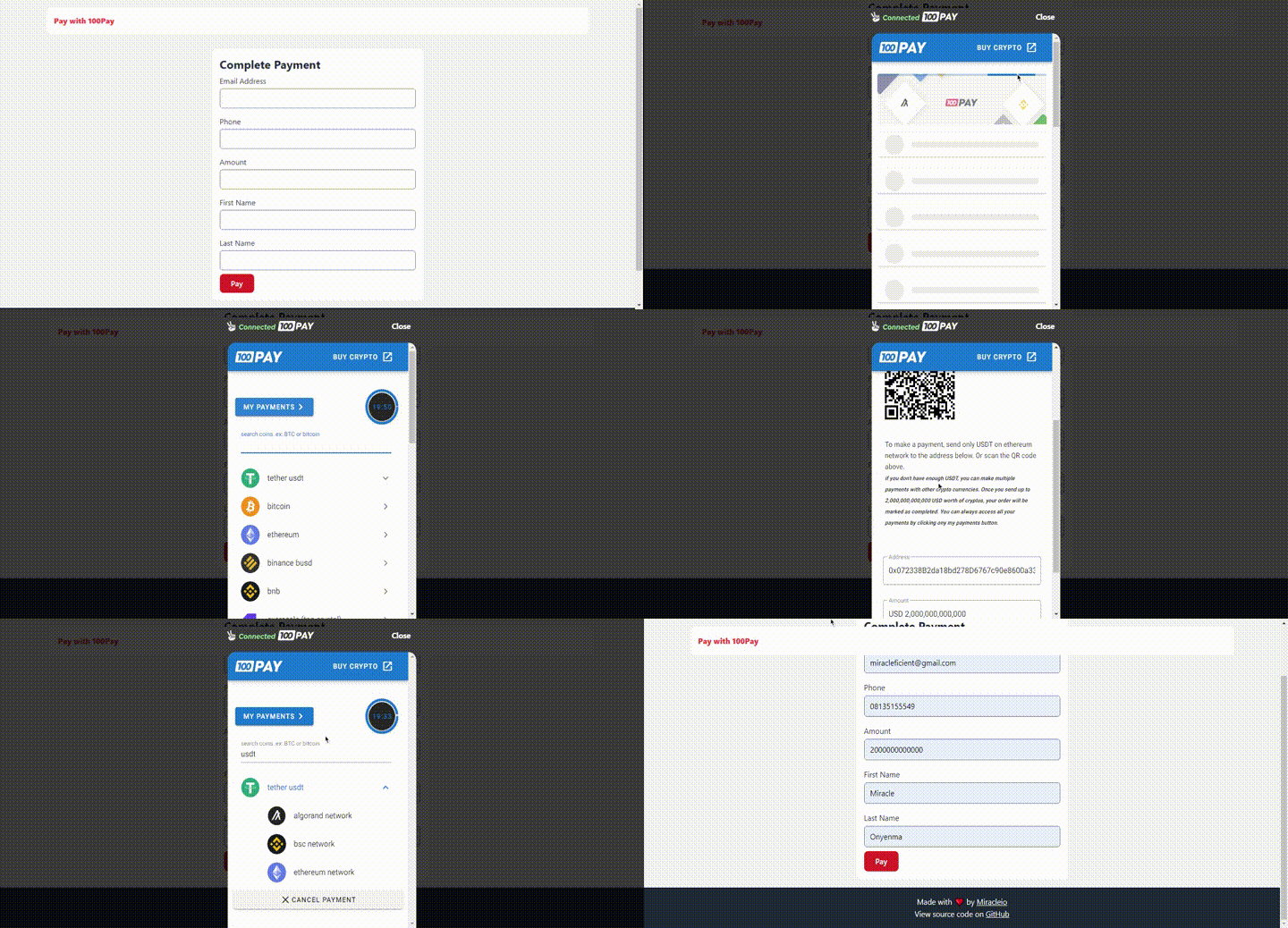
### View Demo
## 👉 Live example hosted on Netlify [here](https://pay-with-100pay-example.netlify.app/)
## 👉 Source code [here](https://github.com/miracleonyenma/pay-with-100pay-example)
---
First Import the Javascript Library to your app or add 100pay-js script tag to your website headers.
<script src="https://js.100pay.co/"></script>
### HTML
```Html
<form id="paymentForm">
<div class="form-group">
<label for="email">Email Address</label>
<input type="email" id="email-address" required />
</div>
<div class="form-group">
<label for="phone">Phone </label>
<input type="tel" id="phone" required />
</div>
<div class="form-group">
<label for="amount">Amount</label>
<input type="number" id="amount" required />
</div>
<div class="form-group">
<label for="first-name">First Name</label>
<input type="text" id="first-name" />
</div>
<div class="form-group">
<label for="last-name">Last Name</label>
<input type="text" id="last-name" />
</div>
<div class="form-submit">
<button type="submit">Pay</button>
</div>
</form>
<!-- Wrapper for the 100Pay checkout modal -->
<div id="show100Pay"></div>
```
### Javascript
When the user clicks on pay button, load 100pay modal.
```HTML
<script>
const paymentForm = document.getElementById('paymentForm');
paymentForm.addEventListener("submit", payWith100pay, false);
function payWith100pay(e) {
e.preventDefault();
const email = document.getElementById("email-address").value;
const phone = document.getElementById("phone").value;
const amount = document.getElementById("amount").value;
const firstName = document.getElementById("first-name").value;
const lastName = document.getElementById("last-name").value;
shop100Pay.setup({
ref_id: "" + Math.floor(Math.random() * 1000000000 + 1),
api_key:
"TEST;PK;XXXX", // paste api key here
customer: {
user_id: "1", // optional
name: firstName + " " + lastName,
phone,
email
},
billing: {
amount,
currency: "USD", // or any other currency supported by 100pay
description: "Test Payment",
country: "USA",
vat: 10, //optional
pricing_type: "fixed_price" // or partial
},
metadata: {
is_approved: "yes",
order_id: "OR2", // optional
charge_ref: "REF" // optionalm, you can add more fields
},
call_back_url: "http://localhost:8000/verifyorder/",
onClose: msg => {
alert("You just closed the crypto payment modal.");
},
onPayment: reference => {
alert(`New Payment detected with reference ${reference}`);
/**
* @dev ⚠️ never give value to the user because you received a callback.
* Always verify payments by sending a get request to 100Pay Verify Payment endpoint on your backend.
* We have written a well detailed article to guide you on how to do this. Check out the link below.
* 👉 https://100pay.co/blog/how-to-verify-crypto-payments-on-100-pay
* */
},
onError: error => {
// handle your errors, mostly caused by a broken internet connection.
console.log(error)
alert("Sorry something went wrong pls try again.")
}
});
}
</script>
<script src="https://js.100pay.co/"></script>
```
## using npm
```bash
npm install @100pay-hq/checkout
```
Start by importing the library to your javascript file
```Javascript
// using import
import { shop100Pay } from "@100pay-hq/checkout";
// or import using require
const shop100Pay = require("@100pay-hq/checkout")
```
When the user clicks on pay button, load 100pay modal.
```Javascript
function payWith100pay(e) {
e.preventDefault();
const email = document.getElementById("email-address").value;
const phone = document.getElementById("phone").value;
const amount = document.getElementById("amount").value;
const firstName = document.getElementById("first-name").value;
const lastName = document.getElementById("last-name").value;
shop100Pay.setup({
ref_id: "" + Math.floor(Math.random() * 1000000000 + 1),
api_key: "", // paste api key here
customer: {
user_id: "1", // optional
name: firstName + " " + lastName,
phone,
email
},
billing: {
amount,
currency: "USD", // or any other currency supported by 100pay
description: "Test Payment",
country: "USA",
vat: 10, //optional
pricing_type: "fixed_price" // or partial
},
metadata: {
is_approved: "yes",
order_id: "OR2", // optional
charge_ref: "REF" // optionalm, you can add more fields
},
call_back_url: "http://localhost:8000/verifyorder/",
onClose: msg => {
alert("You just closed the crypto payment modal.");
},
onPayment: reference => {
alert(`New Payment detected with reference ${reference}`);
/**
* @dev ⚠️ never give value to the user because you received a callback.
* Always verify payments by sending a get request to 100Pay Get Crypto Charge endpoint on your backend.
* We have written a well detailed article to guide you on how to do this. Check out the link below.
* 👉 https://100pay.co/blog/how-to-verify-crypto-payments-on-100-pay
* */
},
onError: error => {
// handle your errors, mostly caused by a broken internet connection.
console.log(error)
alert("Sorry something went wrong pls try again.")
}
});
}
```
## .Vue Example File
```HTML
<template>
<div>
<div id="app">
<form id="paymentForm">
<div class="form-group">
<label for="email">Email Address</label>
<input type="email" id="email-address" v-model="checkout_form.email" required />
</div>
<div class="form-group">
<label for="amount">Amount</label>
<input type="tel" id="amount" v-model="checkout_form.amount" required />
</div>
<div class="form-group">
<label for="first-name">First Name</label>
<input type="text" id="first-name" v-model="checkout_form.name" />
</div>
<div class="form-submit">
<button type="submit" @click="payWith100pay()"> Pay </button>
</div>
</form>
</div>
<!-- Wrapper for the 100Pay checkout modal -->
<div id="show100Pay"></div>
</div>
</template>
<script>
// using import
import { shop100Pay } from "@100pay-hq/checkout";
// using require
const shop100Pay = require("@100pay-hq/checkout");
export default {
data(){
return {
checkout_form: {
name: "Brainy",
phone: "0123456",
email: "brainy@100pay.co",
amount: 10000,
currency: "USD",
country: "NGN"
}
}
},
methods: {
payWith100pay(e) {
e.preventDefault();
shop100Pay.setup({
ref_id: "" + Math.floor(Math.random() * 1000000000 + 1),
api_key: "", // paste api key here
customer: {
user_id: "1", // optional
name: this.checkout_form.name,
phone: this.checkout_form.phone,
email: this.checkout_form.email
},
billing: {
amount: this.checkout_form.amount,
currency: this.checkout_form.currency,
description: "Test Payment",
country: this.checkout_form.country,
vat: 10, //optional
pricing_type: "fixed_price" // or partial
},
metadata: {
is_approved: "yes",
order_id: "OR2", // optional
charge_ref: "REF" // optionalm, you can add more fields
},
call_back_url: "https://my-site.com/redirect-user-after-payment",
onClose: msg => {
alert("You just closed the crypto payment modal.");
},
onPayment: reference => {
alert(`New Payment detected with reference ${reference}`);
/**
* @dev ⚠️ never give value to the user because you received a callback.
* Always verify payments by sending a get request to 100Pay Verify Payment endpoint on your backend.
* We have written a well detailed article to guide you on how to do this. Check out the link below.
* 👉 https://100pay.co/blog/how-to-verify-crypto-payments-on-100-pay
* */
},
onError: error => {
// handle your errors, mostly caused by a broken internet connection.
console.log(error)
alert("Sorry something went wrong pls try again.")
}
});
}
}
}
</script>
```
## Want More?
### [Verify Payments](https://100pay.co/blog/how-to-verify-crypto-payments-on-100-pay)
### [Enable Webhooks](https://100pay.co/blog/subscribing-to-webhooks-on-your-100-pay-account)
### Read our API documentation [100Pay Developers Documentation](https://documenter.getpostman.com/view/13045730/2s93RMUatE)