@100pay-hq/checkout
Version:
accept crypto payments on your website and apps in 3 mins
760 lines (606 loc) • 20.6 kB
Markdown
# 100Pay Checkout
Accept crypto payments on your website in 3 minutes.
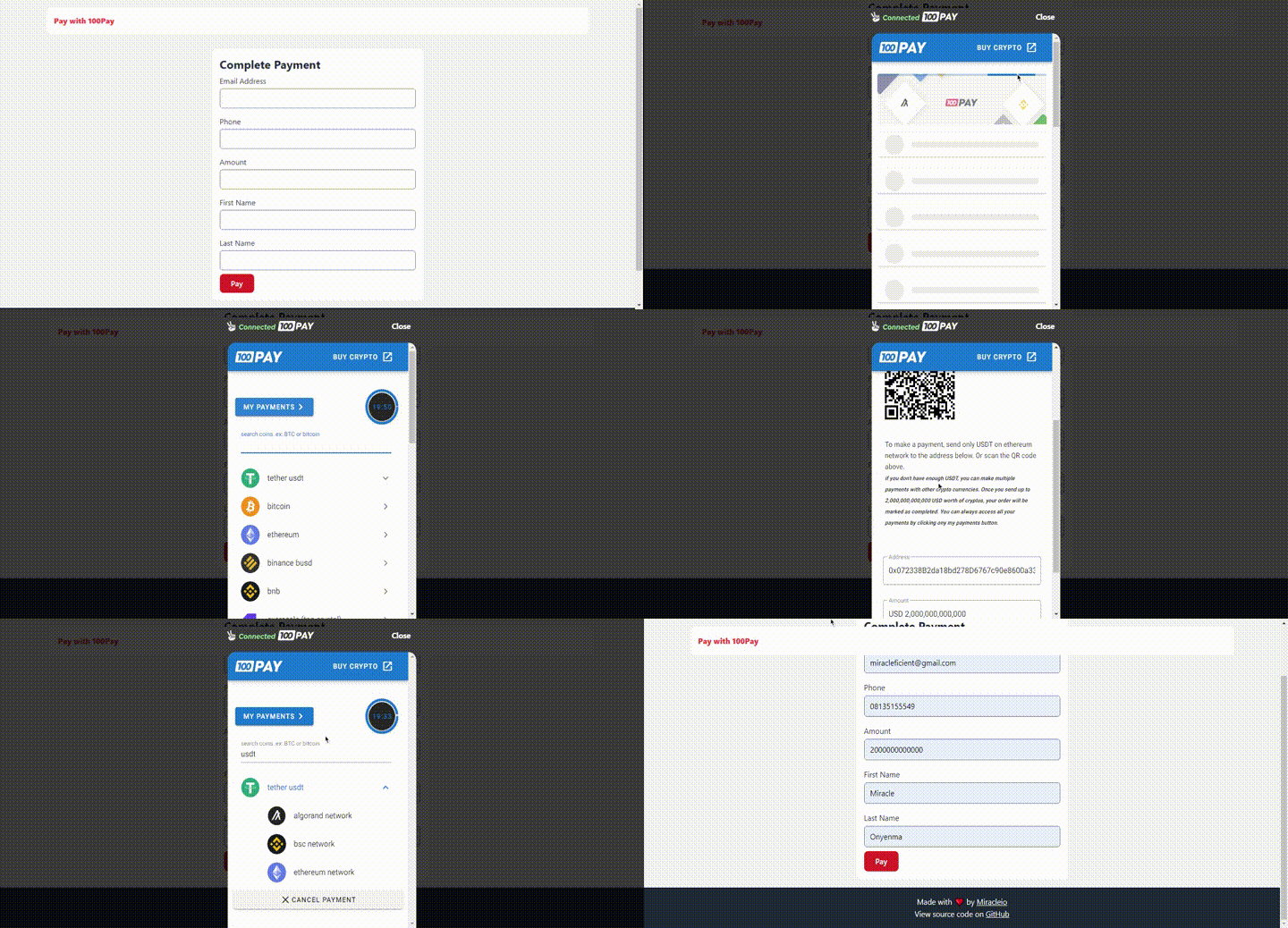
## Table of Contents
- [Getting Started](#getting-started)
- [Features](#features)
- [Installation](#installation)
- [Via CDN (Script Tag)](#via-cdn-script-tag)
- [Via NPM](#via-npm)
- [Basic Usage](#basic-usage)
- [HTML Setup](#html-setup)
- [JavaScript Implementation](#javascript-implementation)
- [Configuration Options](#configuration-options)
- [Charge Data](#charge-data)
- [Display Options](#display-options)
- [Framework Examples](#framework-examples)
- [Vue.js Example](#vuejs-example)
- [React Example](#react-example)
- [API Reference](#api-reference)
- [Methods](#methods)
- [Callbacks](#callbacks)
- [Type Definitions](#type-definitions)
- [Payment Verification](#payment-verification)
- [Webhooks](#webhooks)
- [Examples](#examples)
- [Support](#support)
## Getting Started
Before you can start accepting crypto payments, you need to:
1. Create a [100Pay account](https://100pay.co)
2. Obtain your API keys from the [100Pay Developers platform](https://100pay.co)
## Features
- ✅ Accept crypto payments on your website
- 💰 Withdraw to your crypto wallet or fiat balance
- 📄 Create payment invoices
- 🔗 Create payment links
- 🪙 Create your own coin on any supported network
- 📊 Analytics to monitor your business
- 🔄 Swap crypto
- 💱 Buy/sell crypto
## Installation
### Via CDN (Script Tag)
Add the 100Pay script to your HTML `<head>` or before the closing `</body>` tag:
```html
<script src="https://js.100pay.co/"></script>
```
### Via NPM
Install the package using npm or yarn:
```bash
npm install @100pay-hq/checkout
```
```bash
yarn add @100pay-hq/checkout
```
Then import it in your JavaScript file:
```javascript
// ES6 Import
import { shop100Pay } from "@100pay-hq/checkout";
// CommonJS Require
const { shop100Pay } = require("@100pay-hq/checkout");
```
## Basic Usage
### HTML Setup
Create a payment form and a container for the 100Pay modal:
```html
<form id="paymentForm">
<div class="form-group">
<label for="email">Email Address</label>
<input type="email" id="email-address" required />
</div>
<div class="form-group">
<label for="phone">Phone</label>
<input type="tel" id="phone" required />
</div>
<div class="form-group">
<label for="amount">Amount</label>
<input type="number" id="amount" required />
</div>
<div class="form-group">
<label for="first-name">First Name</label>
<input type="text" id="first-name" />
</div>
<div class="form-group">
<label for="last-name">Last Name</label>
<input type="text" id="last-name" />
</div>
<div class="form-submit">
<button type="submit">Pay with Crypto</button>
</div>
</form>
<!-- Container for the 100Pay checkout modal -->
<div id="show100Pay"></div>
```
### JavaScript Implementation
```javascript
const paymentForm = document.getElementById('paymentForm');
paymentForm.addEventListener("submit", payWith100pay);
function payWith100pay(e) {
e.preventDefault();
const email = document.getElementById("email-address").value;
const phone = document.getElementById("phone").value;
const amount = document.getElementById("amount").value;
const firstName = document.getElementById("first-name").value;
const lastName = document.getElementById("last-name").value;
shop100Pay.setup({
ref_id: "" + Math.floor(Math.random() * 1000000000 + 1),
api_key: "TEST;PK;YOUR_API_KEY_HERE",
customer: {
user_id: "1", // optional
name: firstName + " " + lastName,
phone: phone,
email: email
},
billing: {
amount: amount,
currency: "USD",
description: "Test Payment",
country: "USA",
vat: 10, // optional
pricing_type: "fixed_price" // or "partial"
},
metadata: {
is_approved: "yes",
order_id: "OR2",
charge_ref: "REF"
// Add any custom fields you need
},
call_back_url: "https://yoursite.com/payment/callback",
onClose: () => {
console.log("Payment modal closed");
alert("You just closed the crypto payment modal.");
},
onPayment: (reference) => {
console.log("Payment reference:", reference);
alert(`New payment detected with reference ${reference}`);
/**
* ⚠️ IMPORTANT: Never give value to users based on this callback alone!
* Always verify payments on your backend by calling the 100Pay API.
* See: https://100pay.co/blog/how-to-verify-crypto-payments-on-100-pay
*/
},
onError: (error) => {
console.error("Payment error:", error);
alert("Sorry, something went wrong. Please try again.");
}
});
}
```
## Configuration Options
### Charge Data
The `shop100Pay.setup()` method accepts two parameters: `CHARGE_DATA` and `DISPLAY_OPTIONS` (optional).
#### Required Fields
| Field | Type | Description |
|-------|------|-------------|
| `api_key` | `string` | Your 100Pay API key (get from dashboard) |
| `ref_id` | `string` | Unique reference ID for this transaction |
| `customer` | `object` | Customer information |
| `customer.name` | `string` | Customer's full name |
| `customer.phone` | `string` | Customer's phone number |
| `customer.email` | `string` | Customer's email address |
| `billing` | `object` | Billing information |
| `billing.amount` | `number` | Payment amount |
| `billing.currency` | `string` | Currency code (e.g., "USD", "EUR", "NGN") |
| `billing.country` | `string` | Country code (e.g., "USA", "NG", "GB") |
| `billing.description` | `string` | Description of the payment |
| `billing.pricing_type` | `string` | Either "fixed_price" or "partial" |
| `metadata` | `object` | Custom data to attach to the transaction |
| `call_back_url` | `string` | URL to redirect users after payment |
| `onPayment` | `function` | Callback when payment is detected |
| `onClose` | `function` | Callback when modal is closed |
| `onError` | `function` | Callback when an error occurs |
#### Optional Fields
| Field | Type | Description |
|-------|------|-------------|
| `customer.user_id` | `string` | Your internal user ID |
| `billing.vat` | `number` | VAT/tax percentage |
| `options` | `object` | Advanced payment configuration |
| `options.currency_allowlist` | `string[]` | Only allow these currencies (e.g., `["USDT", "BTC"]`) |
| `options.currency_blocklist` | `string[]` | Block these currencies |
| `options.currency_default` | `string` | Which currency to select by default |
#### Supported Currencies
100Pay supports 90+ currencies including:
`USD`, `EUR`, `GBP`, `NGN`, `CAD`, `AUD`, `JPY`, `CNY`, `INR`, `BRL`, `ZAR`, `KES`, `GHS`, and many more.
See the [Type Definitions](#type-definitions) section for the complete list.
#### Supported Countries
100Pay supports payments from 240+ countries. Use ISO 3166-1 alpha-2 country codes (e.g., `US`, `NG`, `GB`) or `USA` for United States.
### Display Options
Customize the appearance of the payment modal:
```javascript
shop100Pay.setup(
{
// ... charge data
},
{
maxWidth: "500px", // Maximum width of the modal (default: "400px")
maxHeight: "700px" // Maximum height of the modal (default: "unset")
}
);
```
#### Display Options Parameters
| Option | Type | Default | Description |
|--------|------|---------|-------------|
| `maxWidth` | `string` | `"400px"` | Maximum width of the payment modal |
| `maxHeight` | `string` | `"unset"` | Maximum height of the payment modal |
**Example with custom display:**
```javascript
shop100Pay.setup({
api_key: "YOUR_API_KEY",
ref_id: "TXN_" + Date.now(),
// ... other charge data
}, {
maxWidth: "600px",
maxHeight: "800px"
});
```
## Framework Examples
### Vue.js Example
```vue
<template>
<div>
<form .prevent="payWith100pay">
<div class="form-group">
<label for="email">Email Address</label>
<input type="email" v-model="form.email" required />
</div>
<div class="form-group">
<label for="phone">Phone</label>
<input type="tel" v-model="form.phone" required />
</div>
<div class="form-group">
<label for="amount">Amount</label>
<input type="number" v-model="form.amount" required />
</div>
<div class="form-group">
<label for="name">Full Name</label>
<input type="text" v-model="form.name" required />
</div>
<button type="submit">Pay with Crypto</button>
</form>
<!-- Container for 100Pay modal -->
<div id="show100Pay"></div>
</div>
</template>
<script>
import { shop100Pay } from "@100pay-hq/checkout";
export default {
name: "PaymentForm",
data() {
return {
form: {
name: "",
phone: "",
email: "",
amount: 100,
currency: "USD",
country: "USA"
}
};
},
methods: {
payWith100pay() {
shop100Pay.setup({
ref_id: "REF_" + Date.now(),
api_key: process.env.VUE_APP_100PAY_API_KEY,
customer: {
user_id: this.$auth?.user?.id, // optional
name: this.form.name,
phone: this.form.phone,
email: this.form.email
},
billing: {
amount: this.form.amount,
currency: this.form.currency,
description: "Product Purchase",
country: this.form.country,
pricing_type: "fixed_price"
},
metadata: {
order_id: "ORD_" + Date.now(),
source: "web"
},
call_back_url: `${window.location.origin}/payment/success`,
onClose: () => {
console.log("Payment modal closed");
},
onPayment: (reference) => {
console.log("Payment reference:", reference);
// Verify payment on your backend
this.verifyPayment(reference);
},
onError: (error) => {
console.error("Payment error:", error);
this.$toast.error("Payment failed. Please try again.");
}
}, {
maxWidth: "500px",
maxHeight: "750px"
});
},
async verifyPayment(reference) {
// Call your backend to verify the payment
try {
const response = await this.$axios.post("/api/verify-payment", {
reference
});
if (response.data.success) {
this.$router.push("/payment/success");
}
} catch (error) {
console.error("Verification error:", error);
}
}
}
};
</script>
```
### React Example
```jsx
import React, { useState } from 'react';
import { shop100Pay } from '@100pay-hq/checkout';
function PaymentForm() {
const [formData, setFormData] = useState({
name: '',
email: '',
phone: '',
amount: 100
});
const handleChange = (e) => {
setFormData({
...formData,
[e.target.name]: e.target.value
});
};
const handleSubmit = (e) => {
e.preventDefault();
shop100Pay.setup({
ref_id: 'REF_' + Date.now(),
api_key: process.env.REACT_APP_100PAY_API_KEY,
customer: {
name: formData.name,
phone: formData.phone,
email: formData.email
},
billing: {
amount: formData.amount,
currency: 'USD',
description: 'Product Purchase',
country: 'USA',
pricing_type: 'fixed_price'
},
metadata: {
order_id: 'ORD_' + Date.now(),
source: 'web'
},
call_back_url: `${window.location.origin}/payment/success`,
onClose: () => {
console.log('Payment modal closed');
},
onPayment: (reference) => {
console.log('Payment reference:', reference);
verifyPayment(reference);
},
onError: (error) => {
console.error('Payment error:', error);
alert('Payment failed. Please try again.');
}
}, {
maxWidth: '500px',
maxHeight: '750px'
});
};
const verifyPayment = async (reference) => {
try {
const response = await fetch('/api/verify-payment', {
method: 'POST',
headers: { 'Content-Type': 'application/json' },
body: JSON.stringify({ reference })
});
const data = await response.json();
if (data.success) {
window.location.href = '/payment/success';
}
} catch (error) {
console.error('Verification error:', error);
}
};
return (
<div>
<form onSubmit={handleSubmit}>
<div>
<label>Full Name</label>
<input
type="text"
name="name"
value={formData.name}
onChange={handleChange}
required
/>
</div>
<div>
<label>Email</label>
<input
type="email"
name="email"
value={formData.email}
onChange={handleChange}
required
/>
</div>
<div>
<label>Phone</label>
<input
type="tel"
name="phone"
value={formData.phone}
onChange={handleChange}
required
/>
</div>
<div>
<label>Amount (USD)</label>
<input
type="number"
name="amount"
value={formData.amount}
onChange={handleChange}
required
/>
</div>
<button type="submit">Pay with Crypto</button>
</form>
{/* Container for 100Pay modal */}
<div id="show100Pay"></div>
</div>
);
}
export default PaymentForm;
```
## API Reference
### Methods
#### `shop100Pay.setup(chargeData, displayOptions?)`
Initializes and displays the payment modal.
**Parameters:**
- `chargeData` (CHARGE_DATA): Payment configuration object
- `displayOptions` (DISPLAY_OPTIONS, optional): Modal display customization
**Returns:** `void`
### Callbacks
#### `onPayment(reference: string)`
Called when a payment is detected. **Important:** This is a client-side callback only. Always verify payments on your backend.
**Parameters:**
- `reference` (string): The payment reference ID
#### `onClose()`
Called when the payment modal is closed by the user.
#### `onError(error: string | Error)`
Called when an error occurs during payment processing.
**Parameters:**
- `error` (string | Error): Error message or Error object
### Type Definitions
```typescript
interface CHARGE_DATA {
api_key: string;
ref_id: string;
customer: {
user_id?: string;
name: string;
phone: string;
email: string;
};
billing: {
amount: number;
currency: CURRENCIES;
country: COUNTRIES;
vat?: number;
pricing_type: "fixed_price" | "partial";
description: string;
};
options?: {
currency_allowlist?: string[];
currency_blocklist?: string[];
currency_default?: string;
};
metadata: Record<string, any>;
call_back_url: string;
onPayment: (reference: string) => void;
onClose: () => void;
onError: (error: string | Error) => void;
}
interface DISPLAY_OPTIONS {
maxWidth?: string;
maxHeight?: string;
}
```
#### Supported Currencies (CURRENCIES)
`AED`, `ARS`, `AUD`, `BDT`, `BGN`, `BHD`, `BND`, `BOB`, `BRL`, `BWP`, `BYN`, `CAD`, `CHF`, `CLP`, `CNY`, `COP`, `CRC`, `CZK`, `DKK`, `DOP`, `DZD`, `EGP`, `EUR`, `FJD`, `GBP`, `GEL`, `GHS`, `HKD`, `HRK`, `HUF`, `IDR`, `ILS`, `INR`, `IQD`, `JOD`, `JPY`, `KES`, `KRW`, `KWD`, `KZT`, `LBP`, `LKR`, `LTL`, `MAD`, `MMK`, `MOP`, `MUR`, `MXN`, `MYR`, `NAD`, `NGN`, `NIO`, `NOK`, `NPR`, `NZD`, `OMR`, `PEN`, `PHP`, `PKR`, `PLN`, `PYG`, `QAR`, `RON`, `RSD`, `RUB`, `SAR`, `SEK`, `SGD`, `SVC`, `THB`, `TND`, `TRY`, `TWD`, `TZS`, `UAH`, `UGX`, `USD`, `UYU`, `UZS`, `VEF`, `VES`, `VND`, `XOF`, `ZAR`
#### Supported Countries (COUNTRIES)
All ISO 3166-1 alpha-2 country codes are supported (240+ countries). Common examples: `US`, `NG`, `GB`, `CA`, `AU`, `IN`, `CN`, `BR`, `ZA`, `KE`, `GH`, etc. You can also use `USA` for United States.
## Payment Verification
**⚠️ Critical Security Notice**
Never trust the `onPayment` callback alone to confirm successful payments. This is a client-side callback that can be manipulated. Always verify payments on your backend.
### Backend Verification
After receiving the payment reference in the `onPayment` callback, make a GET request to the 100Pay verification endpoint from your backend:
```javascript
// Backend (Node.js example)
const axios = require('axios');
async function verifyPayment(reference) {
try {
const response = await axios.get(
`https://api.100pay.co/api/v1/pay/charge/${reference}`,
{
headers: {
'api-key': process.env.PAY_100_API_KEY
}
}
);
const payment = response.data;
// Check payment status
if (payment.status === 'success' && payment.paid === true) {
// Payment confirmed - fulfill order
return { success: true, payment };
} else {
// Payment not confirmed
return { success: false, message: 'Payment not confirmed' };
}
} catch (error) {
console.error('Verification error:', error);
return { success: false, error };
}
}
```
### Verification Flow
1. User completes payment
2. `onPayment` callback fires with reference
3. Frontend sends reference to your backend
4. Backend verifies with 100Pay API
5. Backend fulfills order only if verified
6. Backend sends confirmation to frontend
**Learn More:** [How to Verify Crypto Payments on 100Pay](https://100pay.co/blog/how-to-verify-crypto-payments-on-100-pay)
## Webhooks
For real-time payment notifications, enable webhooks in your 100Pay dashboard. Webhooks notify your backend immediately when a payment is completed, failed, or refunded.
### Setting Up Webhooks
1. Log in to your [100Pay Dashboard](https://100pay.co/dashboard)
2. Navigate to **Settings > Webhooks**
3. Add your webhook URL
4. Select events to subscribe to
5. Save and copy your webhook secret
### Example Webhook Handler
```javascript
// Backend webhook endpoint (Express.js example)
const crypto = require('crypto');
app.post('/webhooks/100pay', (req, res) => {
const signature = req.headers['x-100pay-signature'];
const payload = JSON.stringify(req.body);
// Verify webhook signature
const expectedSignature = crypto
.createHmac('sha256', process.env.WEBHOOK_SECRET)
.update(payload)
.digest('hex');
if (signature !== expectedSignature) {
return res.status(401).json({ error: 'Invalid signature' });
}
// Process webhook event
const event = req.body;
switch (event.type) {
case 'charge.success':
// Handle successful payment
handleSuccessfulPayment(event.data);
break;
case 'charge.failed':
// Handle failed payment
handleFailedPayment(event.data);
break;
// Handle other events
}
res.json({ received: true });
});
```
**Learn More:** [Subscribing to Webhooks on 100Pay](https://100pay.co/blog/subscribing-to-webhooks-on-your-100-pay-account)
## Examples
### Live Demo
👉 [View Live Demo](https://pay-with-100pay-example.netlify.app/)
👉 [View Source Code](https://github.com/miracleonyenma/pay-with-100pay-example)
### Example Use Cases
1. **E-commerce Checkout** - Accept crypto for product purchases
2. **Subscription Payments** - Recurring crypto payments
3. **Donation Pages** - Accept crypto donations
4. **Service Payments** - Accept crypto for services
5. **Event Tickets** - Sell tickets with crypto payments
## Support
### Documentation
- 📚 [100Pay API Documentation](https://documenter.getpostman.com/view/13045730/2s93RMUatE)
- 📖 [100Pay Developer Docs](https://100pay.co/developers)
- 📝 [100Pay Blog](https://100pay.co/blog)
### Resources
- 🌐 [Website](https://100pay.co)
- 💬 [Community Support](https://100pay.co/support)
- 📧 [Email Support](mailto:support@100pay.co)
### Useful Guides
- [How to Verify Crypto Payments](https://100pay.co/blog/how-to-verify-crypto-payments-on-100-pay)
- [Setting Up Webhooks](https://100pay.co/blog/subscribing-to-webhooks-on-your-100-pay-account)
- [Integration Guide](https://100pay.co/developers/integration)
---
## License
MIT License - see LICENSE file for details
## Contributing
Contributions are welcome! Please feel free to submit a Pull Request.
---
Made with ❤️ by [100Pay](https://100pay.co)